- Updated
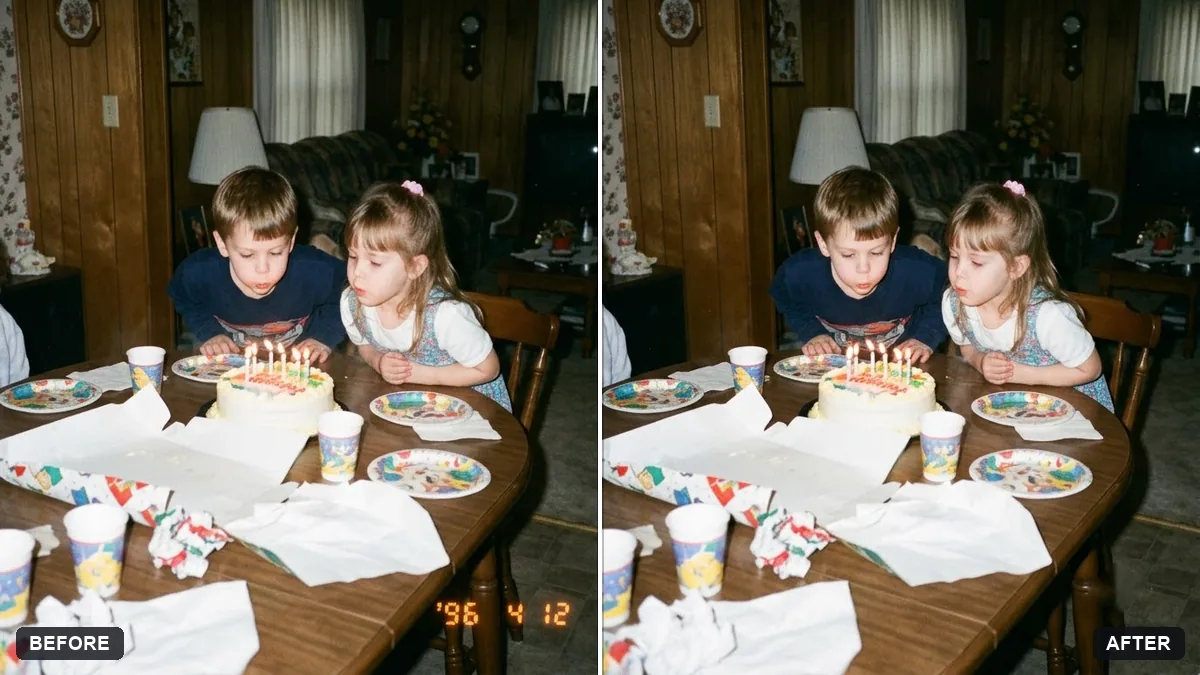
Remove the orange date stamp from a scan
This prompt removes the orange date stamp from the corner you name in a scanned film photo and fills the area to match the surroundings.
Remove the orange date stamp from the [CORNER, e.g. bottom right] corner of this scanned photo. Fill the area with matching background texture, colour and grain.

Keep everything else exactly the same, including faces and film look.
Only use it on your own photographs.
Your photo goes to the AI app you choose, never to PromptUp.
Get a better result
Your scanned photo with the orange date numbers gone and the area filled with matching film grain, colour and background, while faces and the rest of the picture stay as they were.
Removing a stamp means filling the gap with what should be there, so the prompt asks for matching texture, colour and grain. Naming the corner tells the AI exactly where to work. Keeping faces and the film look the same protects the rest of the memory.
A soft orange smudge is left where the digits were.
Fix: Name the corner exactly and add “remove every trace of orange, and match the grain around it”. Zoom in to check the edges of the patch.
- The stamp sat over a detail, so the filled area looks wrong. Describe what was underneath, for example “the stamp is over the grass and the edge of a sari border”, so the fill continues it properly.
- The whole photo comes out cleaner, losing its film look. Keep “keep everything else exactly the same, including the film look”. Do not ask for a general restoration in the same prompt.
If the scan has a white border or a curled corner, add “also straighten the border and keep the print edges”. Use this only on photographs that are your own.
Remove only the leftover orange marks in the corner. Keep the grain, colours and everything else in the photo exactly the same.
Guides on this topic
More photo editing prompts
See all 334 →
More like this
- Phone photo of a page to clean scanGemini · ChatGPT
- Rebuild a torn photo cornerGemini · ChatGPT
- Remove a shadow from a document photoGemini · ChatGPT
- Join two halves of a torn photoGemini · ChatGPT
- Convert a film negative to a positiveGemini · ChatGPT