- Updated
Remove glare from eyeglasses
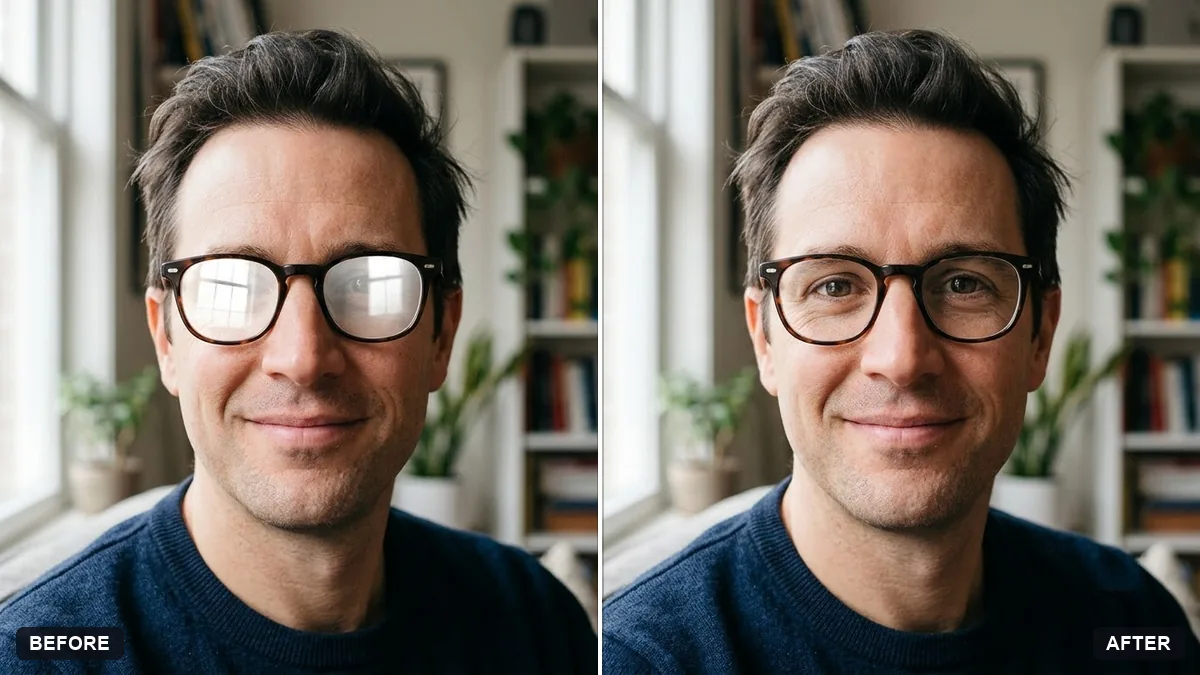
This prompt removes glare and reflections from the lenses of your glasses so your eyes are visible, while the rest of the photo stays as it is.
Remove the glare and reflections from the lenses of my [GLASSES TYPE, e.g. prescription] glasses in this photo. Keep the glasses frame, my eyes and my face exactly as they are.

Show my real eyes clearly through the lenses with natural slight lens tint. Do not change anything else in the photo.
If you do not wear glasses, ask for a version without them only if it is your own photo.
Your photo goes to the AI app you choose, never to PromptUp.
Get a better result
The same photo with the reflections gone from the lenses, so your eyes show through. The frame, your face and the background should look untouched.
The AI changes your eyes or takes the glasses off completely.
Fix: Keep “keep the glasses frame” in the prompt, and use a photo where your eyes are at least partly visible behind the glare.
- The lenses turn fully clear and the glasses look as if they are missing. Keep the phrase “natural slight lens tint” and add “the lenses should still look like glass”. A faint edge reflection looks more real than none.
- Glare covers the eyes completely, so the AI invents them. Choose a photo where the pupils are at least partly visible. If they are hidden, retake it with your face turned slightly away from the window or lamp.
- The frame changes colour or shape. Describe the frame in the bracket, for example “round tortoiseshell prescription”, and compare the arms and nose pads with the original.
For sunglasses, write “dark sunglasses” in the bracket and replace the eyes line with “keep the lens darkness the same and only remove the bright reflections on the surface”. Eyes should not show through dark lenses.
Put my glasses back exactly as they were. Only remove the reflections on the lenses, and keep my eyes exactly as in the original.
About this prompt
Can I remove glasses glare from a photo with AI?
Yes, with a chat tool that can edit photos. Upload the picture, paste the prompt and say what kind of glasses you wear. Check the eyes against the original afterwards, because they are the part most likely to change.
Guides that use this prompt
More photo editing prompts
See all 334 →
More like this
- Remove reflections from window shotsGemini · ChatGPT
- Remove unwanted lens flareGemini · ChatGPT
- Tidy the background of a team photoGemini · ChatGPT
- Remove parked cars from a street photoGemini · ChatGPT
- Clean up an event stage photoGemini · ChatGPT