- Updated
Clean up an event stage photo
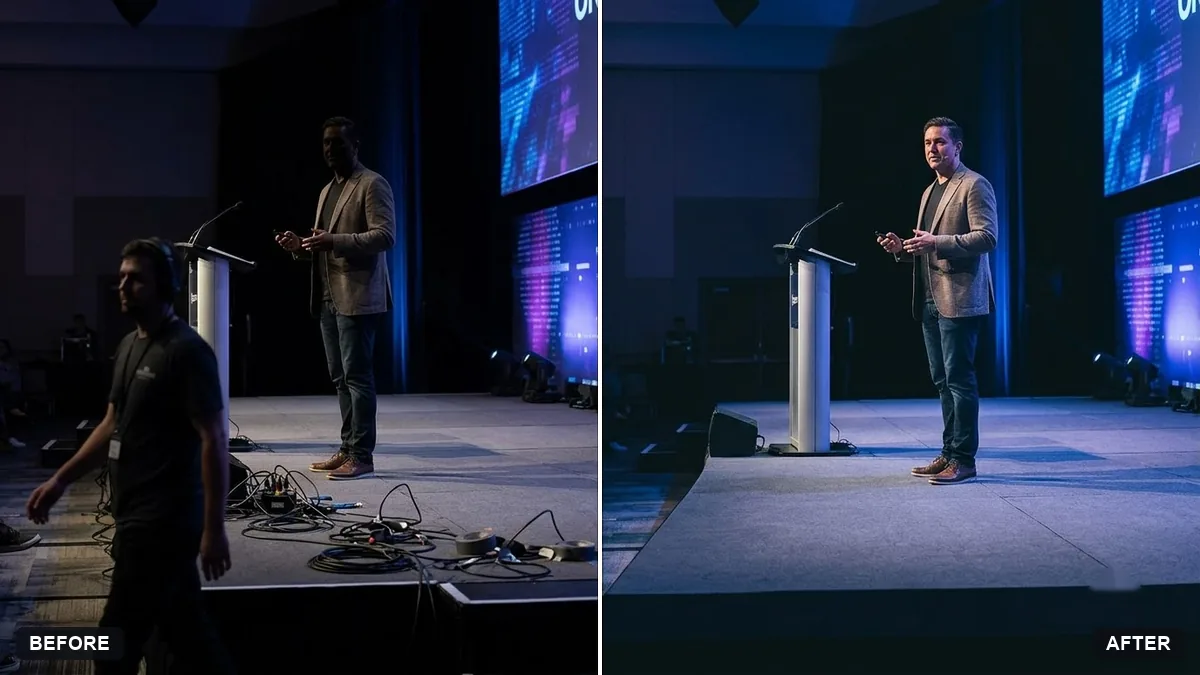
This prompt removes distracting cables, stray equipment and people crossing the frame, balances the exposure and lifts the shadows on the speaker's face, keeping the stage, lights, banners and speaker as they are.
Clean up this photo of a [CONFERENCE / CONCERT] stage. Remove distracting cables, stray equipment and people walking across the frame, balance the exposure and lift the shadows on the speaker's face.

Keep the stage, lighting, banners and speaker exactly as they are.
Ask to remove only distracting items such as cables, not to change the event branding.
Your photo goes to the AI app you choose, never to PromptUp.
Get a better result
Your stage photo with cables, stray equipment and passers-by removed, the exposure balanced and the speaker’s face brightened, while the stage, lights, banners and speaker stay as they are.
The sponsor banner or slide text changes.
Fix: Say “do not touch the banner, the screen or any lettering”. Zoom in and compare the logos with the original.
- The speaker’s face looks fake after the lift. Ask to “lift the shadows gently on the face only, keep skin texture and expression”, not to retouch it.
- Removed people leave blurry patches. Point to each one, such as “the person in the grey shirt on the right edge”, and ask to “fill the gap with the floor and the stage edge”.
After the cleanup, ask for “a tighter crop with the speaker on the left third and the banner readable”. Write the event and speaker names yourself in the post.
Keep the banner, the lights and the speaker as they are. Remove only the two cables at the front and brighten the face a little more.
Guides that use this prompt
More photo editing prompts
See all 334 →
More like this
- Tech conference speaker on stageGemini · ChatGPT
- Remove signs and clutter from a street photoGemini · ChatGPT
- Event ticket designIdeogram · ChatGPT · Gemini
- Tidy a cluttered backgroundGemini · ChatGPT
- Remove glare from eyeglassesGemini · ChatGPT