- Updated
Event ticket design
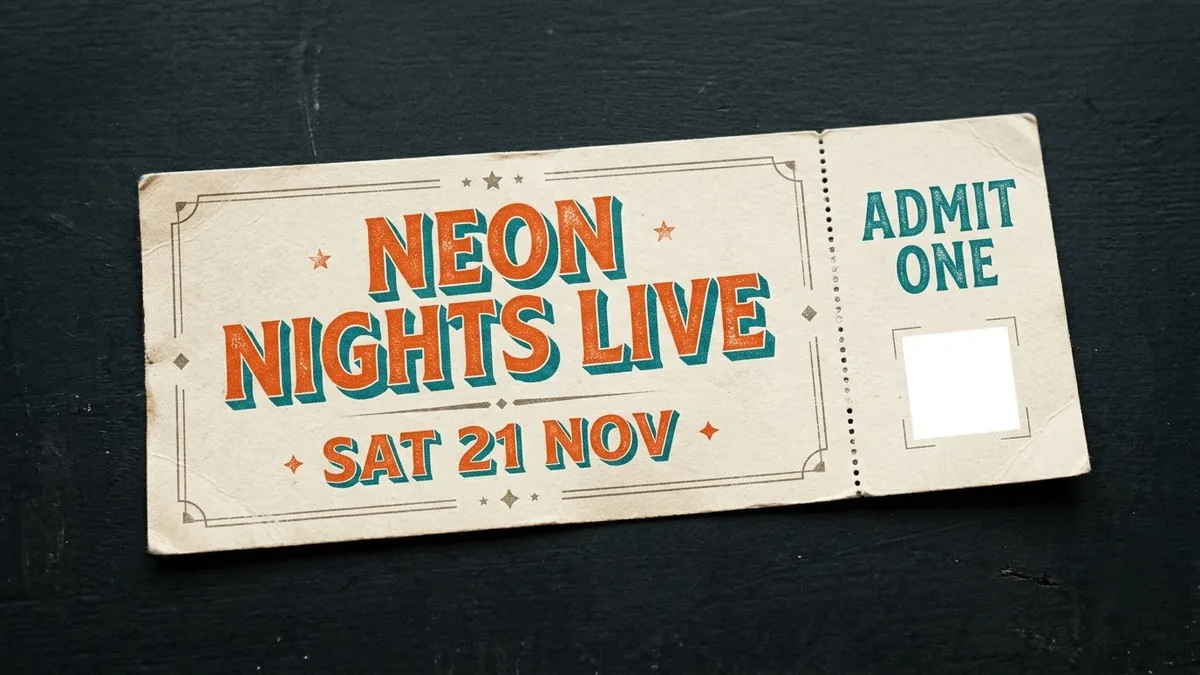
This prompt designs a horizontal ticket for your event with the date and venue, a perforated stub with ADMIT ONE and a blank square where you place a real QR code.
A horizontal event ticket design for "[EVENT NAME]", [DATE], [VENUE]. Perforated stub on the right with "ADMIT ONE" and a blank square for a QR code, bold [STYLE, e.g. retro concert] typography, [COLOURS], textured paper look, shown flat on a plain background with a soft shadow.
Add the real QR code afterwards. AI can not create a working one.
Get a better result
A horizontal event ticket for your event with a perforated stub on the right reading ADMIT ONE and a blank square for a QR code, bold typography in your style, a textured paper look and a soft shadow on a plain background.
The AI draws a fake QR code that will not scan.
Fix: Follow the tip. Leave the square blank and add the real QR code afterwards, because AI can not make a working one.
- The date, venue or event name has wrong letters or digits. Keep them short and check each character, or add all the text in a design tool over the empty design.
- The stub is too small for the QR code. Say “the stub is wide enough for a square of at least 2 cm on a real ticket, with a clear margin around it”.
Change the style to a wedding: “cream paper, gold foil lettering, a small floral border, admit one to the reception”. Use it as a fun entry card, not for security.
clean, simple lettering, spelled exactly as written in quotes
Guides that use this prompt
More image generation prompts
See all 347 →

More like this
- Break a project into small ticketsClaude · ChatGPT · Gemini
- Clean up an event stage photoGemini · ChatGPT
- Create an event run-of-showChatGPT · Gemini · Claude
- Book launch event posterGemini · ChatGPT · Midjourney
- Plan a party or event on a budgetChatGPT · Gemini · Claude