- Updated
Embroidered patch design
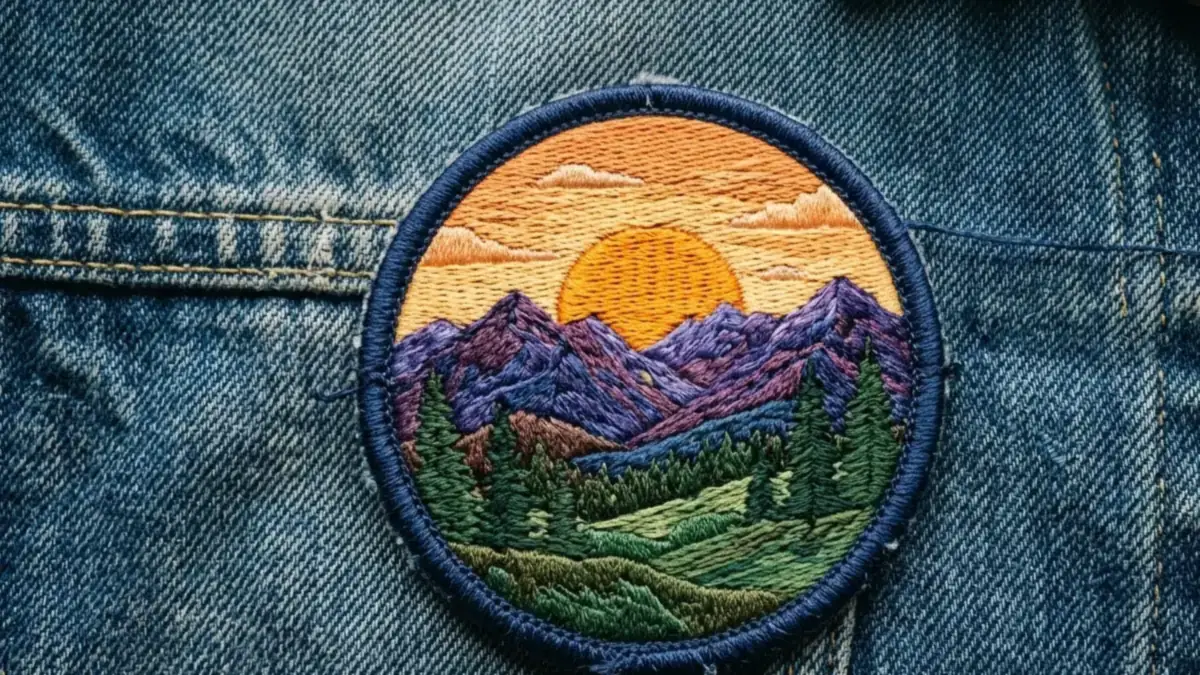
This prompt designs an embroidered patch of a subject such as a mountain sunrise, with visible stitching texture, satin-stitch borders, your thread colours and merrowed edges.
An embroidered patch design of [SUBJECT, e.g. a mountain sunrise] with visible stitching texture, satin-stitch borders, [COLOURS] thread, merrowed edge, circular shape, slight fabric fraying and a subtle shadow, photographed on a denim jacket, flat lay, high-detail macro.
Limit to 4 to 6 colours. Real patches are made with a limited thread palette.
Get a better result
A circular embroidered patch with visible stitching, satin-stitch borders, a merrowed edge and slight fraying, shown on a denim jacket in a high-detail flat lay.
It looks like a flat drawing instead of real stitched thread.
Fix: Keep the stitching words (satin stitch, merrowed edge), and pick a simple subject with 3 or 4 thread colours. Small details do not embroider well.
- The subject has too much detail to stitch. Pick one big shape, like a sun above a ridge, and avoid thin lines. Real embroidery cannot hold fine detail.
- The denim looks fake or too smooth. Add “worn mid-blue denim with a visible twill weave and a stitched seam”. A real-looking fabric makes the patch look real.
- The patch floats above the jacket with no shadow. Keep “subtle shadow” and add “the patch is sewn flat to the fabric, with a thin shadow at its edge”.
Ask for “a set of four small patches in different shapes on a canvas bag”. Sets suit shop mock-ups better than a single patch.
raised thread texture, visible individual stitches, simple bold shapes, 4 thread colours
More image generation prompts
See all 347 →
More like this
- Astronaut portraitGemini · ChatGPT
- Cross-stitch embroidery portraitGemini · ChatGPT
- Turn an idea into a high-engagement X (Twitter) threadChatGPT · Gemini · Claude
- Storybook cottage made realGemini · ChatGPT · Midjourney
- Geometric rangoli designMidjourney · Gemini · ChatGPT