- Updated
Layered paper-cut art
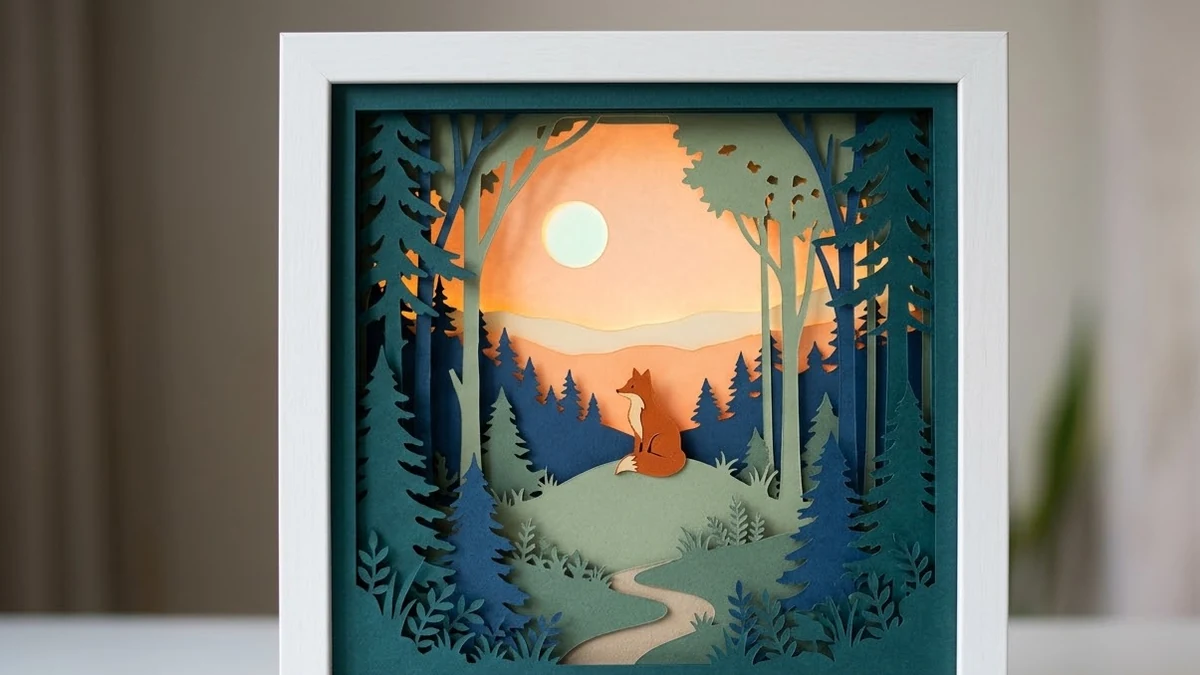
This prompt creates layered paper-cut art of a scene such as a forest with a fox at dusk, with five to seven stacked paper layers in your colours and soft shadows between them.
Layered paper-cut artwork of [SCENE, e.g. a forest with a fox at dusk], five to seven stacked paper layers in [COLOURS], soft shadows between each layer, visible paper edges and slight texture, backlit for a glowing depth effect, shadow-box frame, handcrafted look. --ar 4:5
Ask for a "warm backlight" for a night scene or "cool backlight" for a morning one.
Get a better result
A layered paper-cut scene of your choice, five to seven stacked layers in your colours with soft shadows between them, visible paper edges and a glowing backlight, framed like a shadow box.
Paper-cut art gets its depth from stacked layers, so the prompt counts the layers and asks for shadows and edges. The backlight is what gives these pieces their glow. Naming a shadow box frame grounds the picture as a real object, which makes the handmade look believable.
The layers merge into one flat picture.
Fix: Ask for clear gaps between layers with a soft shadow on each, and for each layer to be a slightly different shade.
- Small details look like they could not be cut. Ask for simple bold shapes with no tiny lines, so the design looks possible to cut by hand.
- The backlight washes out the colours. Pick warm or cool backlight on purpose, as the tip says, and ask for the strongest glow only behind the farthest layer.
Ask for layers of waves, coral and a turtle in blues and teals, with a cool backlight like sun from above.
clear gaps between the layers with a soft shadow under each, simple bold shapes, strongest glow behind the farthest layer
More image generation prompts
See all 347 →
More like this
- Layered paper craft portraitGemini · ChatGPT
- Paper cut-out animationKling · Veo · Seedance
- Mountain monastery in the mistMidjourney · Gemini · ChatGPT
- Scandinavian folk art patternMidjourney · Gemini · ChatGPT
- Warli art village sceneMidjourney · Gemini · ChatGPT