Free tool · runs in your browser
AI photo prompt generator
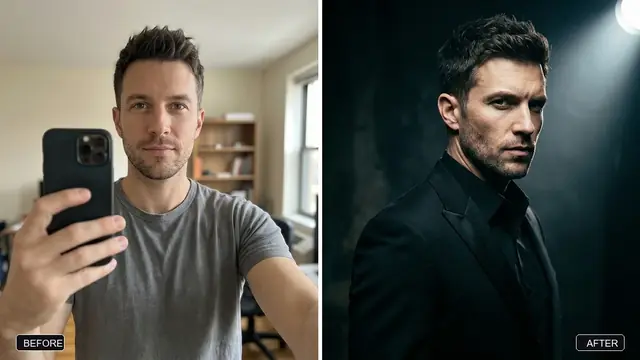
Describe the picture you want, then pick the AI tool, style, light, framing and size. You get a ready-to-copy prompt written the way that tool reads best. Editing your own photo? It adds the lines that keep your face the same. Want a film look? Switch to Cinematic mode for lens, light, film stock and grade.
Build your photo prompt
Cinematic mode writes prompts for new pictures. To edit a photo of your own, switch back to Simple.
Your prompt
How to use it
- Describe the picture in one line. Who or what is in it, and what is happening. "A chef plating pasta in a small kitchen" beats "a nice food photo".
- Pick the AI tool. Gemini and ChatGPT read full sentences. Midjourney reads short phrases and settings like
--ar 4:5. Ideogram is the best of these at text inside a picture. - Choose style, light and framing. These three choices change the result more than any extra adjectives.
- Pick the size before you start. A tall 9:16 picture for a Reel and a wide 16:9 thumbnail need different framing, so set it in the prompt rather than cropping later.
- Editing your own photo? Choose "Edit my photo", keep "My face" switched on, attach the photo in Gemini or ChatGPT, then paste the prompt in the same message.
What each option adds to the prompt
| Option | What it adds | Why it helps |
|---|---|---|
| Style | The medium and look, such as a cinematic film still with a shallow depth of field. | Without it, most tools default to a glossy, over-smooth "AI" look. |
| Light | One clear light source, such as soft window light from one side. | Light sets the mood, and one named source looks more real than "dramatic lighting". |
| Framing | How close the camera is, from close-up to wide scene. | Stops the tool from cutting off heads or shrinking the subject. |
| Size | The aspect ratio, written the way the tool expects. | The picture is composed for the place you will post it. |
| Keep the same | Lines that lock your face, clothes or background in an edit. | AI edits often change faces slightly. Naming what to keep reduces that. |
It is a guide, not a guarantee: AI image tools still make mistakes, so expect to try two or three times. If a result looks fake, run the prompt through Make AI photos look real. For a full rewrite of any prompt, try the Prompt Doctor.
Cinematic mode: lens, light and film
Switch to Cinematic above the generator when you want a picture to look like a still from a film. Pick a ready-made look, such as neo-noir night, golden-hour documentary or a classic black-and-white portrait, or choose each part yourself:
- Camera: the lens (14mm to 600mm, macro, anamorphic, tilt-shift), the aperture and the camera or film format.
- Framing: shot size, camera angle and composition.
- Light: the light set-up (Rembrandt, rim light, neon, window light and more), colour temperature, time of day and atmosphere.
- Look: the film stock and grain, the colour grade and lens effects such as halation or diffusion.
Every option says what it does. The prompt is written the way each app reads it: Midjourney gets --ar, --raw and --no at the end, Flux gets plain description with no negative words, and ChatGPT and Gemini get the layout their own guides suggest. It also warns when two choices fight each other and removes empty words like "8K" or "hyperdetailed". Results still vary from one try to the next. Every term is explained in the cinematic prompt guide.
More photo prompt help
Questions, answered
Which AI tools does this work with?
Gemini, ChatGPT, Midjourney and Ideogram each get a version written for them, and the "Any tool" option writes plain sentences that work in most other image tools.
Will my face stay the same when I edit a photo?
The prompt asks the AI to keep your face, features, skin tone and expression exactly the same, which helps a lot. AI tools can still change small details, so compare the result with your original and try again if it looks off.
Why is Midjourney greyed out for photo edits?
Midjourney makes new pictures from text. To edit a photo of yourself, Gemini or ChatGPT is simpler: attach the photo and paste the prompt in the same message.
Is my photo or prompt uploaded to PromptUp?
No. The prompt is built in your browser and PromptUp never sees your photo. You upload it straight to the AI tool you choose.