- Updated
Pixel art game character sprites
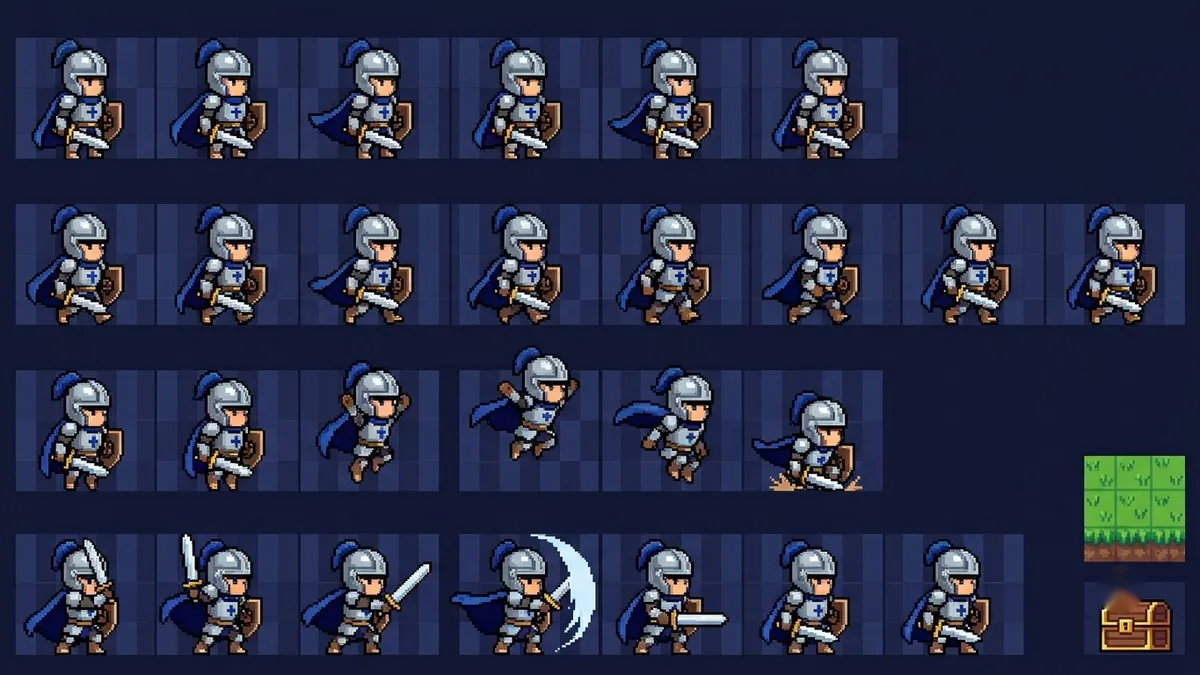
This prompt makes a 16-bit style sprite sheet for a character such as a small knight with a blue cape, showing idle, a four-frame walk and an attack pose. Clean up the frames in a pixel editor for game use.
Pixel art sprite sheet of [CHARACTER, e.g. a small knight with a blue cape], 16-bit style, showing idle, walk (4 frames) and attack poses in a grid, limited 16-colour palette, crisp pixels with no anti-aliasing, black outline, transparent-looking plain magenta background.
Ask for the sprite at 32x32 or 64x64 pixels depending on your game.
Get a better result
A pixel art sprite sheet of your character with idle, four-frame walk and attack poses in a grid, 16-bit style, a 16-colour palette, crisp pixels, black outlines and a plain magenta background.
Frames are not the same size or the character shifts between frames.
Fix: Ask for “every frame in an equal square cell, the character’s feet on the same baseline”, and say the pixel size, as the tip suggests.
- The pixels are blurry or have gradients. Repeat “crisp pixels, no anti-aliasing, no gradients, flat colours only”.
- The walk cycle does not loop smoothly. Ask for “a four-frame cycle where frame four leads back to frame one”, and check it in your game engine before you use it.
Extend the list to “idle, walk, attack, jump and a hurt frame” in a second row, keeping the same palette and size.
Redraw the sprite sheet at 32 by 32 pixels per frame with the same colours. Keep the feet on one baseline.
More image generation prompts
See all 347 →
More like this
- Pixel art avatarGemini · ChatGPT
- Video game character versionGemini · ChatGPT
- Pixel art animated loopKling · Seedance · Veo
- Board game box coverIdeogram · ChatGPT · Gemini · Midjourney
- Cute monster character setMidjourney · Gemini · ChatGPT