- Updated
E-commerce sale banner
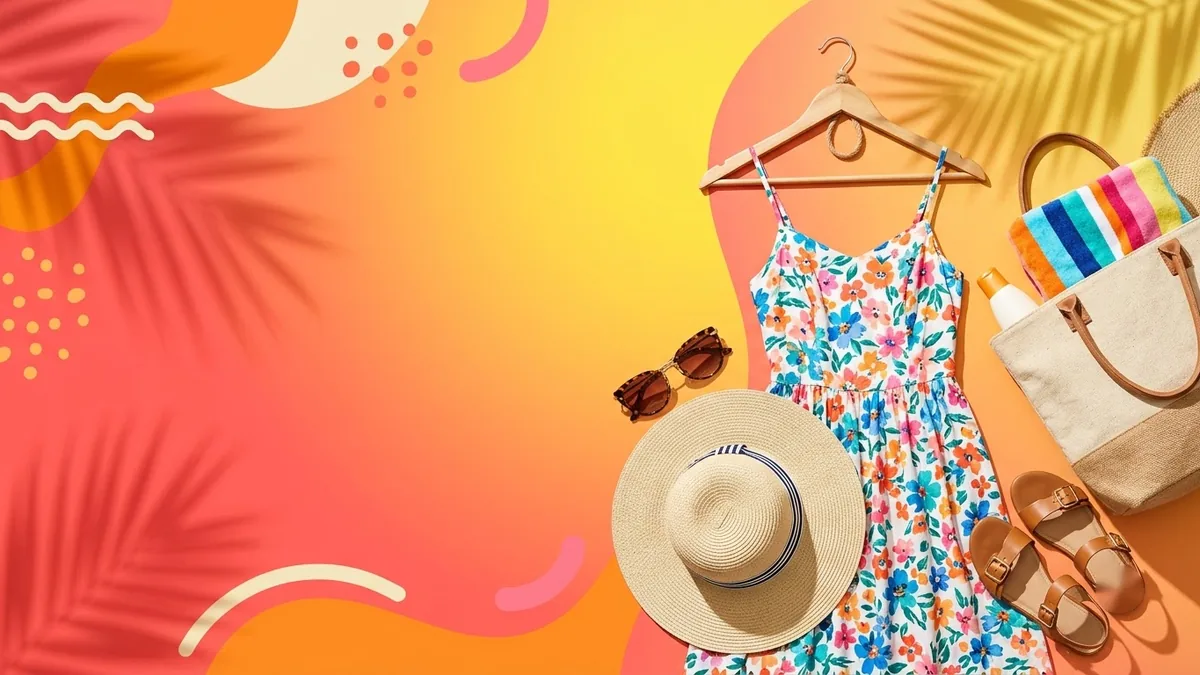
This prompt designs a wide sale banner for your store with the exact headline, such as Summer Sale, subtext for the dates and your products arranged in the frame. Check the offer wording and dates carefully.
A wide e-commerce sale banner for "[STORE NAME]": headline "[SALE, e.g. Summer Sale — Up to 50% Off]", subtext "[DATES]", featuring [PRODUCTS] arranged on the right, bold [COLOUR] and [COLOUR] colour blocks, dynamic shapes, clear space on the left for text, professional and high-contrast, 3:1 ratio.
Keep the headline under 6 words. Long text often gets distorted.
Get a better result
A wide 3:1 sale banner with your store name, a bold headline, the dates, your products arranged on the right, strong colour blocks and clear space on the left for the text.
The sample headline in the brackets is long and gets distorted.
Fix: Replace it with something short, such as “Summer Sale 50% Off”, so it is under six words and has no special dash.
- The products in the banner are not yours. Ask for generic shapes in the product area and place your real product photos in an editor. Customers expect to see what they can buy.
- The shape is not 3:1 and the text sits too close to the edge. Crop to 3:1 and keep the headline well inside, with a margin of about 8 percent, so mobile crops do not cut it.
Ask for “a 1:1 version: headline across the top, products below, the same colours”. Wide banners get cropped on phones, so a square suits mobile pages and social posts.
Shorten the headline to Summer Sale 50% Off, leave the product area as plain shapes and keep the text at least 8 percent away from every edge.
Guides that use this prompt
More image generation prompts
See all 347 →
More like this
- Sales discovery call questionsChatGPT · Gemini · Claude
- Sneaker sale posterGemini · ChatGPT · Midjourney
- Garage sale flyerGemini · ChatGPT · Midjourney
- E-commerce product photo (Amazon / Flipkart)Gemini · ChatGPT · Flux
- Bake sale poster for a causeGemini · ChatGPT · Midjourney