- Updated
Pixel art avatar
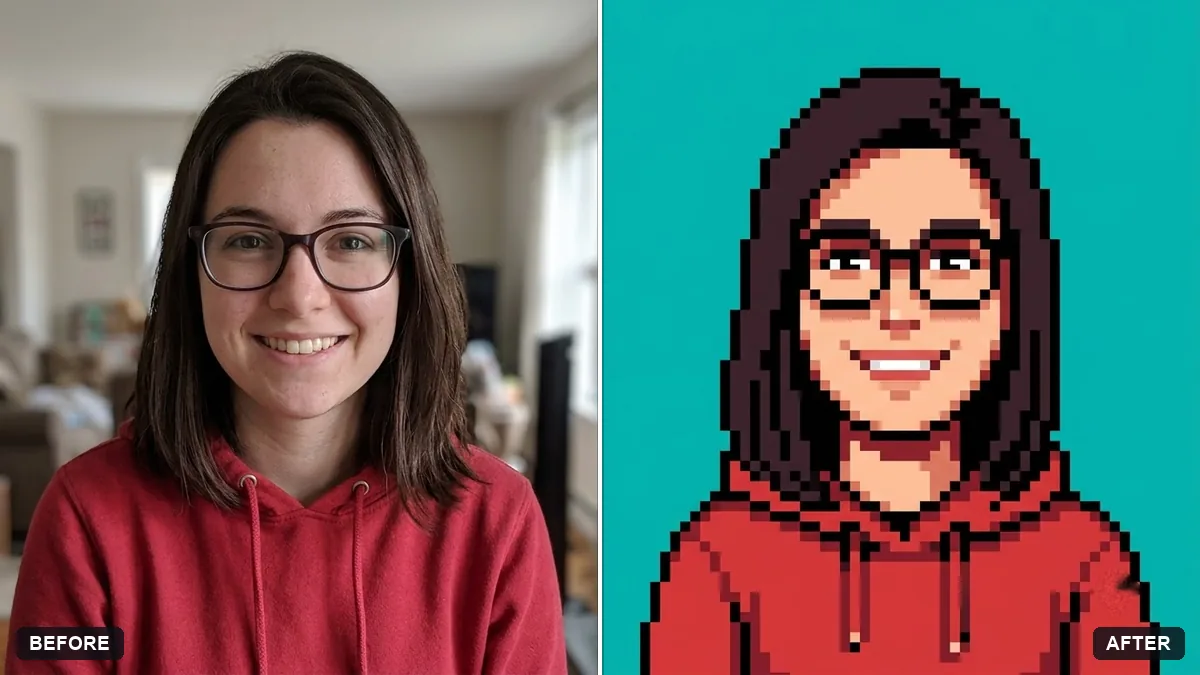
This prompt creates a 64x64 pixel art avatar that keeps your hair colour, hairstyle, skin tone, glasses and clothing colours, with a limited palette.
Turn this photo into a 64x64 pixel art avatar. Keep my hair colour, hairstyle, skin tone, glasses and clothing colours recognisable.

Limited 16-colour palette, crisp pixels with no blur, black outline, simple background in [COLOUR], front-facing bust, retro game character style.
Perfect for game profiles. Ask for a full-body sprite as a second image.
Your photo goes to the AI app you choose, never to PromptUp.
Get a better result
A tiny 64 by 64 pixel art version of you with a black outline, limited 16-colour palette and your own hair, skin, glasses and clothing colours, front-facing on a simple coloured background.
The result is blurry and not truly pixelated.
Fix: Repeat “crisp square pixels, no anti-aliasing, no blur, no gradients”, and ask for the image at a large size in the same style so the pixels stay sharp.
- The face does not resemble you at that small size. List your one or two strongest features in a line, such as “thick eyebrows and a beard”. At 64 pixels only a few features survive.
- Too many colours appear. Say “exactly 16 colours, flat shading”. If it keeps adding shades, ask for a retro 8-bit palette instead.
As the tip suggests, follow up with “now a full-body sprite of the same character, standing, facing right, same palette”. Then ask for a walking pose in the same style.
Keep everything else exactly as in the original photo. Only change what I asked for.
Guides on this topic
More photo editing prompts
See all 334 →
More like this
- Bold creator profile pictureGemini · ChatGPT
- Pixel art game character spritesChatGPT · Gemini · Midjourney
- Video game character versionGemini · ChatGPT
- Natural, honest photo for a dating profileGemini · ChatGPT
- Pixel art animated loopKling · Seedance · Veo