- Updated
Cross-stitch embroidery portrait
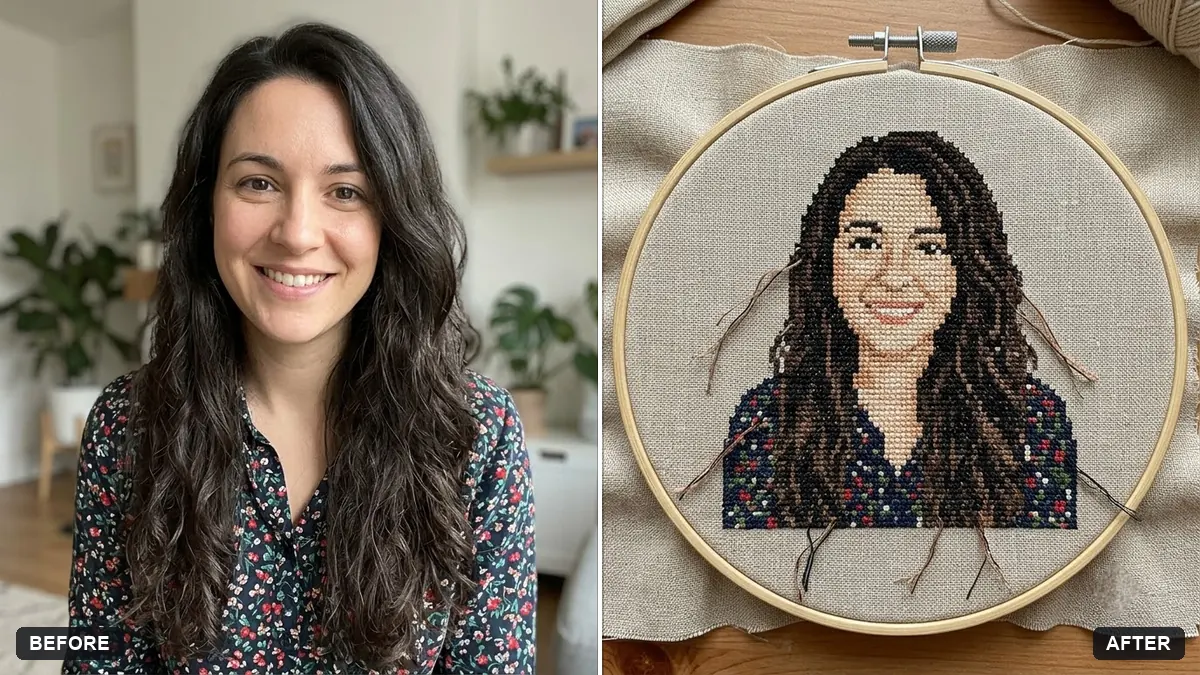
This prompt shows your photo as a cross-stitch portrait on linen, with visible X-shaped stitches. Your face stays recognisable.
Turn this photo into a hand-embroidered cross-stitch portrait on linen. Keep the face recognisable.

Visible X-shaped stitches in a limited [NUMBER] colour thread palette, simplified details, cream Aida cloth texture, wooden embroidery hoop, soft natural lighting, cosy craft photo.
Choose a low number of colours to make it look like real cross-stitch.
Your photo goes to the AI app you choose, never to PromptUp.
Get a better result
Your photo reworked as a hand-embroidered cross-stitch on cream Aida cloth, with visible X stitches in a limited thread palette, in a wooden hoop with soft natural light.
Real cross-stitch uses a small number of thread colours and a grid of X stitches, so the prompt sets both. Cream Aida cloth and a wooden hoop make it look like a craft object. Simplified details keep the design stitchable, and a low colour count, as the tip says, is what makes it convincing.
The face is no longer recognisable.
Fix: Pick a simple, high-contrast photo with a plain background and ask for slightly more detail around the eyes.
- It looks like pixel art. Ask for visible thread texture, tiny gaps between the stitches and slightly uneven tension to feel handmade.
- Too many colours appear. State a number, such as eight, and keep to it, as the tip says.
Ask for a tiny version in a small round hoop with a ribbon, framed on a wooden table with other craft items.
Keep the face recognisable. Make the stitches larger and clearer, with fewer colours, so each X can be seen on the linen.
More photo editing prompts
See all 334 →
More like this
- Renaissance oil painting of youGemini · ChatGPT
- Classical marble statue portraitGemini · ChatGPT
- Turn a photo into a colouring pageGemini · ChatGPT
- Charcoal drawing portraitGemini · ChatGPT
- Linocut print portraitGemini · ChatGPT