- Updated
Linocut print portrait
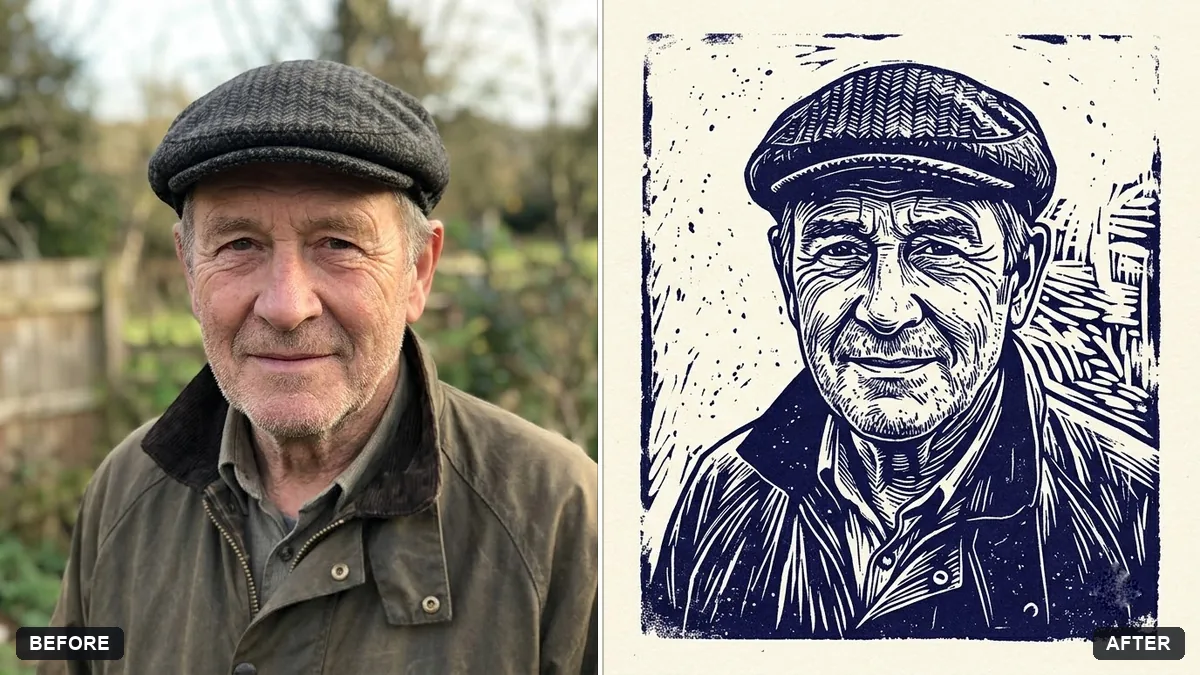
This prompt makes a linocut-style print of your photo in one ink colour on cream paper with bold carved lines, keeping your face recognisable.
Turn this photo into a hand-carved linocut print. Keep my face recognisable.

Two-colour design in [INK COLOUR] on cream paper, bold carved lines, strong black-and-white contrast, visible ink texture and small imperfections, simplified shapes, slightly uneven edges.
Simple, high-contrast photos convert best into linocut style.
Your photo goes to the AI app you choose, never to PromptUp.
Get a better result
Your portrait as a hand-carved block print, with bold gouged lines in one ink colour on cream paper, flat shapes for the hair and clothes, and small uneven edges that look pressed by hand.
Linocut prints have bold carved lines and strong contrast, so the prompt asks for those with visible ink texture and small imperfections. Simplified shapes make it look hand-cut. A simple, high-contrast photo, as the tip says, converts best.
It looks like a photo filter, with smooth gradients.
Fix: Say “no gradients, no soft shading, only solid ink and bare paper, carved gouge marks for shadows”.
- The ink colour is dull or muddy. Pick one strong colour in the bracket, such as deep red or indigo, and add “single flat ink layer”.
- Too much detail survives, so it stops looking carved. Ask for “simplified shapes, fewer than ten major areas of shadow” so the AI has to choose bold forms.
Ask for a second colour printed slightly off-register behind the first, like a real two-block print. The small misalignment sells the handmade look.
Keep the style and the colour. Make the carved lines in the background bolder, and leave a clean paper border around the print.
Guides on this topic
More photo editing prompts
See all 334 →
More like this
- Ink wash painting portraitGemini · ChatGPT
- Watercolour painting from your portraitGemini · ChatGPT
- Cross-stitch embroidery portraitGemini · ChatGPT
- Turn a photo into a line drawingGemini · ChatGPT
- Turn a photo into a colouring pageGemini · ChatGPT