- Updated
Charcoal drawing portrait
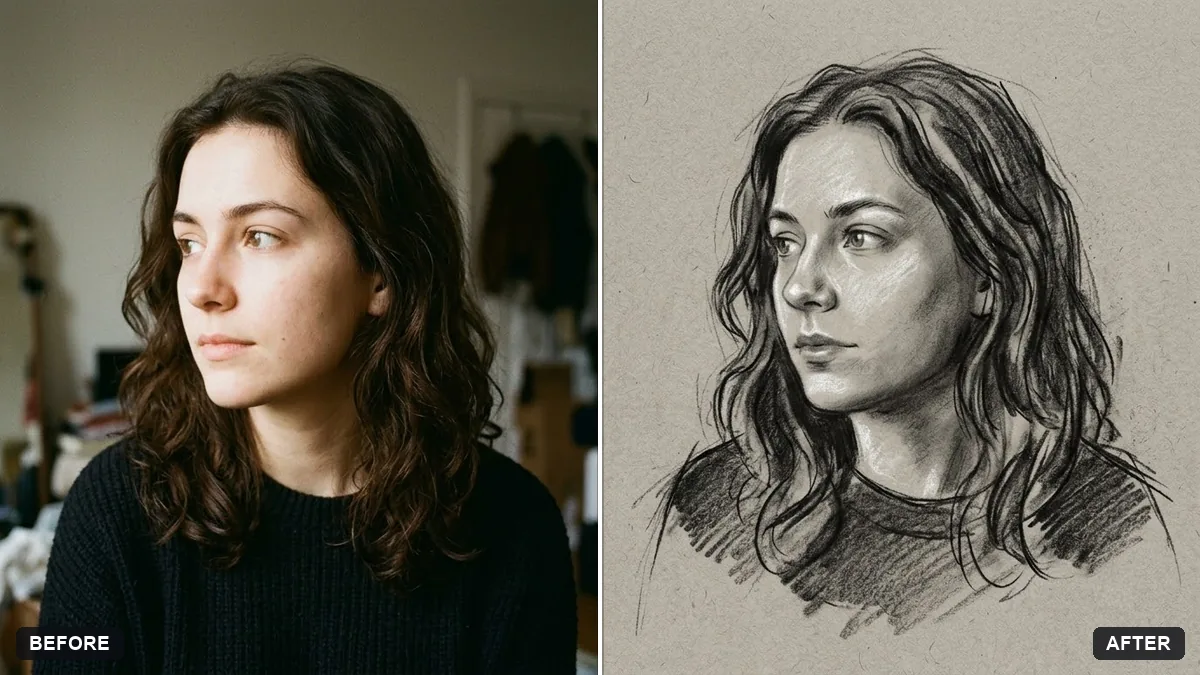
This prompt redraws your photo as an expressive charcoal drawing on paper in the tone you choose, keeping your face accurate and recognisable.
Redraw this photo as an expressive charcoal drawing on [PAPER TONE, e.g. warm grey] paper. Keep my face accurate and recognisable.

Smudged soft shadows, bold dark lines, white chalk highlights, visible paper grain, loose unfinished edges around the shoulders, dramatic light from the left.
Ask for a "life drawing" look for a more artistic effect.
Your photo goes to the AI app you choose, never to PromptUp.
Get a better result
Your photo redrawn as an expressive charcoal portrait on toned paper, with smudged shadows, bold dark lines, white chalk highlights, visible paper grain and loose edges at the shoulders.
Charcoal is bold and messy, so the prompt asks for smudged shadows, dark lines and white chalk highlights on toned paper. Loose edges and light from the left add drama. A life drawing look, as the tip says, makes it more artistic.
The face is accurate but the picture still looks like a photo filter.
Fix: Follow the tip and ask for “a hand-drawn life drawing, with visible strokes and uneven pressure, not a smooth filter”.
- Likeness is lost in the smudging. Keep “keep my face accurate and recognisable” and add “draw the eyes and the mouth carefully, leave the rest loose”.
- Colour creeps into the drawing. Say “only charcoal black, grey and white chalk, no colour”. The paper tone is the only colour allowed.
Change the paper to “a dark slate blackboard” and the lines to “white and pale chalk only”. Keep the loose edges for a classroom-sketch feel.
Keep my face accurate. Make the strokes looser and more visible, and use only charcoal and white chalk on the paper.
Guides on this topic
More photo editing prompts
See all 334 →
More like this
- Turn a photo into a line drawingGemini · ChatGPT
- Blueprint-style technical drawingMidjourney · Gemini · ChatGPT
- Watercolour painting from your portraitGemini · ChatGPT
- Layered paper craft portraitGemini · ChatGPT
- Classical marble statue portraitGemini · ChatGPT