- Updated
Blueprint-style technical drawing
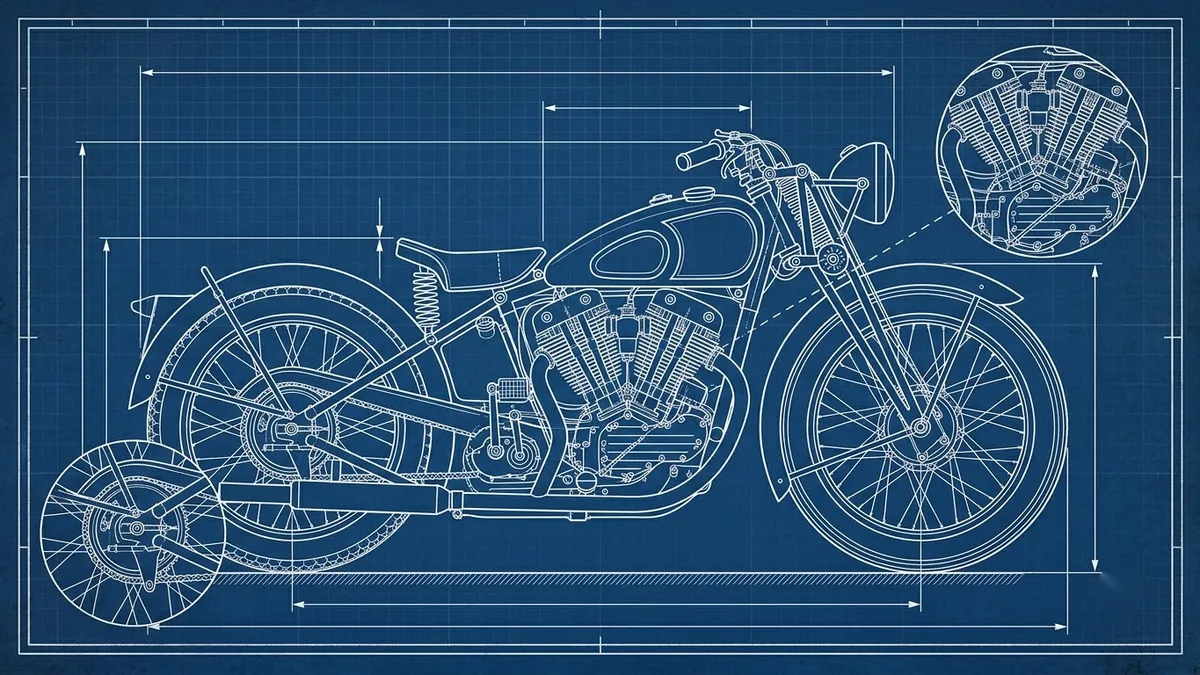
This prompt draws an object such as a vintage motorcycle as a blueprint, with white lines on deep blue grid paper and orthographic views.
A blueprint-style technical drawing of [OBJECT, e.g. a vintage motorcycle], white lines on deep blue grid paper, orthographic front, side and top views, dimension lines and small handwritten notes, title block in the corner, clean draftsman precision, subtle paper creases.
Choose objects with strong silhouettes so the lines look convincing.
Get a better result
A white-line blueprint of your chosen object on deep blue grid paper, with front, side and top views, dimension lines, handwritten notes, a title block and subtle paper creases.
Real blueprints follow a format, and the prompt lists its parts: white lines on blue grid paper, front, side and top views, dimension lines, notes and a title block. Those conventions are what make it look like a working drawing. Subtle paper creases add age. The object blank works best with strong shapes, as the tip says, because clear silhouettes make the lines more convincing.
The views do not match each other.
Fix: Pick an object with a clear silhouette, as the tip says, and treat the drawing as decoration, not real engineering.
- The text is nonsense. Ask for “minimal text, simple labels” and replace any errors yourself.
- The lines are thick and cartoonish. Add “fine uniform line weight, draftsman precision”.
Make a set of three blueprints on the same grid, such as a bicycle, a camera and a kettle, for a wall display.
Keep the sheet. Add a small exploded-view detail in the corner and a scale bar.
More image generation prompts
See all 347 →

More like this
- Turn a photo into a line drawingGemini · ChatGPT
- Write a technical specChatGPT · Gemini · Claude
- Charcoal drawing portraitGemini · ChatGPT
- Architectural exterior renderMidjourney · Gemini · ChatGPT
- Double exposure silhouette artMidjourney · Gemini · ChatGPT