- Prompt at a glance
- Category
- Image
- Works with
- Gemini · ChatGPT · Midjourney
- Latest versions
- Nano Banana 2 · ChatGPT Images 2.5 · Midjourney V8.2 (checked September 2026)
- Length
- 131 words
- Fields to fill
- DOOR COLOUR
- Last updated
Storybook cottage made real
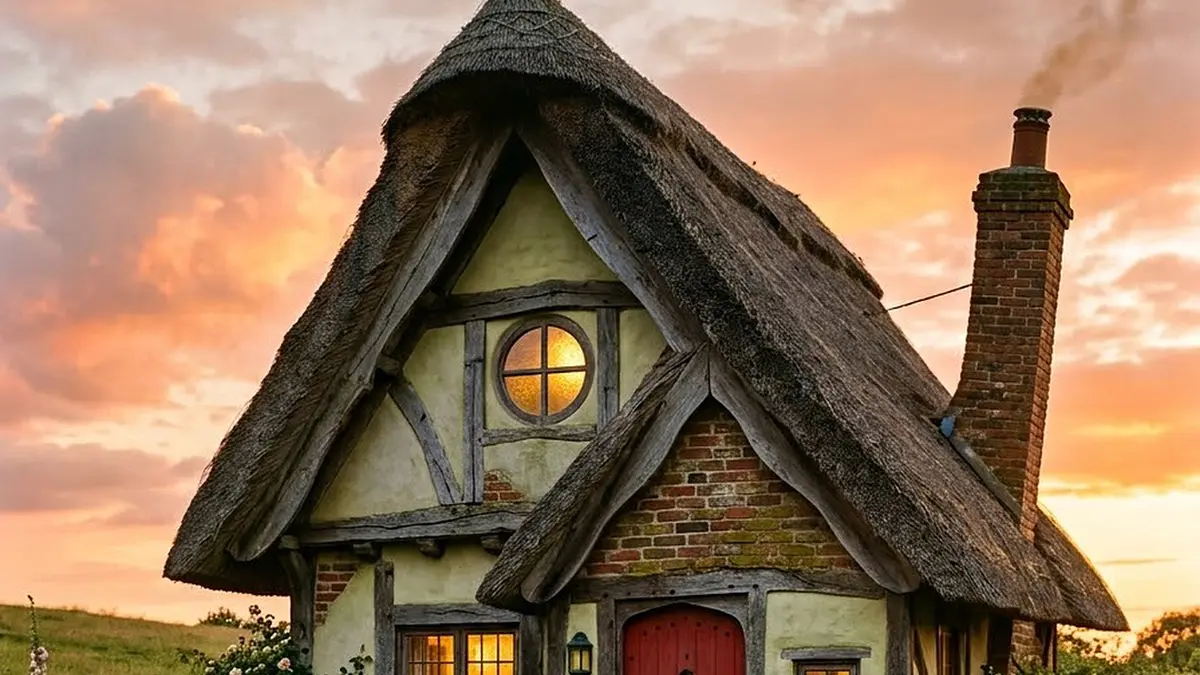
Take a house that looks like a child's cartoon drawing and make it real: a crooked thatched cottage with glowing round windows, a red door and a curl of chimney smoke at sunset. Real-material words like mossy bricks and real straw do the work. It is an original design, so it does not copy any film house.
Photorealistic photo of a whimsical cottage that looks like a child's cartoon drawing made real, at sunset. A small crooked two-storey cottage on a grassy hill with a curved thatched roof that droops at the edges, mismatched round and square windows glowing warm yellow, a bright [DOOR COLOUR, e.g. red] front door, a leaning brick chimney with a thin curl of smoke, a little wooden fence, wildflowers and a worn dirt path leading to the door. Low camera at grass height. Vivid pink and orange sunset sky with soft clouds. Real materials: weathered wood, real straw, old bricks with moss, dew on the grass. Cozy, nostalgic mood, 35mm lens, gentle film grain. An original design, not a house from any film or cartoon. No people, no text, no signs, no logos.
Real-material words (moss on old bricks, real straw, dew on the grass) turn a cartoon shape into a photo. Keep “an original design” in the prompt so the model does not copy a famous film house.
From copy to picture in four steps
- 1
Open Gemini and start a new image.
- 2
Paste the prompt and replace the [BRACKETED] fields with your subject or brand.
- 3
Generate a few variations and pick the closest.
- 4
Refine by changing one detail at a time, such as the lighting, angle or colours.
About this prompt
Which AI tools work with this prompt?
It is written for Gemini, ChatGPT and Midjourney. Paste it into your preferred tool and adjust the wording if the result is off.
What do I need to fill in?
Replace the field before you send it: DOOR COLOUR. Each field shows an example in the prompt.
Can I use the generated image commercially?
That depends on the tool you generate it with and your plan. Check that tool's terms before you publish or sell the result.