- Updated
Discount coupon or voucher
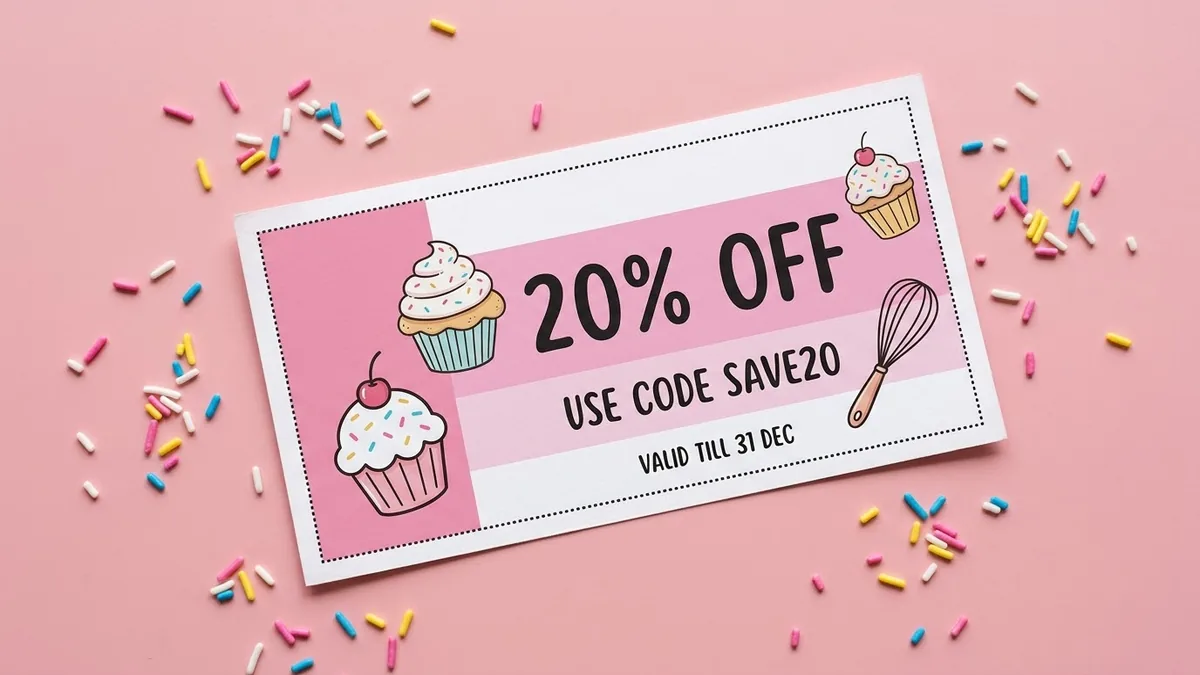
This prompt makes a voucher for your business type with a big offer such as 20% OFF, a coupon code, a valid-until date and dotted cut-out lines. Check the code and dates.
A cheerful discount voucher for [BUSINESS TYPE]: big text "[OFFER, e.g. 20% OFF]", smaller line "Use code [CODE]", "Valid until [DATE]", dotted cut-line border, [COLOUR] and white colour blocks, playful icons of [THEME], clear layout, landscape orientation, print-ready look.
Double-check dates and codes. Small text is where AI makes mistakes.
Get a better result
A cheerful landscape voucher with a big offer, a code line, an expiry line, a dotted cut-line border, colour blocks and playful icons, laid out clearly for printing.
Vouchers must be read quickly, so the offer is big and the code and date smaller. A dotted cut line makes it look printable. Checking dates and codes, as the tip says, matters because small text is where AI slips.
The code or date is wrong.
Fix: Check every character, as the tip warns, or leave it blank and type the details in an editor.
- The small text is unreadable. Keep three text lines, make the offer very large and use high contrast between text and colour.
- The voucher looks like a real brand’s. Use your own colours and icons, and do not copy another company’s coupon.
Change the layout to a gift voucher with a blank line for the recipient’s name and the amount, and add the text yourself.
the offer as the largest text, the code and date clearly readable at small size, a wide dotted cut line
More image generation prompts
See all 347 →


More like this
- Double exposure silhouette artMidjourney · Gemini · ChatGPT
- Double exposure portraitGemini · ChatGPT
- Write the tests first for a new featureClaude · ChatGPT · Claude Code
- Check an AI answer for mistakesChatGPT · Gemini · Claude