- Updated
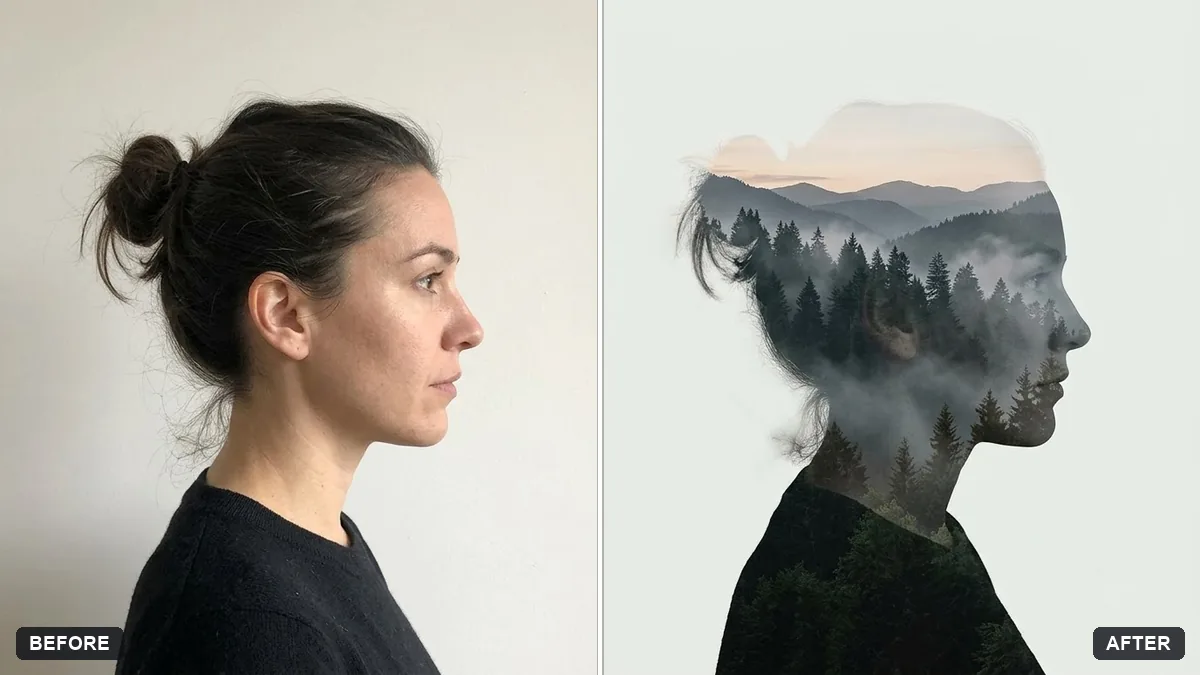
Double exposure portrait
This prompt blends your profile silhouette with a scene you choose, such as a forest, city skyline or starry sky, keeping your face recognisable.
Turn this portrait into a double exposure image, blending my profile silhouette with a [FOREST / CITY SKYLINE / STARRY SKY] inside it. Keep my face recognisable.

Soft gradients, white background, artistic and moody, high detail.
Use a plain light background in your original portrait for the cleanest blend.
Your photo goes to the AI app you choose, never to PromptUp.
Get a better result
Your profile silhouette filled with a forest, city skyline or starry sky, with soft gradients on a white background, in an artistic and moody style.
Double exposure blends two images, and it works best with a clean profile silhouette, so the prompt places the scene inside your outline against a white background. Choosing a forest, a skyline or a starry sky sets the mood of the whole piece. Soft gradients let the two images melt together while keeping your face recognisable.
The profile is unclear.
Fix: Use a side-on photo with a clean outline. A front view blends badly with a second image.
- The inner scene is too busy. Pick one scene and ask for fewer details, so the shape of your head still reads.
- The background is not plain. Start from a photo against a light wall, as the tip says, or the blend gets muddy.
Ask for a monochrome version with deep contrast and a single faint colour in the inner scene.
Keep my silhouette. Make a second version with [OTHER SCENE] inside it instead, so I can choose between the two.
More photo editing prompts
See all 334 →
More like this
- Double exposure silhouette artMidjourney · Gemini · ChatGPT
- Bright and airy photo presetGemini · ChatGPT
- Moody dark photo presetGemini · ChatGPT
- Cinematic colour grade with vignetteGemini · ChatGPT
- Teal and orange movie lookGemini · ChatGPT