- Updated
Panning motion blur effect
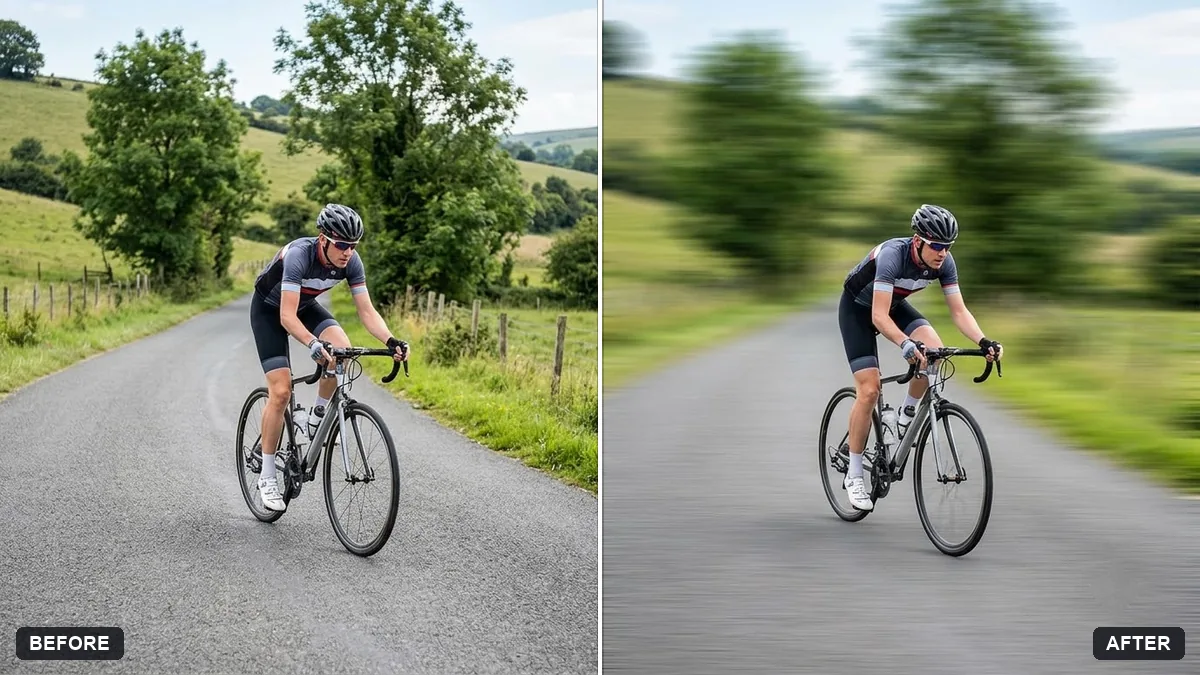
This prompt adds horizontal speed streaks to the background while keeping the moving subject sharp and detailed.
Add a panning motion blur to the background of this photo of a [CYCLIST / CAR / RUNNER], with horizontal speed streaks, while keeping the subject sharp and detailed.

Do not change the subject, colours or composition.
Ask the AI to keep the subject sharp with speed streaks behind.
Your photo goes to the AI app you choose, never to PromptUp.
Get a better result
A sharp subject, such as a cyclist, car or runner, against a background stretched into horizontal speed streaks, like a classic panning shot.
A panning shot follows a moving subject so it stays sharp while the background streaks, and the prompt recreates exactly that effect. Naming the subject type, cyclist, car or runner, tells the model which way the motion goes. Horizontal speed streaks give direction. The last line protects the subject, colours and composition, which is the part an AI edit is most likely to change.
The subject blurs too.
Fix: Say the subject must stay crisp and detailed, with the motion only in the background and any spinning wheels.
- The streaks go the wrong way. State the direction of travel, so the streaks run along it and behind the subject.
- The blur is uniform. Ask for stronger streaks near the edges and gentler ones closer to the subject, to look like a real camera pan.
Ask for a little dust or water spray kicked up behind the subject, in the same direction as the streaks.
Keep the subject sharp and add more space in front of it, with the speed streaks running horizontally behind.
More photo editing prompts
See all 334 →
More like this
- Cinematic colour grade with vignetteGemini · ChatGPT
- Moody dark photo presetGemini · ChatGPT
- Teal and orange movie lookGemini · ChatGPT
- Add a portrait-mode blur to the backgroundGemini · ChatGPT
- Bright and airy photo presetGemini · ChatGPT