- Updated
Add a rain effect to a photo
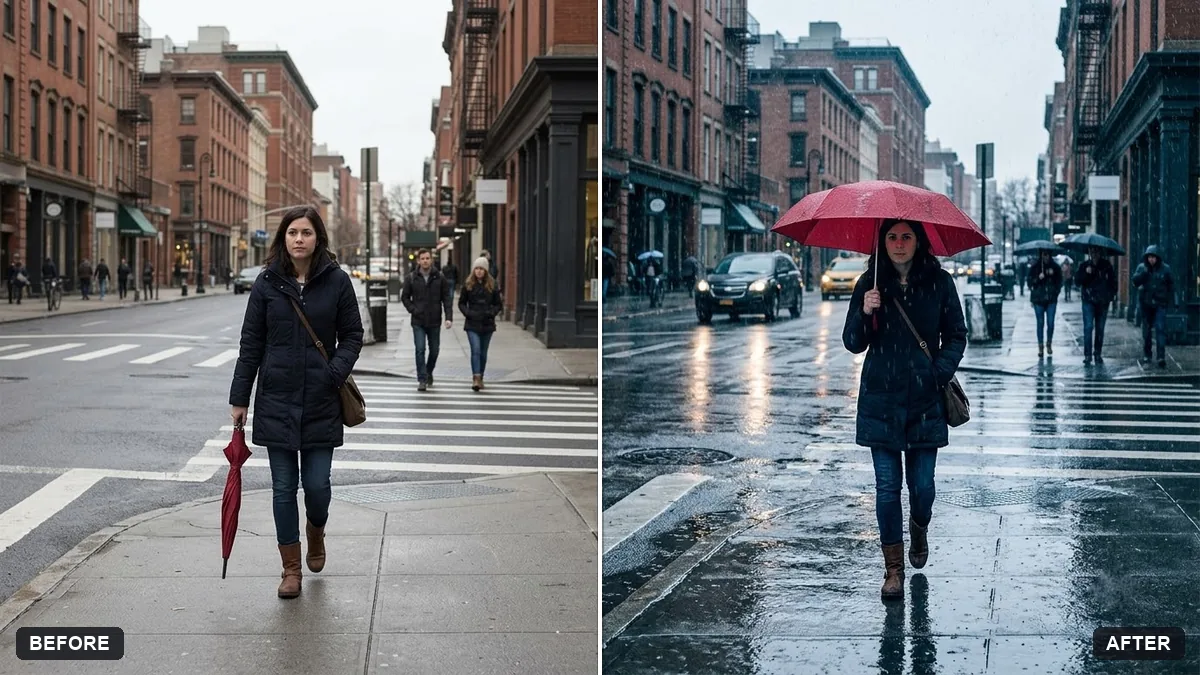
This prompt adds fine rain streaks, wet reflective surfaces, slightly darker and cooler tones, ripples in puddles and a soft grey sky, without changing the people or objects.
Add realistic [LIGHT / HEAVY] rain to this photo. Fine streaks of rain, wet reflective surfaces, slightly darker and cooler tones, small ripples in puddles and a soft grey sky.

Do not change the people, faces or objects.
Mention wet reflections and darker tones to make the rain believable.
Your photo goes to the AI app you choose, never to PromptUp.
Get a better result
Your photo with fine rain streaks, wet reflective surfaces, slightly darker and cooler tones, small ripples in puddles and a soft grey sky, with people, faces and objects unchanged.
The rain looks like a white overlay of lines.
Fix: Ask for “rain that is thinner in the distance and more visible against dark areas”, and say “light” or “heavy” in the blank.
- The ground is still dry. Say “wet pavement with reflections of the lights and the sky, and small ripples in puddles”. A photo with a hard floor shows this best.
- People look sunny and dry. Add “keep the people exactly as they are, with only a subtle damp shine on hair and jackets”. Do not ask for umbrellas unless you want them.
Add “late dusk, with streetlights and shop windows glowing and reflecting in the wet ground”. A rainy evening usually looks more cinematic than rain at noon.
Keep every person and object exactly the same. Make the rain lighter, the sky greyer and the road reflections stronger.
Guides on this topic
More photo editing prompts
See all 334 →
More like this
- Add a dramatic stormy skyGemini · ChatGPT
- Boost a dull sunsetGemini · ChatGPT
- Change the season in a photoGemini · ChatGPT
- Add stars to a night skyGemini · ChatGPT
- Add northern lightsGemini · ChatGPT