- Updated
Add falling snow
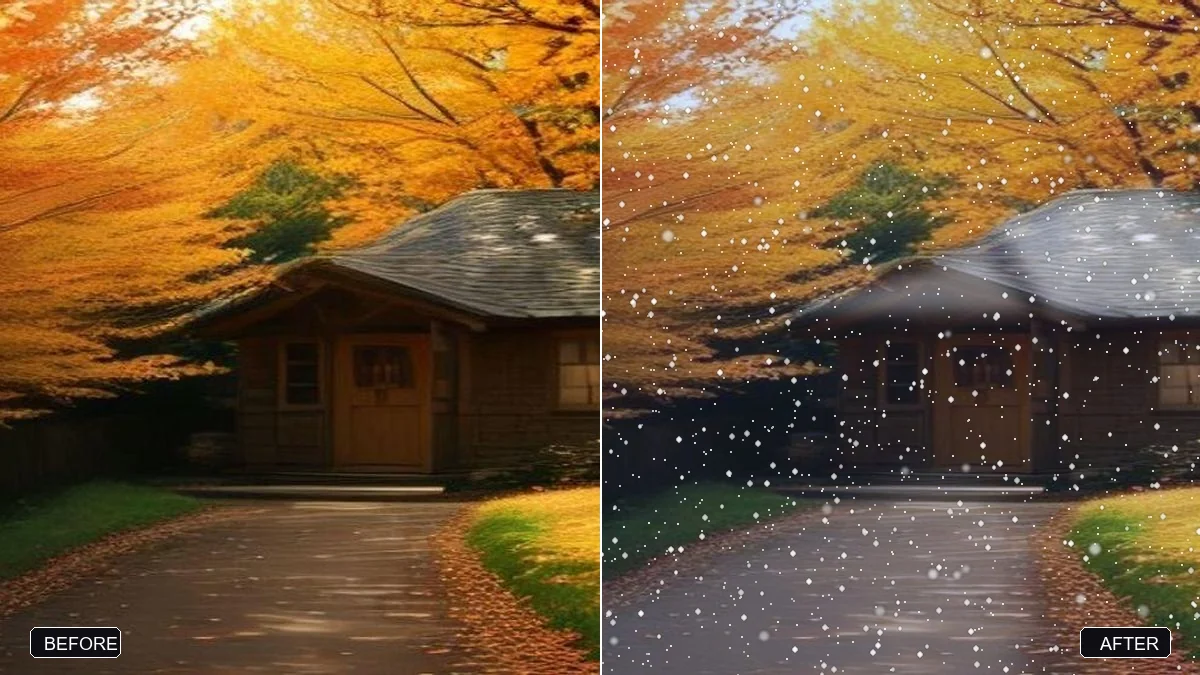
This prompt adds falling snow and a dusting of snow on the surfaces you name and cools the colours slightly, keeping faces and clothing unchanged. Ask for light snowfall so details are not buried.
Add gentle falling snow to this photo and a light dusting of snow on the [ROOFS / TREES / GROUND]. Cool the colours slightly and add soft flakes in the foreground and background.

Keep faces, clothing and the main subject unchanged.
Ask for light snowfall only; heavy snow can bury details of the original scene.
Your photo goes to the AI app you choose, never to PromptUp.
Get a better result
Your photo with gentle falling snow, a light dusting on the roofs, trees or ground you picked, slightly cooler colours and soft flakes near and far, with people and the main subject unchanged.
The snow looks pasted on, with none on the ground or the roofs.
Fix: Pick where the snow settles from the brackets, and use an outdoor photo with some sky, trees or roofs in it.
- Heavy snow hides the details of the scene. Follow the tip and ask for “light snowfall only, thin flakes, the scene still clearly visible”.
- Snow lands on people’s clothing or faces. Say “no snow on faces or clothing, only a few flakes in the air around them”.
- The photo looks fake because the scene is warm and green. Ask for “cool the colours, remove warm sunlight and leaves, and make shadows bluish”. A summer photo needs a stronger shift than an autumn one.
Add “warm lit windows and a soft golden glow from the lights, with light snow in the air” for a card-style picture. Keep the faces unchanged.
Keep the people and the main subject exactly the same. Make the snowfall lighter and the flakes smaller and softer.
Guides that use this prompt
More photo editing prompts
See all 334 →
More like this
- Boost a dull sunsetGemini · ChatGPT
- Add northern lightsGemini · ChatGPT
- Snowfall outside a windowVeo · Kling · Seedance
- Turn a day scene into a night sceneGemini · ChatGPT
- Add stars to a night skyGemini · ChatGPT