- Updated
Add a dramatic stormy sky
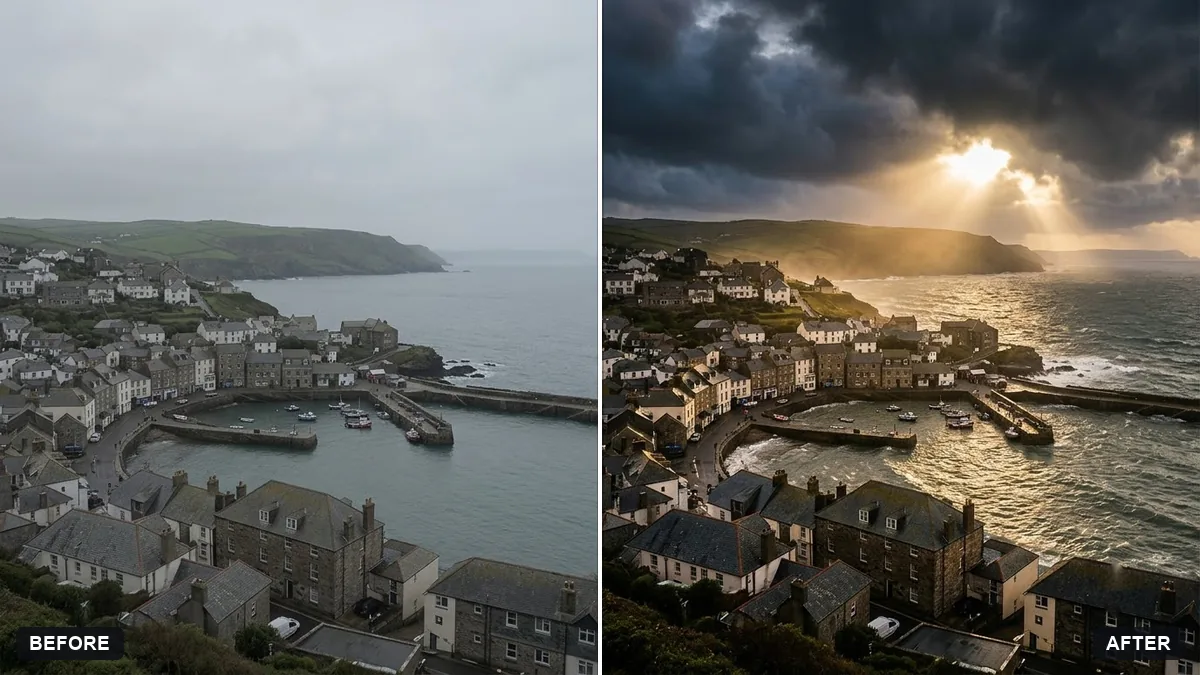
This prompt replaces the sky with a dramatic stormy one and adjusts the light and colour on the buildings or landscape to match.
Replace the sky in this photo with a dramatic stormy sky with dark rolling clouds and a break of golden light. Adjust the lighting and colour on the buildings or landscape to match.

Keep the subject and foreground exactly the same, with a realistic blend at the horizon. Extra instructions: [ANY DETAIL TO KEEP OR AVOID].
Match the lighting of the original photo so the scene feels believable.
Your photo goes to the AI app you choose, never to PromptUp.
Get a better result
Your scene under dark rolling storm clouds with one break of golden light, with the buildings or landscape relit to match and a believable blend at the horizon.
A new sky only looks real if the ground matches it, so the prompt asks to adjust the light on buildings or land. A break of golden light in dark clouds gives drama. Keeping the foreground exact and blending the horizon carefully avoids a cut-out look.
The foreground still looks sunny.
Fix: Ask for cooler, flatter light on the ground, with a warm patch only where the golden light hits.
- The horizon has a visible edge. Zoom in along trees and roofs, and ask for them to be blended into the new clouds without a glow.
- The sky is too busy. Ask for fewer, larger cloud masses. A simpler sky looks more convincing.
Ask for a grey veil of rain falling in the far distance on one side, with the foreground still dry.
Make the light on the roofs, roads and leaves look wet and cool to match the storm, with one patch of golden light breaking through.
More photo editing prompts
See all 334 →
More like this
- Add a rain effect to a photoGemini · ChatGPT
- Replace a dull sky with a sunsetGemini · ChatGPT
- Add falling snowGemini · ChatGPT
- Turn a night scene into daytimeGemini · ChatGPT
- Add sun rays through treesGemini · ChatGPT