- Updated
Add spring blossom to trees
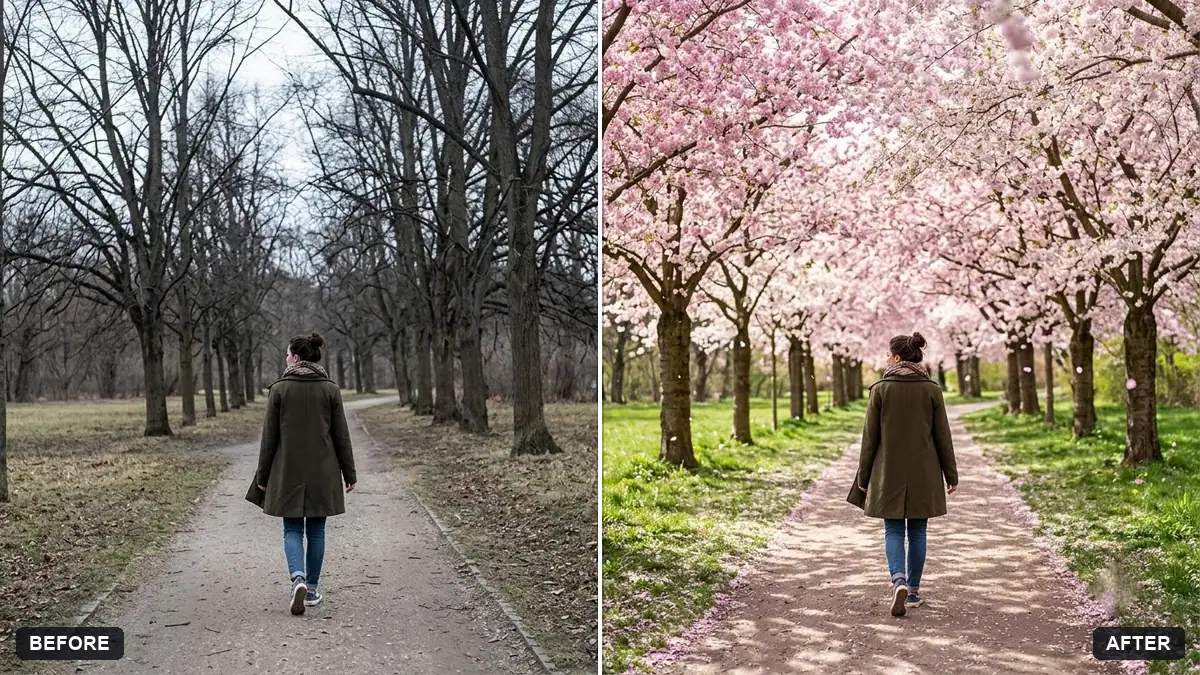
This prompt adds soft pink blossom to the trees with a few petals drifting in the air and a slightly brighter light.
Add spring [CHERRY / ALMOND] blossom to the trees in this photo with soft pink petals on the branches and a few drifting in the air. Brighten the light slightly and add fresh green grass.

Keep the people and the rest of the scene unchanged.
Choose a photo with visible trees or branches for the best effect.
Your photo goes to the AI app you choose, never to PromptUp.
Get a better result
Your trees covered in soft pink blossom with petals drifting in the air, slightly brighter light and fresh green grass, with the people and the rest of the scene left as they were.
This edit changes the season, not the scene, so the prompt adds blossom to the trees you already have and keeps people and everything else unchanged. Choosing cherry or almond blossom sets the shade of pink. A few petals drifting in the air add motion, while slightly brighter light and fresh grass make the whole photo feel like spring rather than a filter.
The blossom looks pasted on.
Fix: Ask for blossom that follows the real branches and shows some bare twigs between the clusters.
- The petals cover faces. Say that falling petals must stay away from faces and be sparse near the people.
- The colours clash with the season. Check what is already in the photo. Bare grass or autumn leaves will fight the spring look.
Ask for white pear or apple blossom instead of pink, with a cooler, fresher morning light.
Put the blossom only on the branches that are already there, keep the sky behind them clear and add a few petals drifting in the air.
More photo editing prompts
See all 334 →
More like this
- Cherry blossom lane in springVeo · Kling · Seedance
- Add a rain effect to a photoGemini · ChatGPT
- Boost a dull sunsetGemini · ChatGPT
- Japanese garden tea houseMidjourney · Gemini · ChatGPT
- Change the season in a photoGemini · ChatGPT