- Updated
Add northern lights
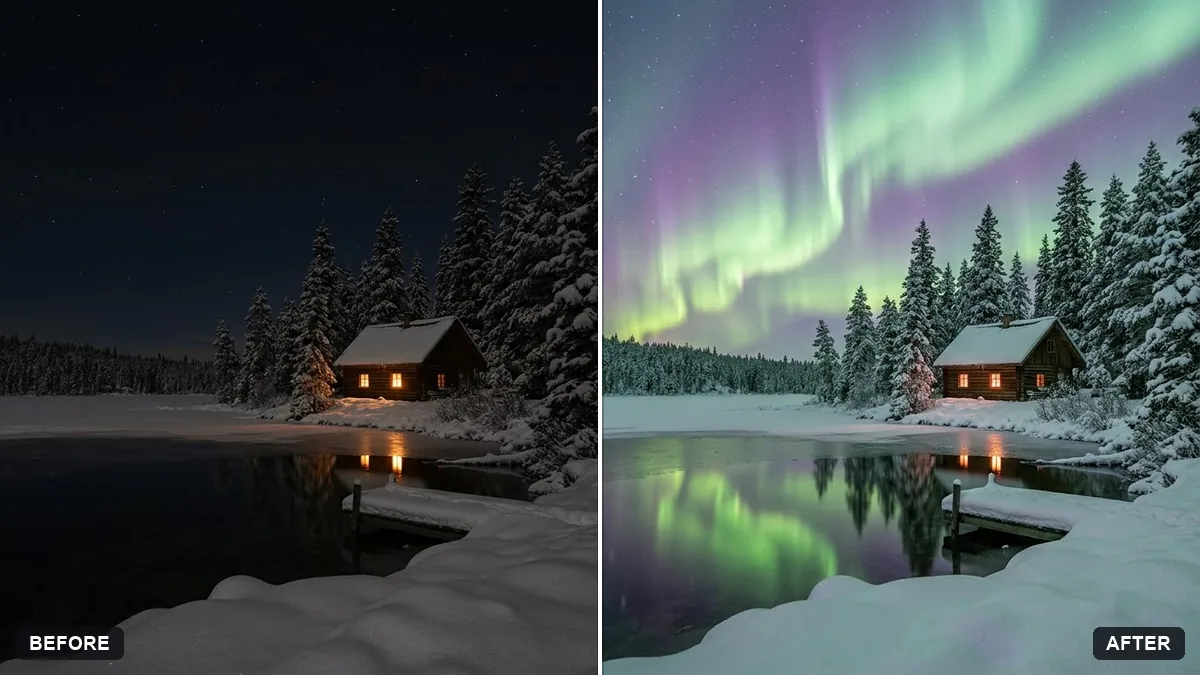
This prompt adds rippling aurora across the sky in a night photo, reflecting gently on the water or snow below, keeping the scene realistic.
Add soft green and purple northern lights rippling across the sky in this night photo, reflecting gently on [WATER / SNOW] below. Keep the scene realistic.

Do not change the foreground, subject or composition.
Use a dark, clear sky in the photo for the most convincing aurora.
Your photo goes to the AI app you choose, never to PromptUp.
Get a better result
Soft green and purple ribbons of light across your night sky, reflecting on the water or snow below, with the foreground and composition left as they were.
Adding an aurora only works if the rest of the photo stays real, so the prompt says what not to change: the foreground, the subject and the composition. Soft green and purple ribbons are the most common aurora colours. Asking for a gentle reflection on water or snow ties the new sky to the ground below, which is what makes it look like it was there when you took the photo.
The aurora looks cartoonish.
Fix: Ask for “faint, realistic, soft edges” and keep the colours gentle instead of vivid neon.
- The sky is not dark enough. Start with a clear night photo. A bright or cloudy sky hides the effect and looks fake.
- There is no reflection. Name the water or snow and ask for a soft, dimmer echo of the light on it.
Ask for one slow curtain of green light rising from the horizon, with fewer colours and a calmer look.
Keep the stars visible and keep the foreground dim and natural, lit only faintly by the aurora.
More photo editing prompts
See all 334 →
More like this
- Northern lights over a lakeVeo · Kling
- Northern Lights over your photoHiggsfield · Kling · Veo
- Add falling snowGemini · ChatGPT
- Add sun rays through treesGemini · ChatGPT
- Add a rain effect to a photoGemini · ChatGPT