- Updated
Add dreamy bokeh lights
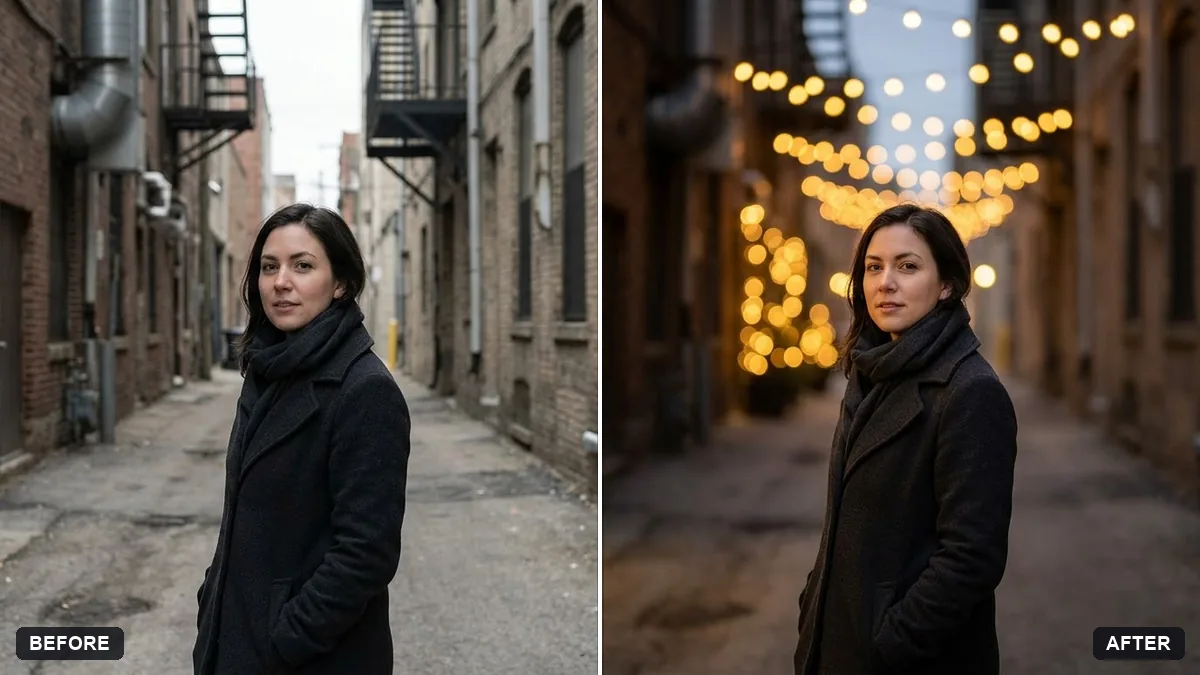
This prompt adds soft round bokeh lights in warm gold or mixed colours to the background and slightly darkens it so the lights stand out.
Add soft round bokeh lights in [WARM GOLD / MIXED COLOURS] to the background of this photo, with the subject kept sharp. Slightly darken the background so the lights glow.

Do not alter the face, clothing or pose.
Choose a dark or evening photo so the lights stand out.
Your photo goes to the AI app you choose, never to PromptUp.
Get a better result
Your photo with soft, round bokeh lights glowing behind you in warm gold or mixed colours, a slightly darker background so they shine and you kept sharp. Your face, clothes and pose do not change.
Light circles land on your face or hair and look like snow.
Fix: Say “lights appear only behind the subject, none overlap the face, hair or shoulders”.
- A glowing outline appears around your hair, as if you were cut out. Add “keep the hair edges natural with no halo or glow outline”, and zoom in on the hair to check.
- On a bright daytime photo the lights look stuck on. Use an evening photo, as the tip says. If you only have a daylight shot, first ask for “an evening street background with lamps”, then add the lights.
Replace the round bokeh with “a string of small warm fairy lights hanging in soft focus behind me”. It gives a cosier, more indoor feel than street lights.
Remove any bokeh circles that touch my face or hair, keep the lights only behind me and make the edge of my hair natural with no glow.
More photo editing prompts
See all 334 →
More like this
- City night bokeh portraitGemini · ChatGPT
- Dreamy watercolour landscapeMidjourney · Gemini · ChatGPT
- Extend a photo to a wider frameGemini · ChatGPT
- Change the background (keep you the same)Gemini · ChatGPT
- Tidy a cluttered backgroundGemini · ChatGPT