- Updated
Add a rainbow after rain
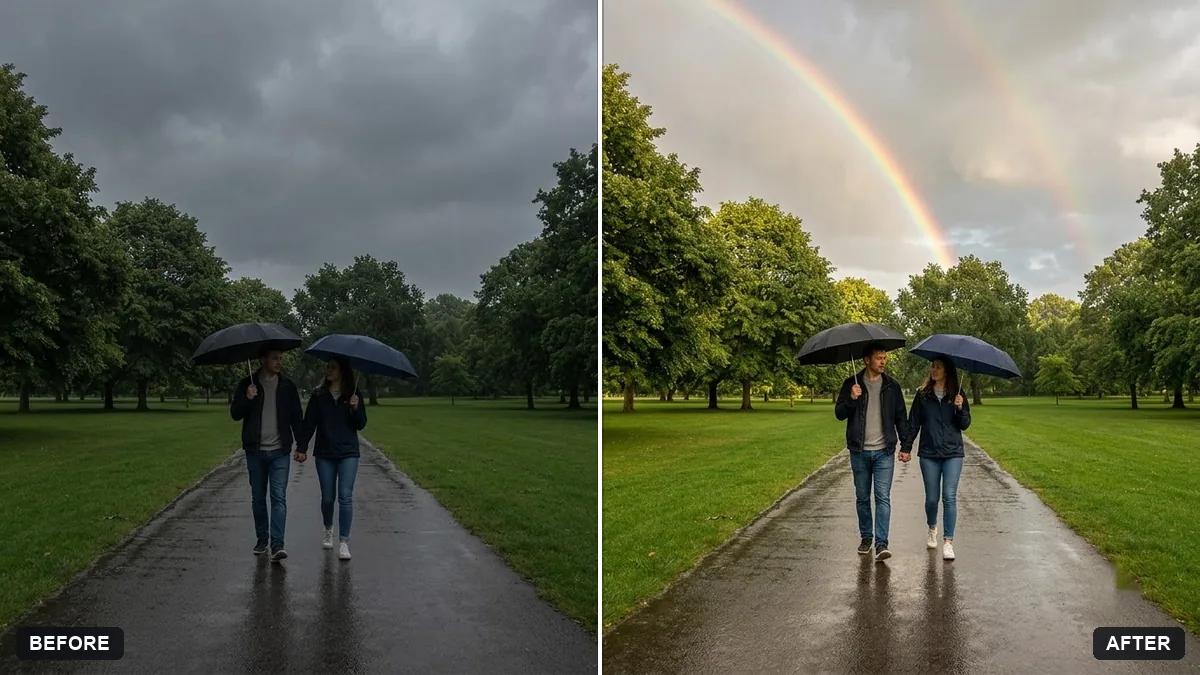
This prompt adds a soft double rainbow and a few fading clouds, and makes the ground look slightly wet with subtle reflections.
Add a soft double rainbow across the sky in this photo as if after a rain shower, with a slight glow and a few fading clouds. Make the ground look slightly wet with subtle reflections.

Keep the people and scene the same. Extra instructions: [ANY DETAIL TO KEEP OR AVOID].
Add a hint of wet surfaces and clearer light so the rainbow feels natural.
Your photo goes to the AI app you choose, never to PromptUp.
Get a better result
Your scene with a faint double rainbow, a soft glow and a few fading clouds, plus slightly wet-looking ground with subtle reflections, while the people stay unchanged.
Rainbows appear after rain with the sun behind you, so the prompt adds wet ground, fading clouds and clearer light along with the arc. Those details make it believable, as the tip says. People and scene stay the same.
The rainbow looks painted on.
Fix: Ask for a translucent arc that fades at the ends and lets the sky show through, with the colours soft and not solid.
- The ground stays dry. Name the surface, such as a road or a courtyard, and ask for a damp sheen and small reflections on it.
- The light does not suit a rainbow. Start with a bright, partly cloudy photo. A flat grey sky makes a rainbow look out of place.
Ask for one subtle, partly hidden rainbow near the horizon instead of a full double arc, for a more realistic feel.
Move the arc so it sits behind us, and keep the lighting on our faces exactly as in the original photo.
More photo editing prompts
See all 334 →
More like this
- Add a dramatic stormy skyGemini · ChatGPT
- Boost a dull sunsetGemini · ChatGPT
- Add morning fog to a landscapeGemini · ChatGPT
- Add falling snowGemini · ChatGPT
- Replace a dull sky with a sunsetGemini · ChatGPT