- Updated
Clean up a baby photo background
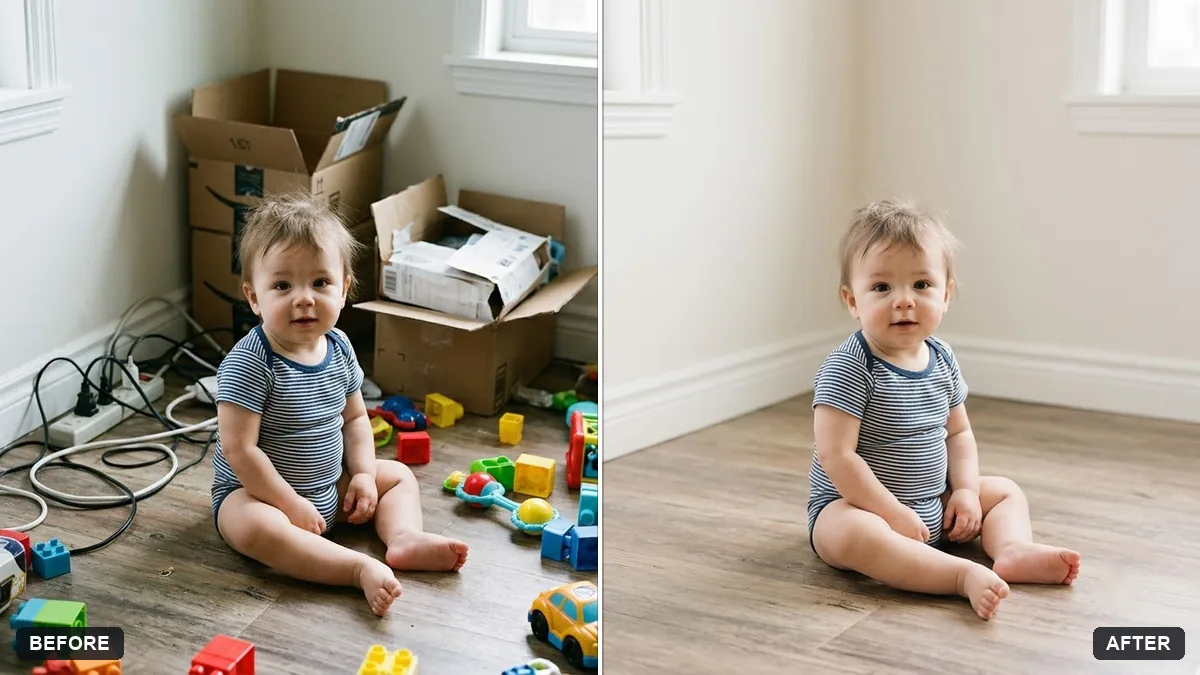
This prompt tidies the background of a baby photo by removing clutter such as toys, cables or boxes, keeping a clean soft or neutral backdrop and evening out the light. The baby's face, skin and clothes are not changed.
Tidy the background of this photo of my baby. Remove clutter such as [TOYS / CABLES / BOXES], keep a clean [SOFT / NEUTRAL] background and even out the light.

Do not change the baby's face, skin or clothes. Keep everything natural.
Keep the baby's skin tones natural; ask the AI not to smooth them.
Your photo goes to the AI app you choose, never to PromptUp.
Get a better result
Your baby photo with toys, cables or boxes removed, a clean soft or neutral background and even light, while the baby’s face, skin and clothes stay unchanged.
The skin is smoothed and looks waxy.
Fix: Use the tip and write “keep the baby’s natural skin tone and texture, no smoothing or retouching of the skin”.
- Part of a blanket or a hand disappears along with the clutter. Name what must stay: “keep the blanket, both hands and the pacifier exactly as they are”, and list only the items to remove.
- The cleaned wall or floor looks smeared or blurry. Add “fill with a clean, sharp, plain background that matches the original light direction”.
Ask for “leave an empty plain area in the top corner where I can add the baby’s age in an editor”. Adding the text yourself avoids the garbled letters AI often makes.
Remove only the items I listed, keep the blanket, hands and clothes untouched, and do not smooth the baby’s skin.
Guides on this topic
More photo editing prompts
See all 334 →
More like this
- Soft maternity portraitGemini · ChatGPT
- Baby product soft lifestyleGemini · ChatGPT · Midjourney
- Graduate with familyGemini · ChatGPT
- New baby announcement cardGemini · ChatGPT · Midjourney
- Gentle memorial tribute portraitGemini · ChatGPT