- Updated
Fix an overexposed baby photo
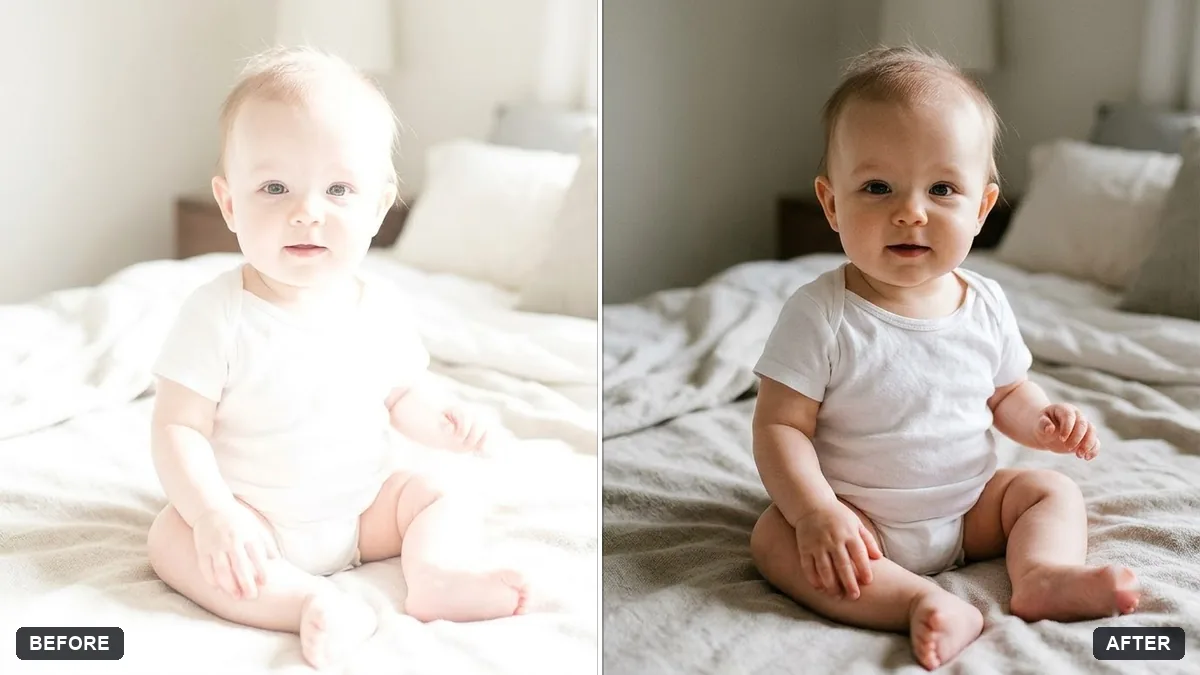
This prompt recovers washed-out highlights in the skin, clothes and background and restores natural skin tones in a baby photo that is too bright.
This photo of my baby is too bright and details are washed out. Recover the highlights in the skin, clothes and background, restore natural skin tones and gentle contrast.

Do not change the baby's face, expression or the composition. Extra instructions: [ANY DETAIL TO KEEP OR AVOID].
Start with the original file if you can; already-edited photos have less detail to recover.
Your photo goes to the AI app you choose, never to PromptUp.
Get a better result
A less glaring version of your baby photo with detail returned to the skin, clothes and background, natural skin tones and gentle contrast. The baby’s face, expression and framing are not changed.
Pure white areas hold no detail, so the AI paints new skin there.
Fix: Try the highlights slider in your phone’s editor first. For what remains, treat the AI’s fill as a reconstruction and check it looks like your baby.
- The skin turns grey or orange. Say “warm natural baby skin with soft pink cheeks as in the original”.
- A white blanket turns dull grey. Ask for “keep the white blanket bright white with visible fabric texture”.
Ask for “keep the bright, high-key airy look, but recover texture in the skin and the clothes”. Many families like a light photo as long as there is detail in it.
Keep the baby’s face exactly as it is, bring back detail in the cheeks and forehead, keep warm natural skin and keep the white blanket bright.
Guides on this topic
More photo editing prompts
See all 334 →
More like this
- Recover blown-out highlightsGemini · ChatGPT
- Baby milestone photo cardGemini · ChatGPT
- Graduate with familyGemini · ChatGPT
- Soft maternity portraitGemini · ChatGPT
- Gentle memorial tribute portraitGemini · ChatGPT