- Updated
Fix wide-angle lens distortion
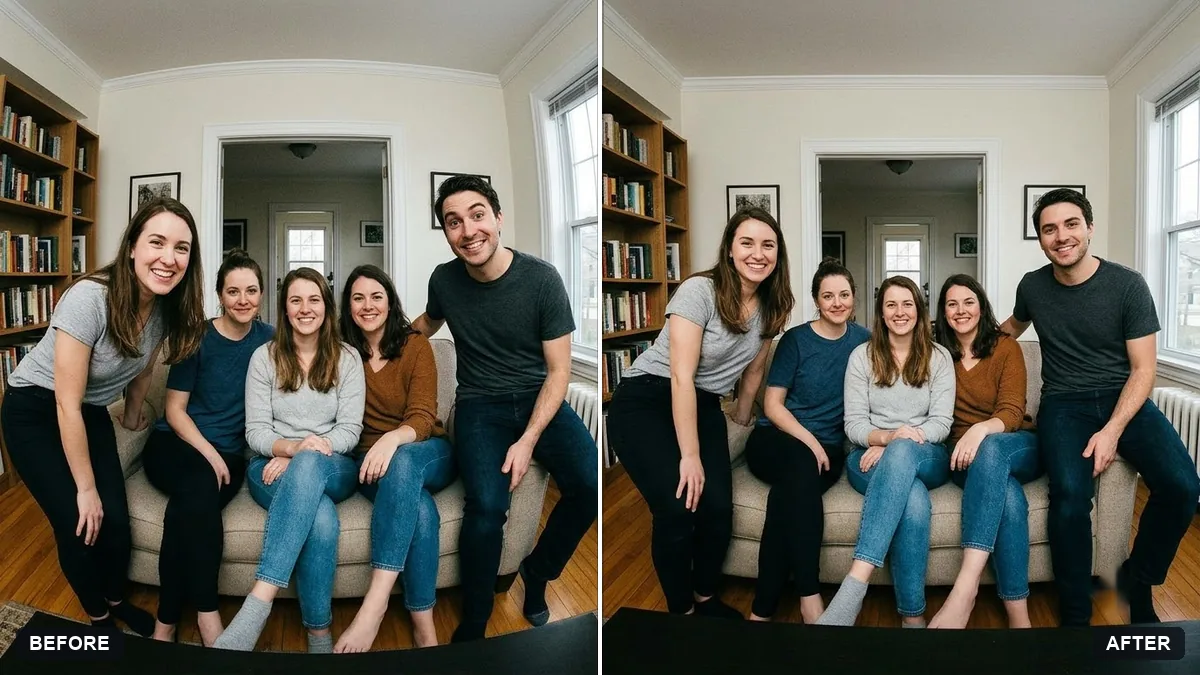
This prompt corrects stretched faces and bodies near the edges of a phone wide-angle photo and straightens curved lines, without cropping too much, keeping everyone's real proportions.
Correct the wide-angle lens distortion in this [GROUP / ROOM] photo. Fix stretched faces and bodies near the edges and straighten curved lines, without cropping too much.

Keep everyone's real proportions and the overall scene unchanged.
Use it for phone wide-angle group photos where the edges look stretched.
Your photo goes to the AI app you choose, never to PromptUp.
Get a better result
The same wide-angle photo with the stretched faces near the edges pulled back to normal proportions and the curved walls and door frames straightened, with the overall scene and crop mostly unchanged.
The people at the edges look better, but the centre faces now look slightly different.
Fix: Add “only correct the left and right edges, leave the middle third unchanged”. Fixing the whole photo evenly changes faces that were fine.
- Lines are straightened, but a large part of the photo is cropped away. Say “crop no more than 5 percent and fill the corners instead”. Straightening always leaves empty corners, so check what the tool filled in.
- A stretched face is corrected into a slightly different face. Upload a second, undistorted photo of that person as a reference and say “keep this person’s real face from the reference”. Without one the tool guesses.
Write “room” in the brackets and add “keep door frames and wall corners perfectly vertical, and keep the furniture sizes realistic”. For rooms, straight verticals matter more than faces.
Fix only the faces on the far left and far right, keep the middle third as it is now, and crop no more than 5 percent.
About this prompt
How do I fix stretched faces at the edge of a wide-angle photo?
Ask Gemini or ChatGPT to correct the lens distortion and name the edges that look stretched, and tell it to keep everyone’s real proportions. Next time, step back or use the normal lens and keep people near the middle of the frame, so there is less to fix.
Guides on this topic
More photo editing prompts
See all 334 →
More like this
- Recover blown-out highlightsGemini · ChatGPT
- Fix a weird AI photo (hands, face, skin)Gemini · ChatGPT
- Correct a yellow or blue colour castGemini · ChatGPT
- Real estate agent portraitGemini · ChatGPT
- Fix closed eyes in a group photoGemini · ChatGPT