- Updated
Rescue an underexposed concert photo
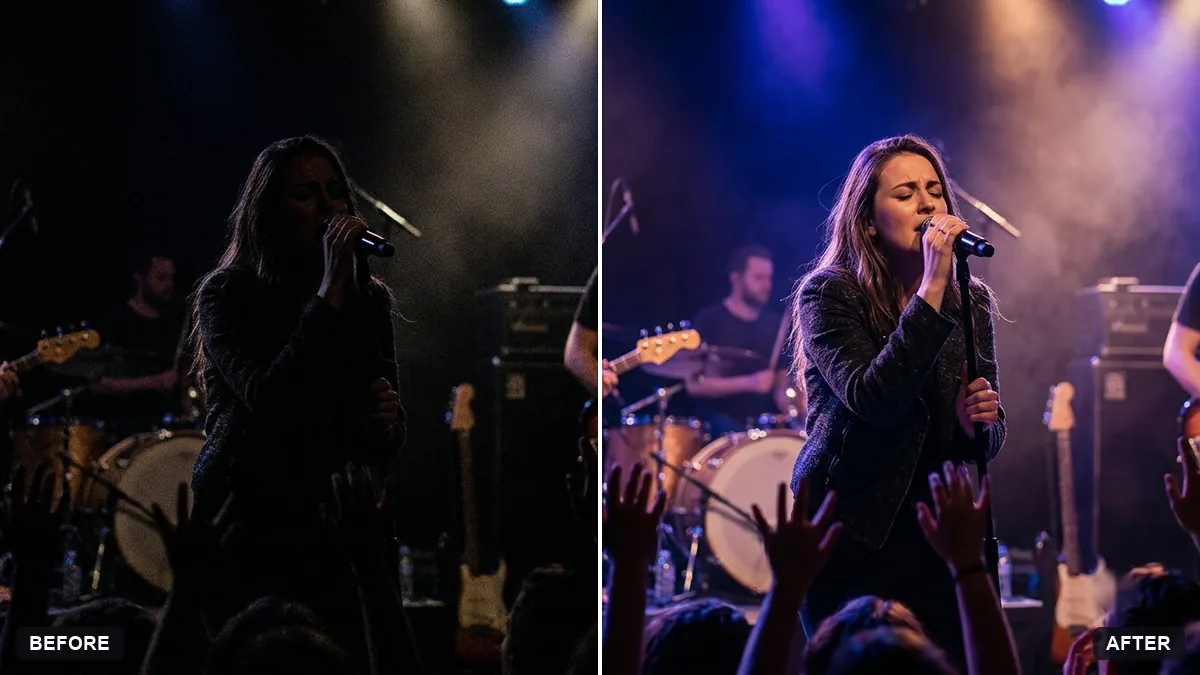
This prompt lifts the shadows in a dark, noisy concert photo to reveal the performer's face and the stage, reduces noise and sharpens detail.
This concert photo is too dark and noisy. Lift the shadows to reveal the performer's face and the stage, reduce noise, sharpen detail and keep the coloured stage lights vivid but natural.

Do not change the performer, instruments or crowd. Extra instructions: [ANY DETAIL TO KEEP OR AVOID].
Keep the stage colours moody; do not over-brighten it to daylight.
Your photo goes to the AI app you choose, never to PromptUp.
Get a better result
Your dark, noisy concert photo with the shadows lifted to show the performer’s face and the stage, noise reduced, detail sharpened and the coloured stage lights kept vivid but natural.
Dark concert photos need careful lifting, so the prompt asks to raise the shadows, reduce noise and sharpen, but to keep the stage lights vivid and natural. Brightening too much would turn it into daylight and lose the mood, as the tip warns. Protecting the performer, instruments and crowd stops the AI from inventing new faces or gear while it cleans up the grain.
The photo is brightened to daylight and the concert mood is lost.
Fix: Follow the tip and write “keep it moody, dark edges and glowing stage lights, only lift the face and the stage”.
- The face is sharpened into a plastic mask. Say “keep natural skin texture, do not smooth, only reduce noise”.
- The crowd or the instruments change. Repeat “do not change the performer, instruments or crowd”. If the crowd is a dark blur, leave it that way.
For a very noisy shot, finish with “convert to black and white with fine film grain”. Film grain can make leftover noise look intentional.
Keep my exact face from the original photo: same eyes, nose, smile, skin tone and age. Change only the style.
Guides that use this prompt
More photo editing prompts
See all 334 →
More like this
- Live Concert video promptHiggsfield · Kling · Veo
- Brighten a face in a backlit photoGemini · ChatGPT
- Straighten a tilted horizonGemini · ChatGPT
- Musician stage portraitGemini · ChatGPT
- Reduce noise in a high-ISO photoGemini · ChatGPT