- Updated
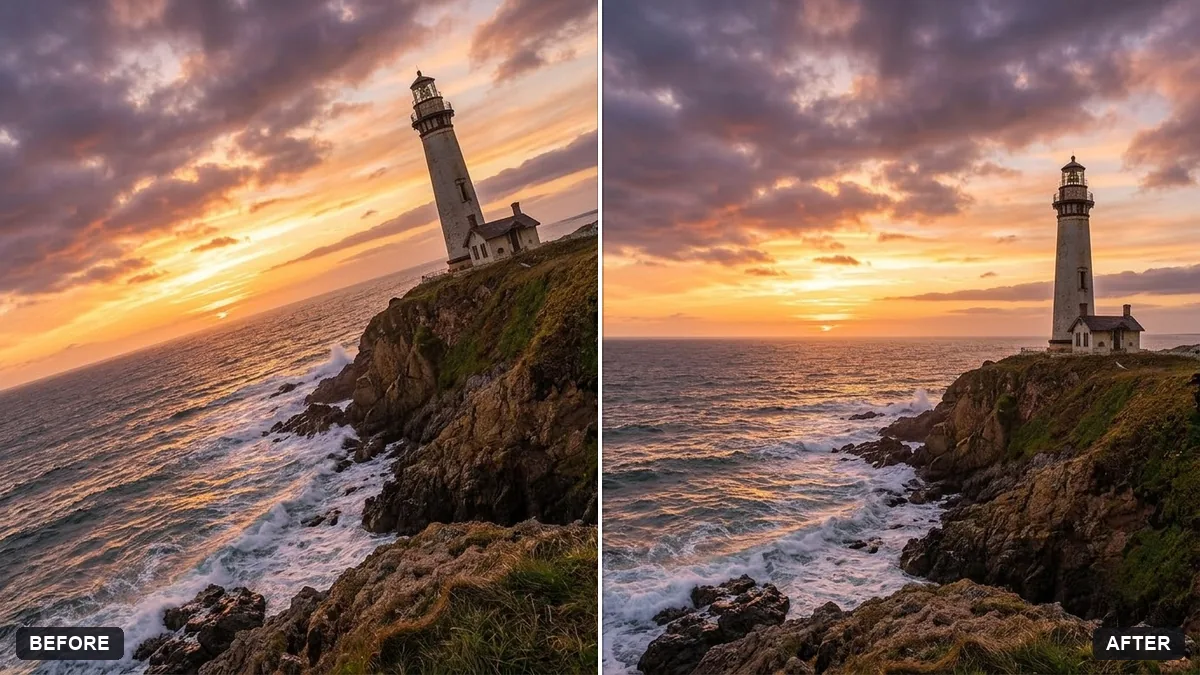
Straighten a tilted horizon
This prompt straightens a tilted horizon or vertical building lines and corrects lens distortion, cropping as little as possible.
Straighten the tilted [HORIZON / BUILDING LINES] in this photo and correct any lens distortion. Crop as little as possible.

If the corners go empty after rotating, extend the scene naturally. Keep every person and object exactly the same.
Extend the canvas instead of cropping to keep your original composition.
Your photo goes to the AI app you choose, never to PromptUp.
Get a better result
The photo rotated until the horizon or building lines are level, lens distortion corrected, as little cropped as possible, and any empty corners filled in naturally.
It straightens the wrong line, such as a sloping hill, and leaves the real horizon tilted.
Fix: Name the line in the bracket: “the sea horizon” or “the left edge of the building”. Natural slopes should stay as they are.
- People near the edges look stretched after the lens correction. Add “keep people and faces undistorted, even if the edges are cropped”. Wide-angle correction can pull things at the borders.
- The filled-in corners show repeated textures or odd shapes. Check the corners at full size. If they look wrong, crop slightly in an editor, or ask for “extend only the sky and the water”.
For architecture, write “vertical building lines” in the bracket and add “keep the walls parallel and straight”. This fixes leaning towers as well as tilted horizons.
Level only the sea horizon, leave the people and everything else untouched, and keep the filled corners natural.
More photo editing prompts
See all 334 →
More like this
- Extend a photo to a wider frameGemini · ChatGPT
- Sailboat at sunriseMidjourney · Gemini · ChatGPT
- Rescue an underexposed concert photoGemini · ChatGPT
- Recover blown-out highlightsGemini · ChatGPT
- Enhance a hazy drone photoGemini · ChatGPT