- Updated
Enhance a hazy drone photo
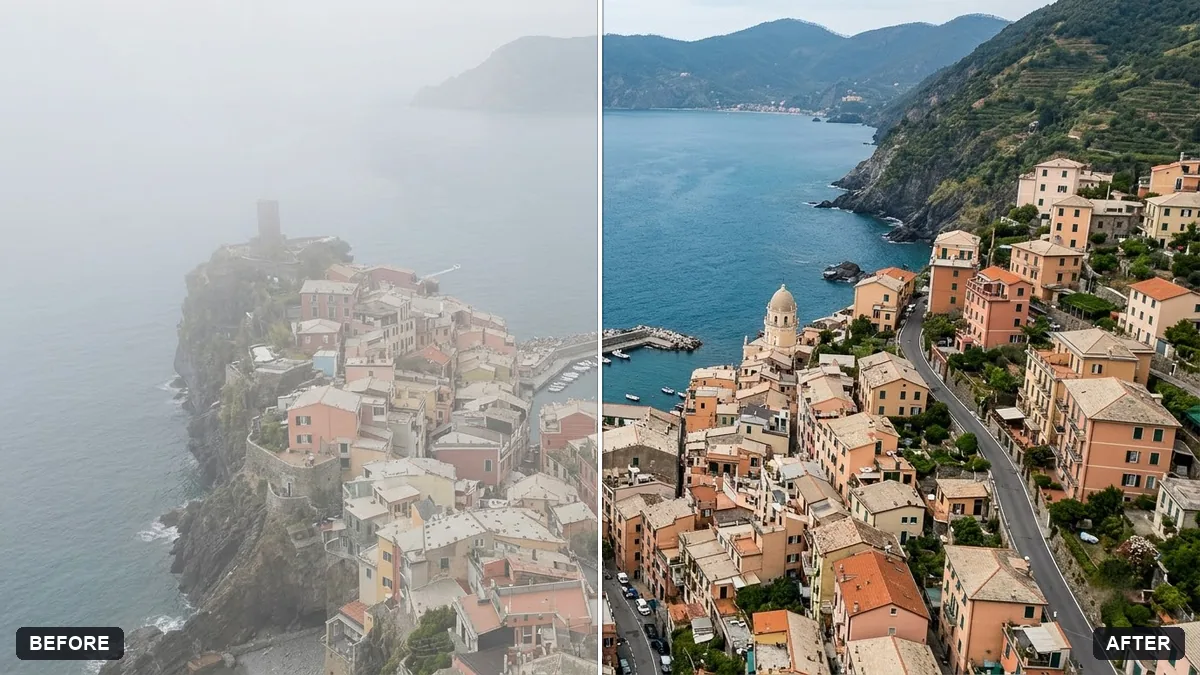
This prompt removes haze, restores contrast and colour depth, sharpens fine detail in buildings, landscape or coastline and balances the sky, without adding or removing objects. Ask for a mild dehaze to keep it natural.
Enhance this drone photo. Remove haze, restore contrast and colour depth, sharpen fine detail in the [BUILDINGS / LANDSCAPE / COASTLINE] and balance the sky.

Keep the scene realistic and do not add or remove objects.
Ask for a mild dehaze and mild contrast to keep the photo looking natural.
Your photo goes to the AI app you choose, never to PromptUp.
Get a better result
Your drone photo with haze removed, better contrast and colour depth, sharper detail in the buildings, landscape or coastline you named, and a balanced sky, without any objects added or removed.
The sky becomes grey and heavy.
Fix: Ask for “gentle dehaze, keep the soft gradient of the sky”, and say mild in the contrast line.
- Fine detail such as roofs or waves looks over-sharpened. Add “keep a natural look, no halos around edges”. Zoom to 100% and check the edges before using it.
- Colours look unnatural, like an oversaturated postcard. Name the look: “true-to-life colours as they would look on a clear day”. Use it for the shoreline water or the green areas.
Ask for “a gentle warm tone on the buildings, as if shot just before sunset, with the shadows kept soft”. Only use this if it matches how the day looked.
Keep every object in place. Reduce the haze a little more near the horizon and keep the sky’s natural colour.
Guides that use this prompt
More photo editing prompts
See all 334 →
More like this
- Straighten a tilted horizonGemini · ChatGPT
- Reduce noise in a high-ISO photoGemini · ChatGPT
- Soften harsh shadows on a faceGemini · ChatGPT
- Rescue a dark, noisy night photoGemini · ChatGPT
- Recover blown-out highlightsGemini · ChatGPT