- Updated
Soften harsh shadows on a face
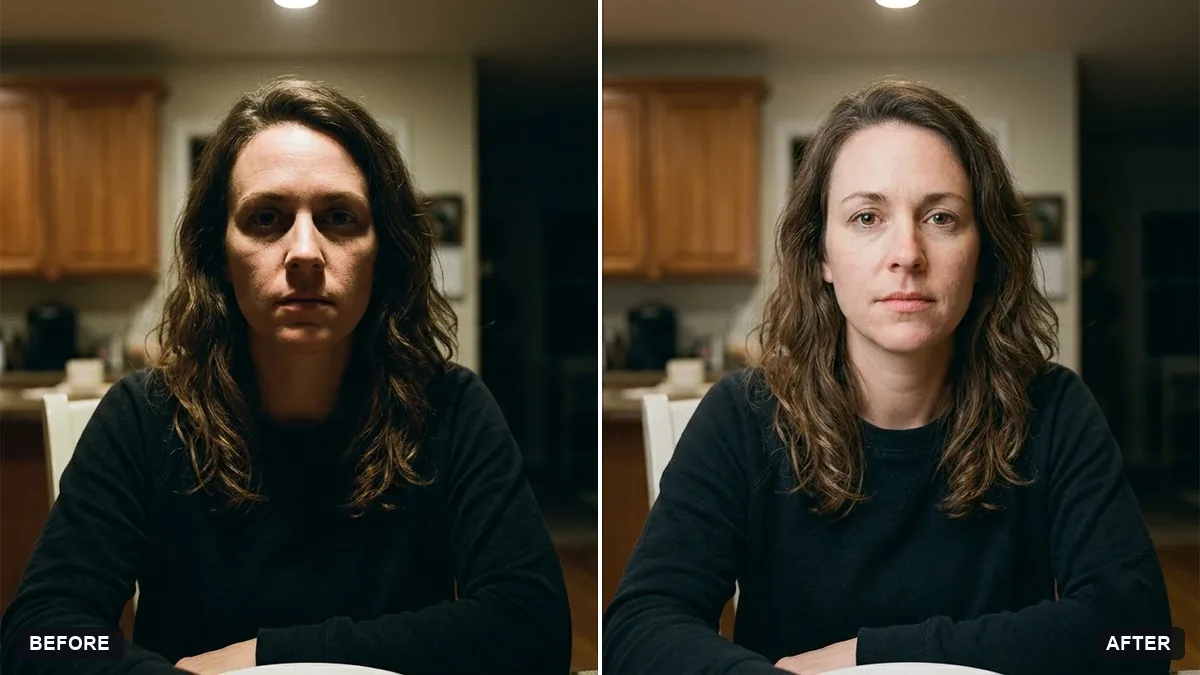
This prompt softens harsh shadows on your face from overhead light, sunlight or flash, lifting the shadows without making the photo look flat.
Soften the harsh shadows on my face in this photo, caused by [OVERHEAD LIGHT / SUNLIGHT / FLASH]. Lift the shadows under my eyes, nose and chin gently.

Keep my face shape, expression and natural skin texture exactly the same. Do not smooth skin or change features. Keep the background unchanged.
Ask for "fill light" if you want an even and natural change.
Your photo goes to the AI app you choose, never to PromptUp.
Get a better result
Your photo with the hard shadows under the eyes, nose and chin softened, with your face shape, expression, natural skin texture and background unchanged.
Harsh light leaves dark eye sockets and chin shadows, so the prompt gently lifts those areas. It forbids smoothing skin or changing features. Naming the light source helps, and asking for fill light, as the tip says, keeps it natural.
The skin looks smooth and waxy.
Fix: Keep “natural skin texture” in the prompt and add “do not blur pores, lines or freckles, only lift the shadows”.
- The change is uneven, so one side of the face is brighter. Ask for “even fill light from the front, like a soft window”. A photo taken in plain overhead light is simple to fix.
- The eyes lose their shape or the catchlights vanish. Add “keep the eyes exactly as they are”. Zoom in on both eyes to check.
Ask for “a slight warm tone on the face to match the light in the background”. A lifted face on a dark scene can look pasted in without it.
Keep my face and skin exactly the same. Lift the shadows under the eyes a little more and leave the shadow on the side of the nose.
Guides that use this prompt
More photo editing prompts
See all 334 →

More like this
- Preview outdoor evening lightingGemini · ChatGPT
- Rescue an underexposed concert photoGemini · ChatGPT
- Enhance a hazy drone photoGemini · ChatGPT
- Straighten a tilted horizonGemini · ChatGPT
- Relight a flat photo with golden-hour lightGemini · ChatGPT