- Updated
Fix glowing eyes in pet flash photos
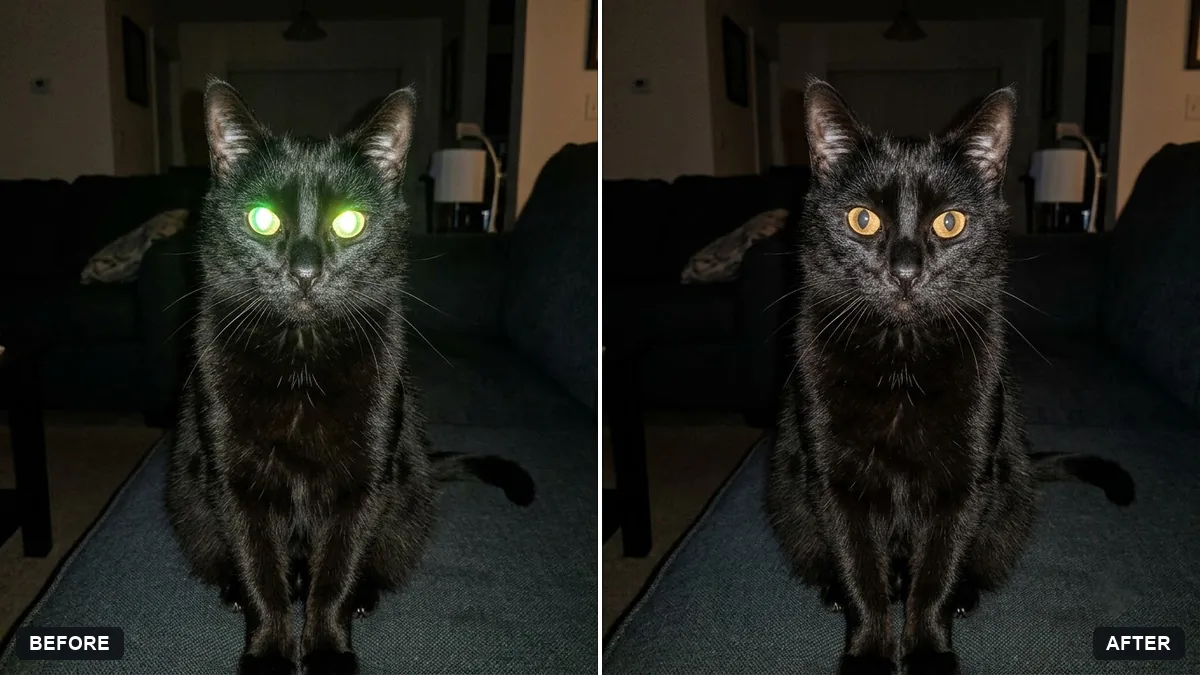
This prompt fixes the glowing eyes in a flash photo of your pet and restores natural eyes in the correct colour.
Fix the glowing green, red or white eyes of my [PET TYPE] in this flash photo. Restore natural [EYE COLOUR] eyes with soft catchlights.

Keep the fur, markings, pose and everything else exactly the same, and do not change the face shape.
Turning on room lights and avoiding direct flash prevents this next time.
Your photo goes to the AI app you choose, never to PromptUp.
Get a better result
The same flash photo with the glowing green, red or white eyes replaced by natural eyes in the colour you named, with small catchlights, while the fur, markings and pose stay as they were.
The pupils come back round like a person’s.
Fix: Name the pupil shape you expect, such as “a cat’s vertical slit pupils” or “a dog’s round pupils”, along with the eye colour.
- Only one eye is fixed, or the two eyes do not match. Write “fix both eyes, the same colour and the same size of catchlight in each”, then zoom in to check before you share it.
- The face looks a little different after the fix. Repeat “do not change the face shape, nose or fur”, and crop close to the face before uploading so the AI has less to redo.
On a grainy, older pet photo add “keep the film grain and warm colours of the original, only repair the eyes”. That stops the fixed eyes looking cleaner than the rest of the picture.
Fix both eyes to the natural colour I named with one small matching catchlight each, keep the right pupil shape, and leave fur, pose and background untouched.
Guides on this topic
More photo editing prompts
See all 334 →
More like this
- Royal portrait of your petGemini · ChatGPT
- Sharpen a blurry pet action shotGemini · ChatGPT
- Pet on a studio backdropGemini · ChatGPT
- Dress your pet for the holidaysGemini · ChatGPT
- Corporate headshot of your petGemini · ChatGPT