- Updated
Pet watercolour portrait
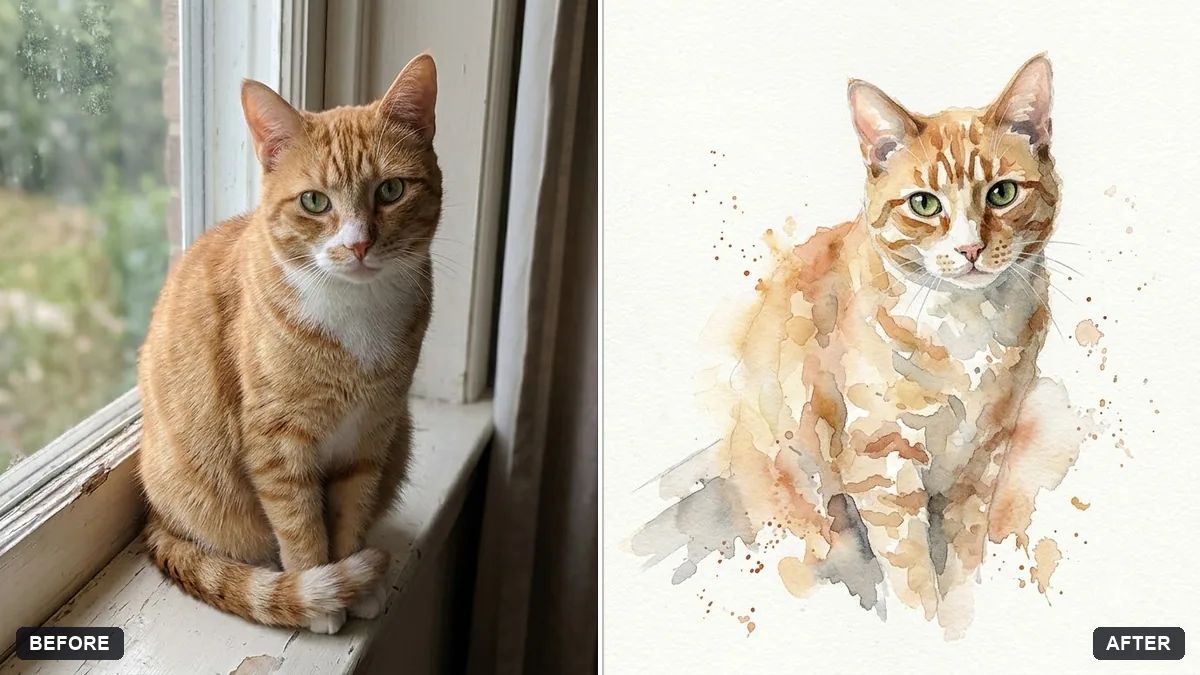
This prompt paints your pet in loose watercolour with soft washes in colours you choose, keeping the markings, eye colour and expression accurate.
Turn this photo of my [PET TYPE] into a loose watercolour portrait. Keep markings, eye colour and expression accurate.

Soft washes in [COLOURS], a few splashes, unpainted white paper around the edges, gentle pencil outline, warm and playful mood. Simple background.
A clear, sharp photo of the face gives the best result.
Your photo goes to the AI app you choose, never to PromptUp.
Get a better result
A loose watercolour portrait of your pet with soft washes in your colours, a few splashes, white paper left around the edges and a gentle pencil outline, keeping its markings, eye colour and expression.
Stripes, patches or a white blaze move to the wrong place.
Fix: Describe them: “white stripe down the nose, left ear black, a brown patch over the right eye”. Check them against your photo.
- It looks like a digital filter, not paint. Ask for “visible paper grain, washes that bleed into one another, uneven edges and a few loose pencil lines”.
- The eyes lose their colour and the expression goes flat. Say “eyes the exact amber of the photo, with a small white highlight, kept detailed while the rest stays loose”.
Ask for “a fine pen and ink drawing, with a single wash of colour on the nose and ears only”. It is quieter and prints well on a card.
Keep the markings I described, make the paint look like real watercolour with paper grain and uneven edges, and keep the eyes detailed in their true colour.
Guides that use this prompt
More photo editing prompts
See all 334 →
More like this
- Make your pet photo moveHiggsfield · Kling
- Pet on a studio backdropGemini · ChatGPT
- Dress your pet for the holidaysGemini · ChatGPT
- Fix glowing eyes in pet flash photosGemini · ChatGPT
- Lost pet flyerGemini · ChatGPT · Midjourney