- Updated
Lost pet flyer
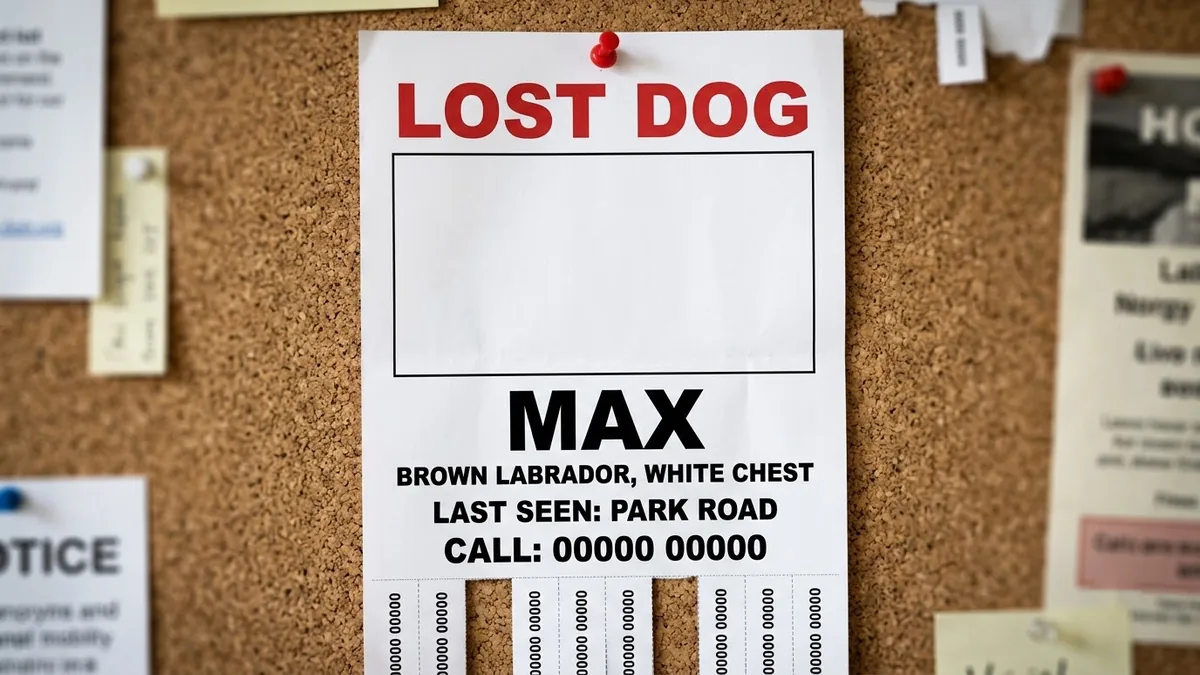
This prompt lays out a high-contrast flyer with LOST and the pet type in bold red, a large blank space for the photo, the name, description, where and when it was last seen, a large phone number and tear-off tabs. Add a clear photo of the pet.
Lost pet flyer layout with the large heading "LOST [DOG / CAT]" in bold red, a big blank rectangular space for a photo, name "[PET NAME]", description "[COLOUR, SIZE, MARKS]", last seen "[PLACE AND DATE]", a large phone number "[NUMBER]", tear-off tabs along the bottom, high contrast and easy to read. --ar 3:4
Use a clear photo of the pet in your own edit; AI artwork is for the layout, not the identification.
Get a better result
A 3:4 lost-pet flyer layout with a bold red heading, a big empty space for your photo, the pet’s name, description and last-seen details, a large phone number and tear-off tabs along the bottom.
The phone number has wrong or missing digits.
Fix: Check each digit on the picture. If any are wrong, retype the number in an editor, since a wrong number defeats the whole flyer.
- The AI draws a pet in the photo area. Keep the blank rectangle and add “leave it completely empty”. Insert your own clear photo, as the tip says.
- Small text is too hard to read from a pole. Ask for “only the heading, the pet name, the phone number and the area in large type, the rest in a smaller line”.
Change the heading to “FOUND” and add a line saying how the owner can describe the pet to claim it. Keep the tear-off tabs.
Keep the layout. Make the phone number even larger, shorten the description to one line and leave the photo area empty.
Guides that use this prompt
More image generation prompts
See all 347 →

More like this
- Pet watercolour portraitGemini · ChatGPT
- Royal portrait of your petGemini · ChatGPT
- Dress your pet for the holidaysGemini · ChatGPT
- Fix glowing eyes in pet flash photosGemini · ChatGPT
- Pet spa day ASMRSeedance · Veo