- Updated
Corporate headshot of your pet
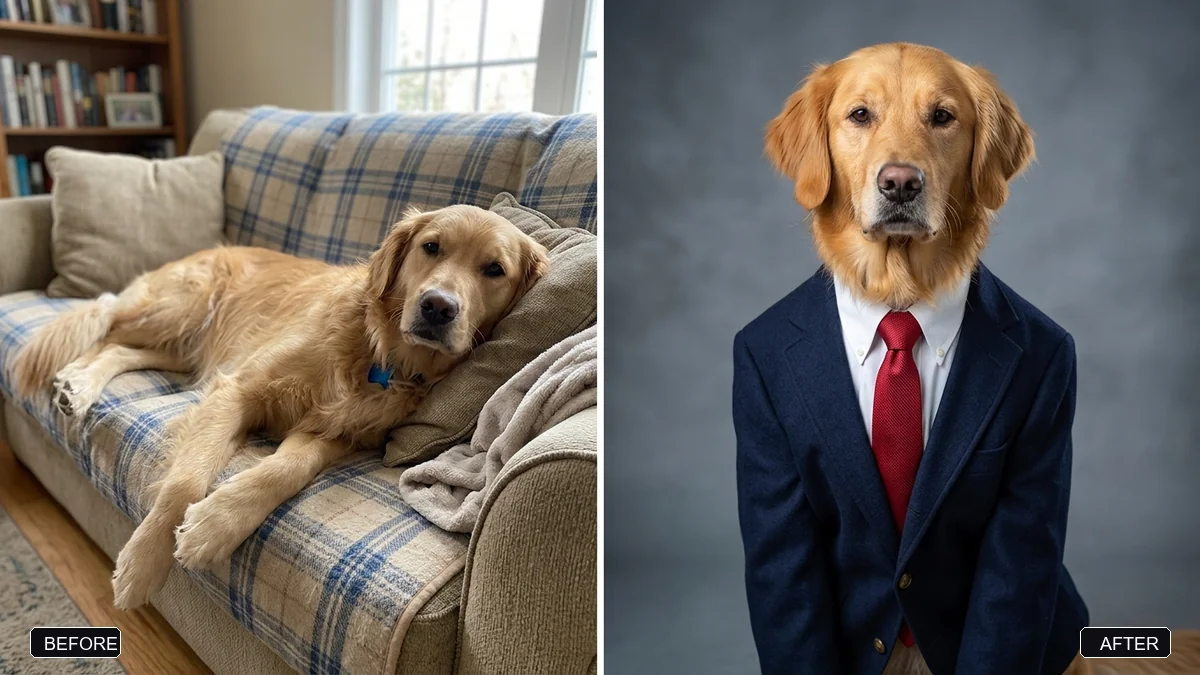
This prompt turns your pet into a professional corporate headshot. It keeps the face, fur colour and markings the same so it is clearly your pet, then dresses it in an outfit you choose. Adding a nameplate makes it funnier.
Turn my [PET, e.g. golden retriever] from this photo into a professional corporate headshot. Keep its face, fur colour, and markings exactly the same so it's clearly my pet.

Dress it in [OUTFIT, e.g. a navy blazer, white shirt, and red tie], sitting upright and facing the camera with a confident expression, in front of a soft grey studio backdrop.

LinkedIn-style studio lighting, sharp detail, natural fur texture, shoulders-up framing, square 1:1.
Add a nameplate with a job title like “Chief Snack Officer” for extra shareability.
Your photo goes to the AI app you choose, never to PromptUp.
Get a better result
A square, shoulders-up corporate headshot of your pet in a blazer or a shirt and tie, sitting upright and facing the camera in front of a soft grey studio backdrop with LinkedIn-style lighting.
Your pet turns into a different animal of the same breed.
Fix: Use a clear photo where its face and markings are visible, and name the markings, for example “white patch over the left eye”.
- The clothes look pasted on, or the pet grows human hands. Add “the clothes fit the pet’s body naturally; the pet keeps its own paws, no human arms or hands”.
- The expression looks human or a little creepy. Say “a calm, natural pet expression with a relaxed mouth”. Over-humanised faces look odd.
- The fur colour is smoothed into one flat shade. Add “keep the fur texture and the exact colour variation, including the lighter fur on the chest”.
Upload photos of two or three pets and ask for “a team page photo with all pets side by side, same backdrop”. A set looks like an office team page.
Keep my pet’s exact face, fur colour and markings from the original photo. Change only the outfit and the background.
Guides that use this prompt
More photo editing prompts
See all 334 →
More like this
- Dress your pet for the holidaysGemini · ChatGPT
- Pet on a studio backdropGemini · ChatGPT
- Lost pet flyerGemini · ChatGPT · Midjourney
- Sharpen a blurry pet action shotGemini · ChatGPT
- Pro LinkedIn headshot from a selfieGemini · ChatGPT