- Updated
Sharpen a blurry pet action shot
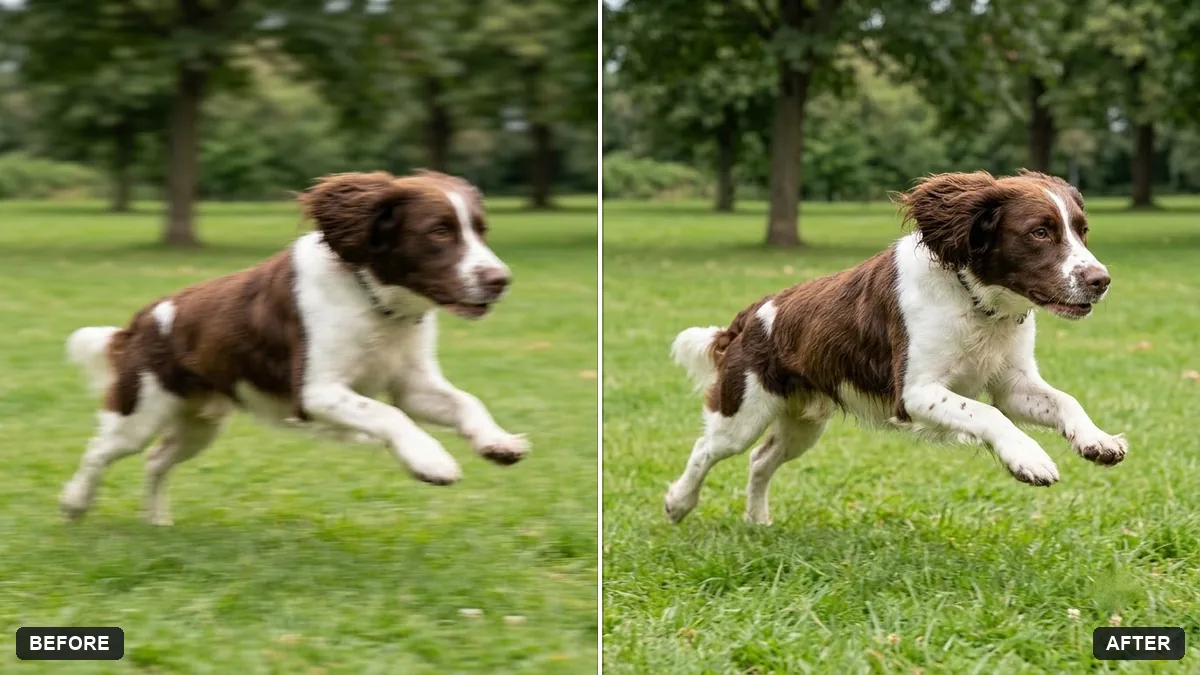
This prompt reduces motion blur in a photo of a dog or cat running or jumping, restoring sharp fur, eyes and paws while keeping the movement in the background.
Reduce the motion blur in this photo of my [DOG / CAT] running or jumping. Restore sharp fur, eyes and paws while keeping the sense of movement in the background.

Keep the pet's pose, colours and markings exactly the same.
The AI works best when the eyes are at least partly visible.
Your photo goes to the AI app you choose, never to PromptUp.
Get a better result
Your pet’s action photo with sharper fur, eyes and paws while the background keeps a feeling of movement. The pose, colours and markings stay the same.
Smeared legs and paws are rebuilt wrongly, with an extra leg or the wrong paw shape.
Fix: Add “keep exactly four legs and the paws in the positions shown”. Count the legs in the result.
- The eyes were fully blurred, so the AI invented them. Check the eye colour and the markings against another photo of your pet. If the eyes were not visible before, treat them as a guess.
- The whole picture becomes sharp and the sense of speed disappears. Say “sharp pet, but keep the streaked grass and background so it still looks fast”.
Ask for “the pet and the background both sharp, as if shot with a very fast shutter, droplets or dust frozen in the air”. It is a different look from the blurred-background version.
Keep exactly four legs and my pet’s markings, make the face and paws sharp and leave the background motion blur as it is.
Guides that use this prompt
More photo editing prompts
See all 334 →
More like this
- Royal portrait of your petGemini · ChatGPT
- Sharpen and upscale a small photoGemini · ChatGPT
- Pet watercolour portraitGemini · ChatGPT
- Make your pet photo moveHiggsfield · Kling
- Make your pet photo come aliveKling · Veo · Seedance