- Updated
Preview outdoor evening lighting
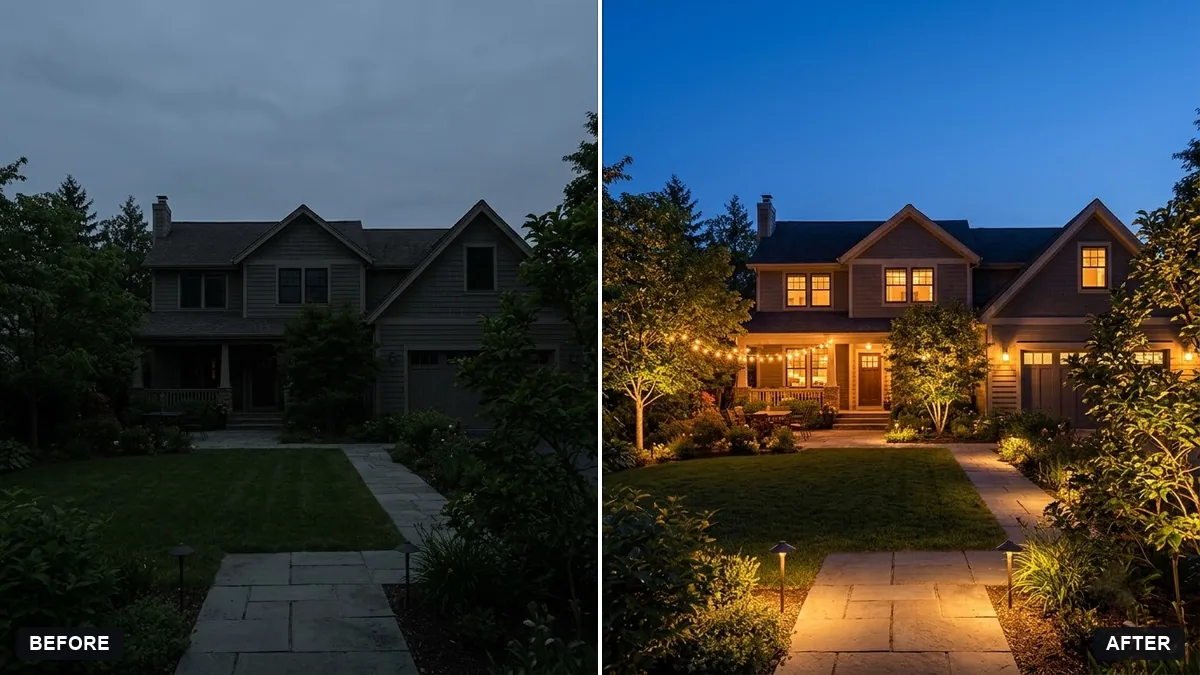
This prompt turns a photo of your house and garden into an evening scene with warm path lights, uplights on trees, light from the windows and string lights over the patio or deck, under a deep blue twilight sky.
Turn this photo of my house and garden into an evening scene with warm outdoor lighting: path lights, uplights on the trees, soft light from windows and string lights over the [PATIO / DECK]. Deep blue twilight sky.

Keep the layout exactly the same. Realistic and tasteful.
Ask for warm white light; cool white can look harsh in gardens.
Your photo goes to the AI app you choose, never to PromptUp.
Get a better result
Your own house and garden after dark, with warm path lights, uplit trees, glowing windows and string lights across the patio under a deep blue twilight sky, layout unchanged.
A lighting preview has to keep the real garden, so the prompt says the layout stays exactly the same. Path lights, uplights on trees, window glow and string lights show a full plan. Deep blue twilight makes warm lights glow, and warm white, as the tip says, looks best.
The AI adds new plants or furniture.
Fix: Say “do not add, move or remove anything, change only the lighting and sky”, and compare against the original.
- The light looks cold and harsh. Ask for “warm white, about 2700K, soft pools of light, no glare”.
- Windows stay dark, so it feels empty. Add “warm light visible in every window, curtains partly drawn”.
Make one version with only path lights and one with only string lights, then show both to whoever installs them. It is only a preview, not a plan.
Keep the scene. Reduce the number of path lights to four and make the tree uplights a little softer.
Guides on this topic
More photo editing prompts
See all 334 →
More like this
- Garden makeover previewGemini · ChatGPT
- Balcony garden makeover previewGemini · ChatGPT
- Preview new curtainsGemini · ChatGPT
- Kitchen remodel previewGemini · ChatGPT
- Preview new bathroom tilesGemini · ChatGPT