- Updated
Preview new floor tiles
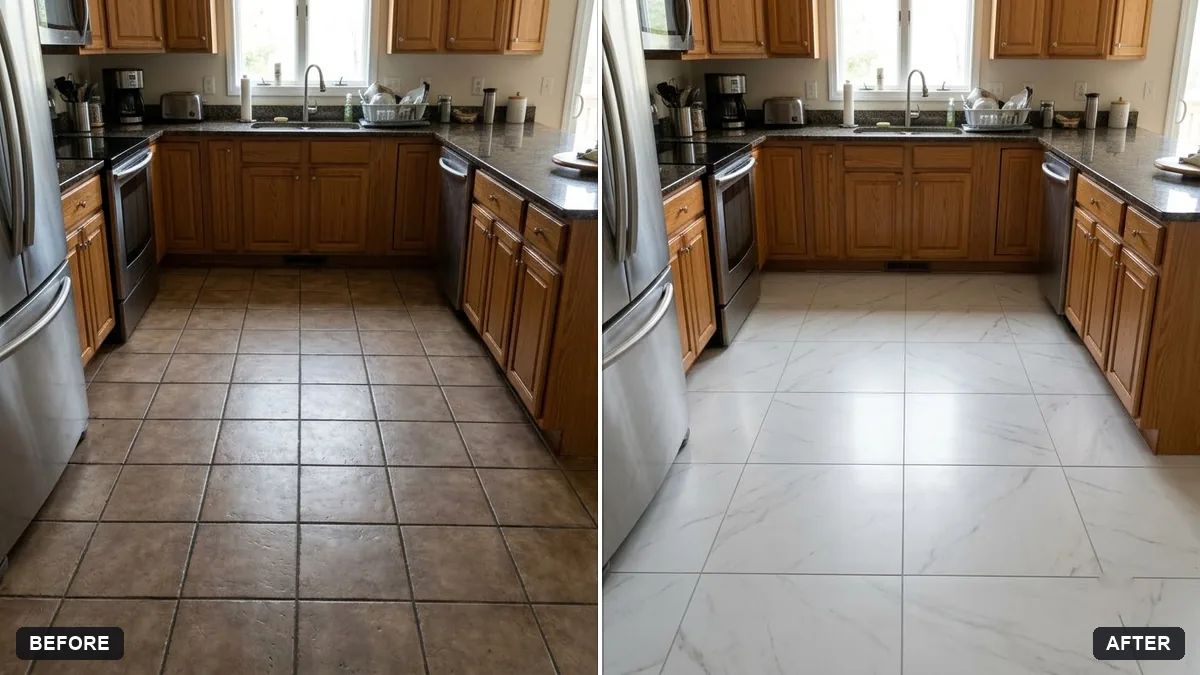
This prompt replaces the floor with tiles in a material and colour you choose, keeping the perspective, grout lines, reflections and existing shadows, and leaving walls, furniture and lighting unchanged.
Replace the floor in this photo with [WOOD / MARBLE / PATTERNED] tiles in [COLOUR]. Keep the correct perspective, natural grout lines, realistic reflections and existing shadows.

Do not change walls, furniture or lighting.
Pick a photo taken from a low angle so the floor is as visible as possible.
Your photo goes to the AI app you choose, never to PromptUp.
Get a better result
The same room with its floor replaced by your chosen tiles in the colour you gave, following the room’s perspective with realistic grout lines, reflections and the existing shadows. Walls, furniture and light stay put.
The tiles look flat or too large, as if laid at the wrong angle.
Fix: Give the tile size, such as “60 by 60 cm tiles”, and add “lines follow the perspective of the room and get smaller toward the far wall”.
- Furniture looks as if it floats, with no shadow or reflection on the new floor. Say “keep the contact shadows under every piece of furniture and add soft reflections of the sofa legs on glossy tile”.
- The tile in the picture does not match the tile you later buy. Use the preview to judge the mood, then take a real sample home and look at it in your own light. Screens and AI colours are not a guaranteed match.
Change the tiles to “wood-look planks laid in a herringbone pattern at 45 degrees”. Compare it with a straight layout to see which makes a small room look larger.
Keep the walls and furniture exactly as they are. Use 60 by 60 cm tiles with thin grout, follow the room’s perspective and keep the shadows under the furniture.
Guides on this topic
More photo editing prompts
See all 334 →
More like this
- Garden makeover previewGemini · ChatGPT
- Preview outdoor evening lightingGemini · ChatGPT
- Garden flower bed previewGemini · ChatGPT
- Balcony garden makeover previewGemini · ChatGPT
- Preview artwork on your wallGemini · ChatGPT