- Updated
Garden flower bed preview
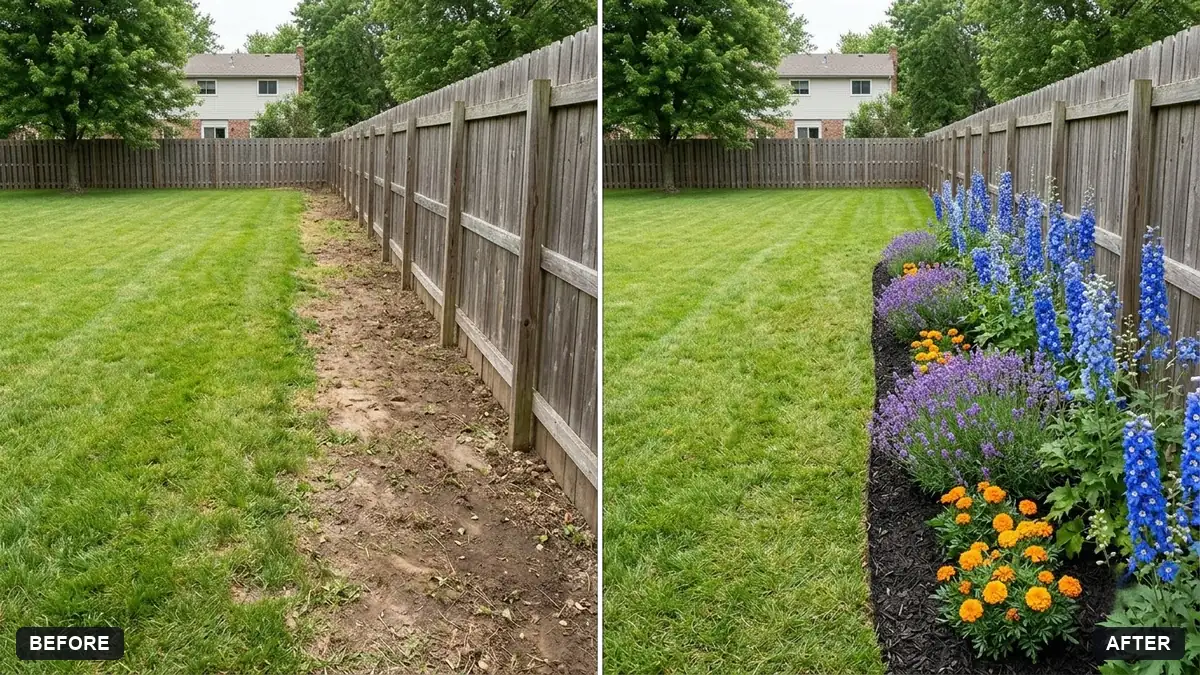
This prompt adds a flower bed with the flowers and colours you list, taller plants at the back and low ones at the front, with mulch and neat edging, keeping the rest of the garden unchanged. Listing plant heights helps.
Add a flower bed along the [FENCE / PATH / HOUSE] in this garden photo, planted with [FLOWERS] in [COLOURS], with taller plants at the back and low ones at the front, mulch and neat edging.

Keep the rest of the garden exactly as is. Natural daylight, realistic scale.
List plant heights and colours so the AI can build a layered look.
Your photo goes to the AI app you choose, never to PromptUp.
Get a better result
Your garden photo with a new flower bed along the fence, path or house, layered with tall plants at the back and low ones at the front, with mulch and neat edging, in daylight and realistic scale.
The plants are all the same height and look like a flat strip.
Fix: Give three heights, such as “foxgloves at the back, salvia in the middle and alyssum at the front”.
- The flowers bloom at the wrong time or in the wrong climate. Check each plant for your region and season before buying. A preview does not tell you what grows well.
- The bed is too wide or covers the path. State a size, “about 60 cm deep and 4 metres long, leaving the path clear”.
Ask for “the same bed in spring and again in late summer”. It helps you choose plants that give interest across the year.
Keep the lawn, fence and house exactly the same. Make the bed narrower, with more green foliage and fewer colours.
Guides on this topic
More photo editing prompts
See all 334 →
More like this
- Kitchen remodel previewGemini · ChatGPT
- Preview a rug in your roomGemini · ChatGPT
- Preview new floor tilesGemini · ChatGPT
- Preview new bathroom tilesGemini · ChatGPT
- Preview new curtainsGemini · ChatGPT