- Updated
Preview a rug in your room
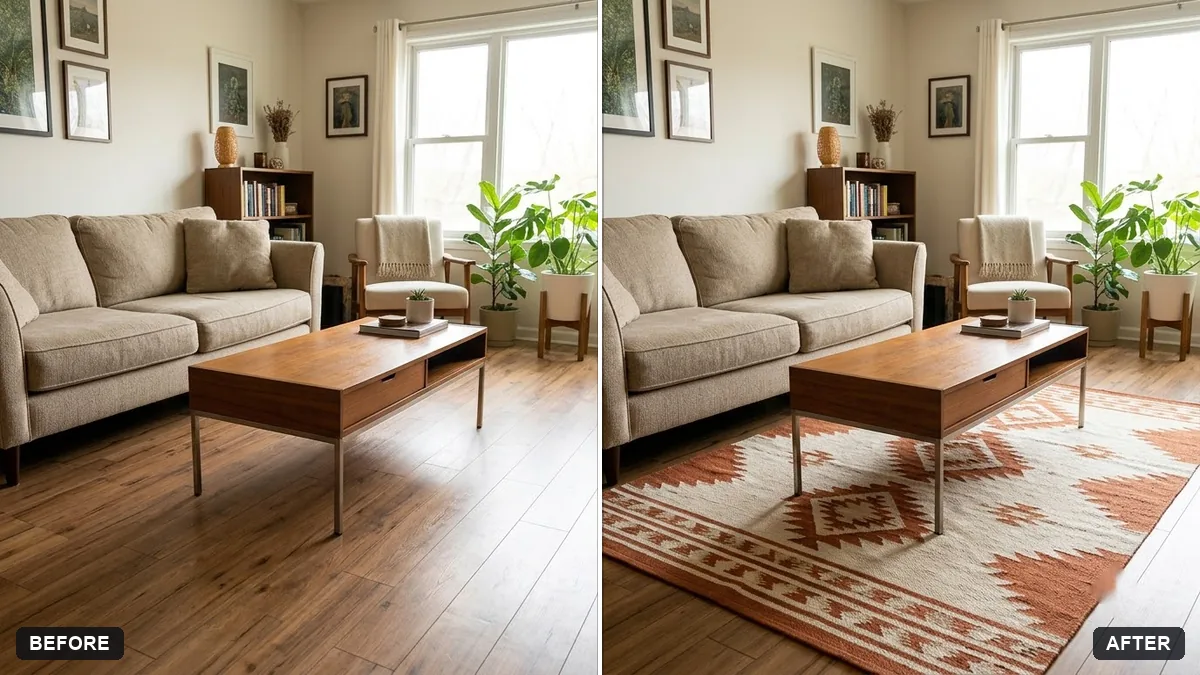
This prompt places a rug centred under your furniture, matching the perspective, lighting and contact shadows, without changing the room. Ask for two or three sizes to compare the fit.
Place a [PATTERN / COLOUR] rug on the floor of this room, sized [SIZE], centred under the [FURNITURE]. Match the perspective, lighting and contact shadows so it looks real.

Keep the room and furniture unchanged.
Ask for two or three sizes in one go to compare the fit.
Your photo goes to the AI app you choose, never to PromptUp.
Get a better result
Your room photo with a rug in the pattern, colour and size you named, centred under the furniture, with matching perspective, lighting and soft contact shadows, and the rest of the room untouched.
The rug looks like a flat sticker lying on the floor.
Fix: Ask for “follow the floor’s perspective, with soft shadows under the furniture legs and a slight edge shadow”. A photo taken from a higher angle shows the floor better.
- The size is wrong against the sofa or bed. Write real sizes, such as “5 by 8 feet, front legs of the sofa on the rug”, instead of words like large or small.
- The pattern changes or repeats oddly. Describe it plainly, for example “a geometric cream and navy rug with a thin border”, or upload a photo of the real rug as a second image.
As the tip says, ask for “three versions: 4 by 6, 5 by 8 and 8 by 10 feet”. Compare how much floor shows around each before you order one.
Keep the room and furniture exactly the same. Use the next size down for the rug and keep its pattern and colours as described.
Guides on this topic
More photo editing prompts
See all 334 →
More like this
- Kitchen remodel previewGemini · ChatGPT
- Balcony garden makeover previewGemini · ChatGPT
- Preview new curtainsGemini · ChatGPT
- Redesign your room from a photoGemini · ChatGPT
- Preview outdoor evening lightingGemini · ChatGPT