- Updated
Balcony garden makeover preview
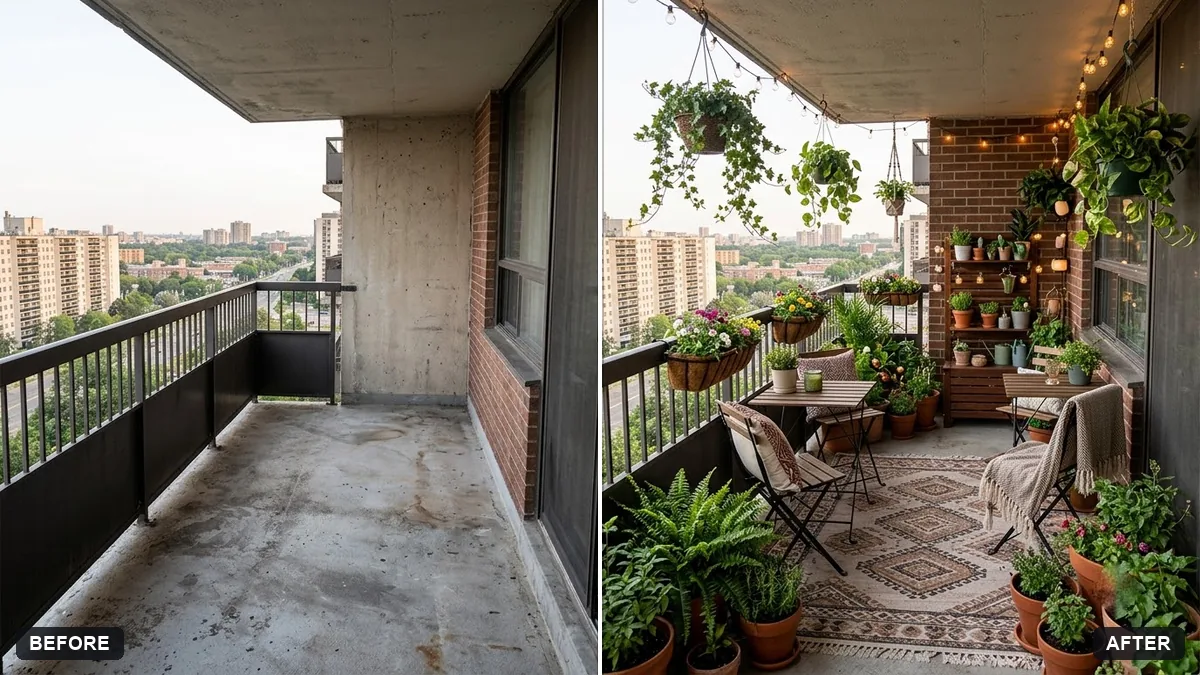
This prompt turns your empty balcony into a garden retreat with terracotta pots, hanging plants, a small bistro table, two chairs and fairy lights.
Turn this photo of my empty balcony into a cosy garden retreat with [TERRACOTTA POTS], hanging plants, a small bistro table and two chairs, fairy lights and a rug. Match the perspective and lighting.

Keep the balcony railing and view exactly the same.
Send a straight-on photo of the balcony for the best perspective.
Your photo goes to the AI app you choose, never to PromptUp.
Get a better result
Your own empty balcony turned into a cosy garden corner with potted plants, a small bistro table, two chairs, fairy lights and a rug, with the railing and the view exactly as they are.
The furniture is too big for a small balcony.
Fix: Give the balcony size, such as “about 4 by 10 feet”, and ask for “a table and two chairs that fit with room to walk”.
- The railing, wall or view changes. Repeat “keep the railing, the walls and the view outside exactly as in the photo” and send a straight-on photo, as the tip says.
- The plants are unrealistic for your climate or light. Name plants that suit your balcony, such as “tulsi, money plant and a small hibiscus”, and mention if it faces strong afternoon sun.
Replace the plants with “a vertical herb rack, grow bags with tomatoes and chillies, and a small watering can”. It suits a working balcony more than a decorative one.
Keep the balcony, railing and view exactly the same. Use fewer plants, make the table smaller, and keep the floor clear.
Guides on this topic
More photo editing prompts
See all 334 →
More like this
- Preview outdoor evening lightingGemini · ChatGPT
- Plan a balcony gardenChatGPT · Gemini · Claude
- Preview solar panels on a roofGemini · ChatGPT
- Preview a rug in your roomGemini · ChatGPT
- Preview new floor tilesGemini · ChatGPT