AI interior design prompts: redesign your room from one photo
Published
Short answerUpload a photo of your room, name a style and a budget feel, and tell the AI to keep the walls, windows and layout exactly the same. Changing only the furniture and decor, not the room's structure, is what makes the result useful instead of just pretty.
Full collectionAI room makeover and interior design prompts18 prompts with examples, steps and fixes →You don't need to buy anything or move a single chair to see whether a style will actually suit your room. Upload a photo of the space as it is now, and AI can show you a redesigned version in minutes. The trick is telling it what to leave alone, not just what to change.
1. Redesign the room, keep the structure
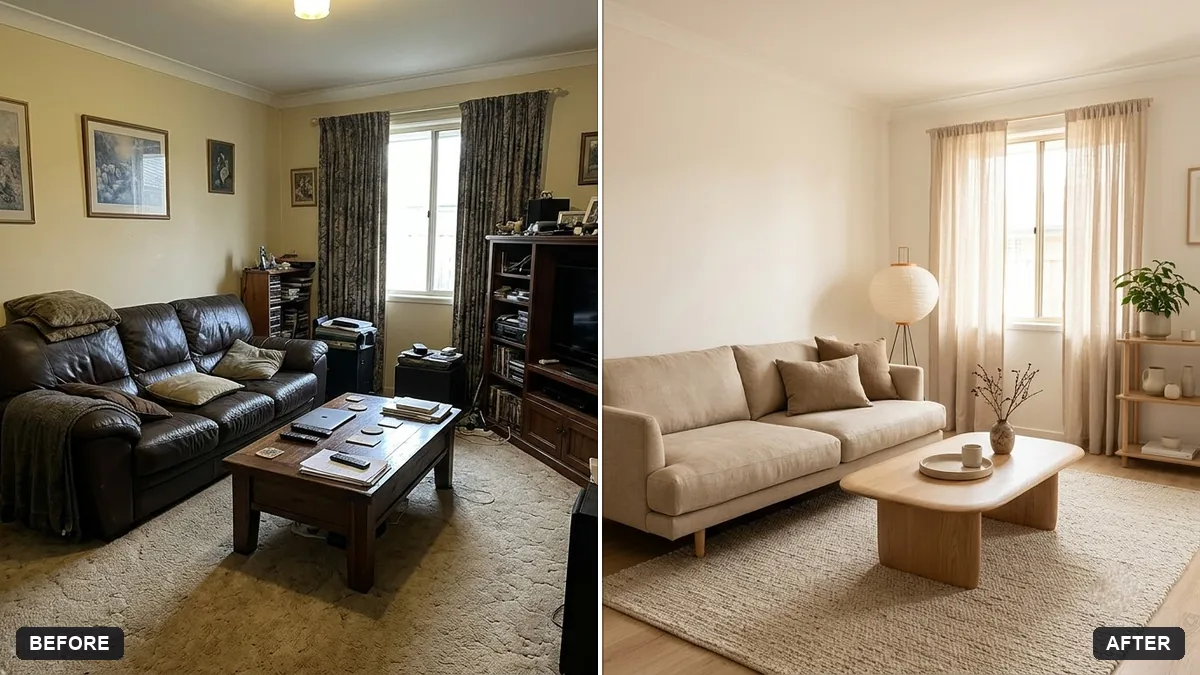
The biggest mistake is a vague prompt like "make this room nicer", which tends to replace the whole room, windows and all, with something generic. Lock the structure in place and only ask for furniture, colour and decor to change:
Redesign the room in this photo in a [STYLE, e.g. warm minimalist Japandi] style. Keep the walls, windows, doors, and layout exactly the same — only change the furniture, decor, colours, and lighting.

Budget feel: [BUDGET, e.g. affordable, flat-pack furniture]. Add [MUST-HAVES, e.g. a study desk and more storage].

Photorealistic interior photo from the same camera angle, natural daylight, realistic materials and proportions.
This is the room makeover prompt. Try a few different styles with the same base photo: Japandi, mid-century, warm industrial, coastal. Because the room's bones stay fixed, you're really comparing styles against each other, not comparing random new rooms.
Ask for "3 different styles side by side" in one message if you want a quick side-by-side comparison instead of generating each one separately.
2. Build a mood board before you shop
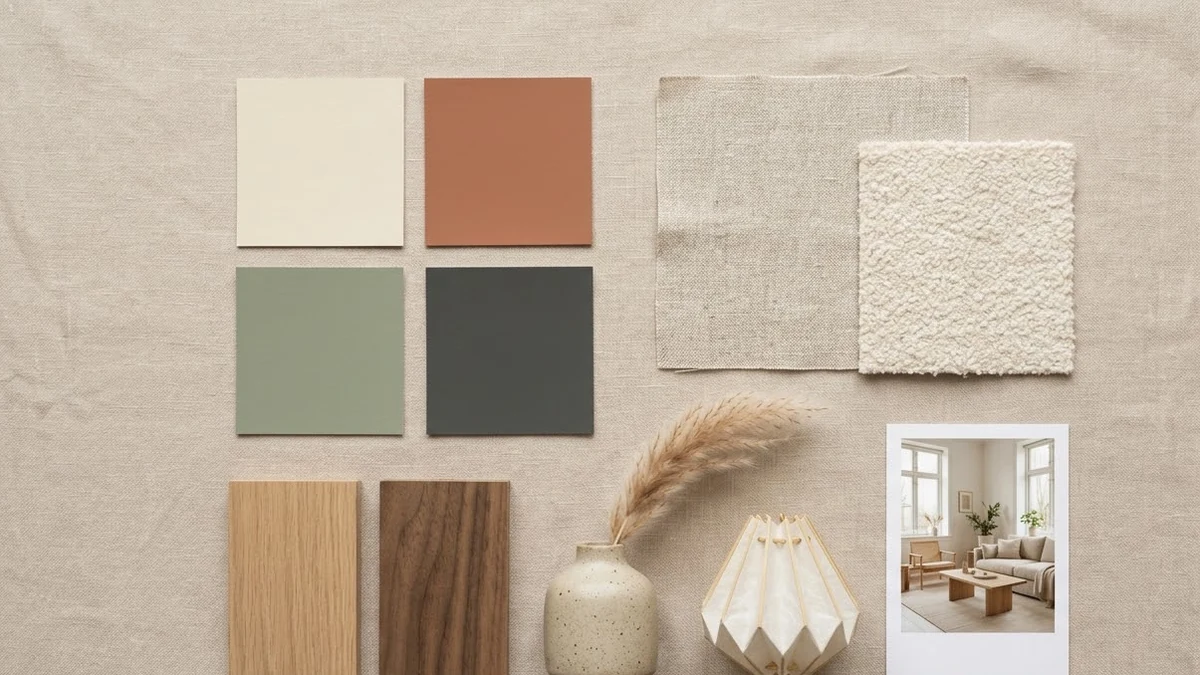
Before you buy anything, a mood board tells you whether colours, materials and textures actually sit together. The interior mood board prompt lays this out as a flat collage you can screenshot and take to a shop or a designer:
A neat interior design mood board for a [ROOM] in [STYLE, e.g. warm Japandi] style, laid out as a flat collage: colour swatches, fabric textures, wood samples, [FURNITURE PIECES], lighting, plants and a small reference photo of the finished room. Soft light beige background, tidy grid, labelled swatches.
This is cheap to run a few times with different colour directions, which is a lot faster than painting a test patch on the wall for each one.
3. Declutter before you decide anything
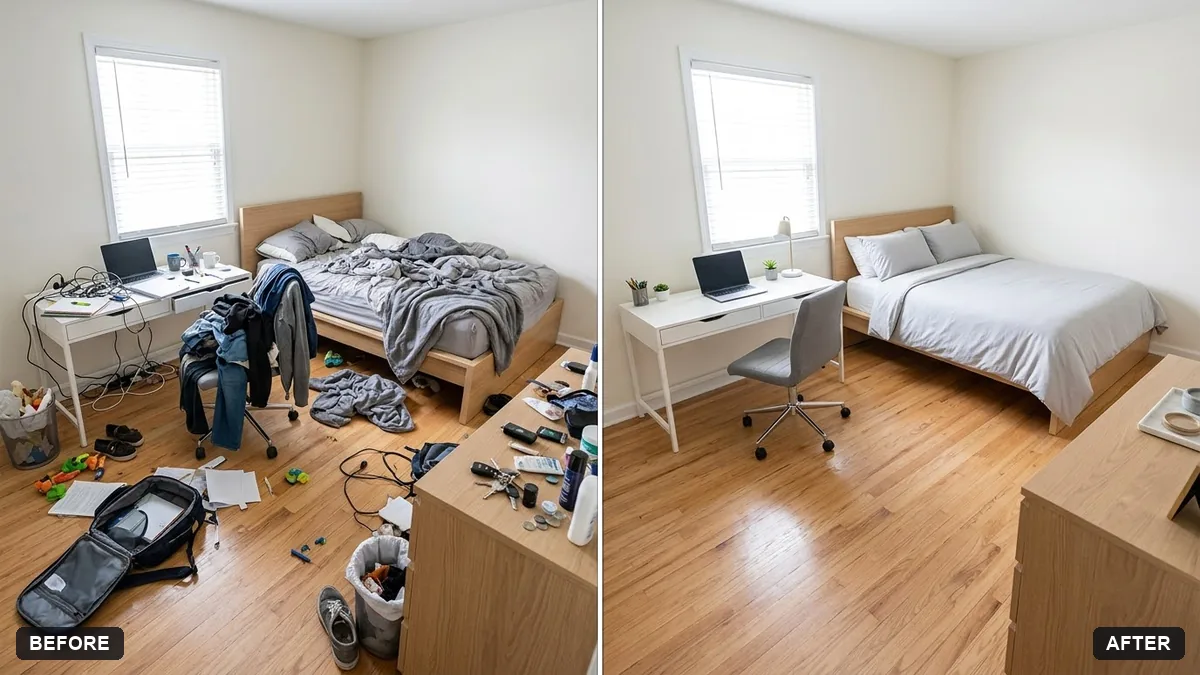
A messy room photo makes every style look worse than it is. Before you try a redesign, or before you photograph a room to sell or rent, declutter it virtually:
Declutter this room for a listing photo. Remove loose items like [PAPERS, TOYS, CLOTHES, CABLES] from surfaces and floors, and leave the furniture and layout unchanged.

Keep it realistic, tidy and lived-in. Do not hide damage, alter the room size or change fixtures.
Run this first, then try step 1's redesign prompt on the cleaner result. You'll judge the actual style more clearly without clutter pulling your eye.
4. Turn the before-and-after into a clip
If you're sharing the makeover online, a time-lapse style clip sells the transformation better than a static before/after photo. The room makeover time-lapse prompt works well once you already have a redesigned version to aim for:
A fixed-angle time-lapse of a bare room being transformed: painting walls, moving furniture in, hanging pictures, adding plants and lamps, the room becoming cosy, a final reveal in soft warm light, upbeat fast-paced music. Style: [CASUAL VLOG / CINEMATIC].
Keep the camera angle the same as your original photo so the "reveal" at the end actually lines up with it.
Fixing common problems
It redesigned the whole room, windows and all. Repeat the "keep walls, windows, doors and layout exactly the same" instruction; some tools need it stated twice, once at the start and once at the end.
The furniture looks too small or too large for the room. Add "furniture sized realistically for this room's proportions" and mention the room's rough dimensions if you know them.
The style looks expensive when you wanted affordable. Be specific about materials: "flat-pack wood furniture, IKEA-style, no custom joinery" rather than just "budget".
It added a window or removed a door. This happens more with heavily stylised prompts. Add "no structural changes" directly after the style description.
Where to go from here
If the room also needs a genuine clear-out before anything else, see AI prompts for decluttering and selling things online for photographing and listing the things you're getting rid of. All four prompts above are free in the room makeover and interior design prompts collection, and the prompt builder can write a version tailored to your own room and style.
Quick checklist
- Say what to keep exactly the same: walls, windows, doors, layout.
- Name a style and a budget feel, not just "nicer".
- Declutter the photo first if the room is messy.
- Build a mood board before buying anything.
- Keep the same camera angle across versions so you can compare them fairly.
- Check furniture proportions look realistic for the room's size.
Prompts to try
More prompts on this topic
- Balcony garden makeover previewGemini · ChatGPT
- Garden makeover previewGemini · ChatGPT
- Declutter your home in 30 daysChatGPT · Gemini · Claude
- Stage furniture in a room photoGemini · ChatGPT
- Kitchen remodel previewGemini · ChatGPT
- Wall art in a room mockupGemini · ChatGPT
Comments
No comments yet. Be the first to share what worked for you.