- Updated
Declutter a room virtually
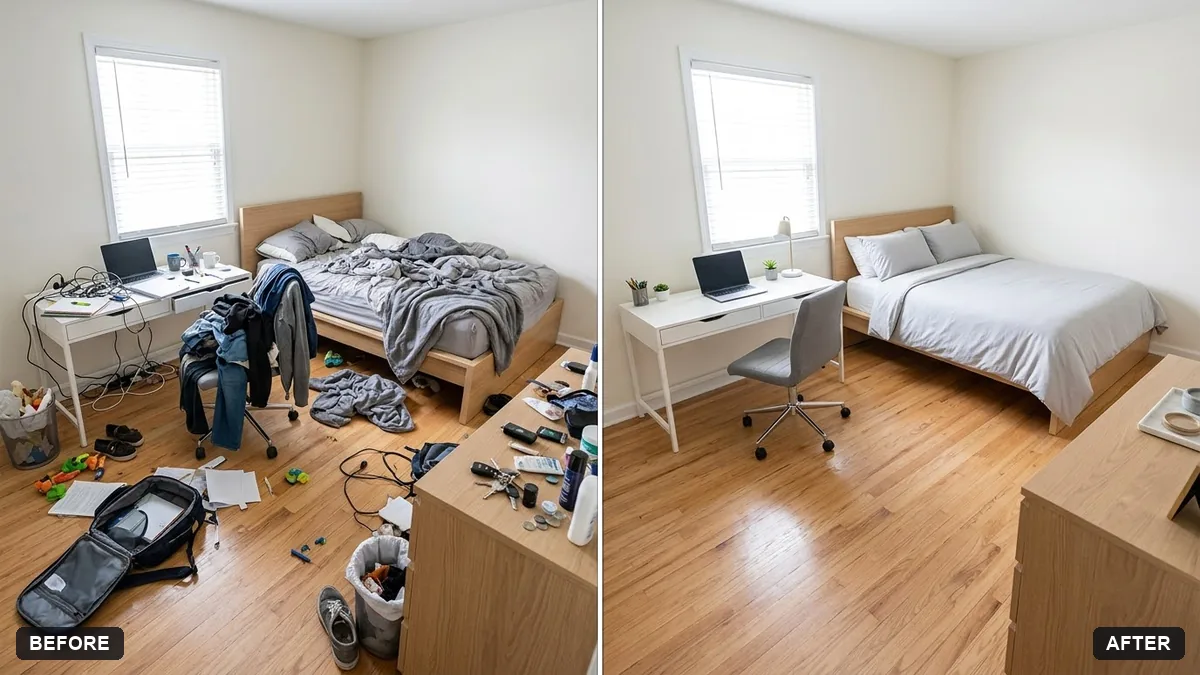
This prompt removes loose items such as papers, toys, clothes and cables from surfaces and floors in a room photo. Do not remove anything that would mislead buyers.
Declutter this room for a listing photo. Remove loose items like [PAPERS, TOYS, CLOTHES, CABLES] from surfaces and floors, and leave the furniture and layout unchanged.

Keep it realistic, tidy and lived-in. Do not hide damage, alter the room size or change fixtures.
Take the original photo with good light so the AI has clear surfaces to work with.
Your photo goes to the AI app you choose, never to PromptUp.
Get a better result
Your room photo with loose papers, toys, clothes or cables cleared from surfaces and floors, furniture and layout untouched, and a tidy but lived-in look for a listing.
Furniture or wall decor is moved or removed along with the clutter.
Fix: Name what must stay: “keep every piece of furniture, the rug, the curtains and the wall art in the same place”.
- A stain or crack disappears. The prompt says not to hide damage, so repeat it. Hiding real flaws in a listing can mislead a buyer, so check against the original.
- The room looks empty and staged instead of lived-in. Say “leave a few natural items, such as a book on the table and one cushion slightly askew”. A little life makes it believable.
Ask for “toys put away out of sight, the bed made, books on the shelf unchanged”. Keep every fixture and the room size exactly as in the photo.
Keep my exact face from the original photo: same eyes, nose, smile, skin tone and age. Change only the style.
Guides that use this prompt
More photo editing prompts
See all 334 →
More like this
- Declutter your home in 30 daysChatGPT · Gemini · Claude
- Redesign your room from a photoGemini · ChatGPT
- Preview new bathroom tilesGemini · ChatGPT
- Preview a house on an empty plotGemini · ChatGPT
- Virtually try on an outfitGemini · ChatGPT