- Updated
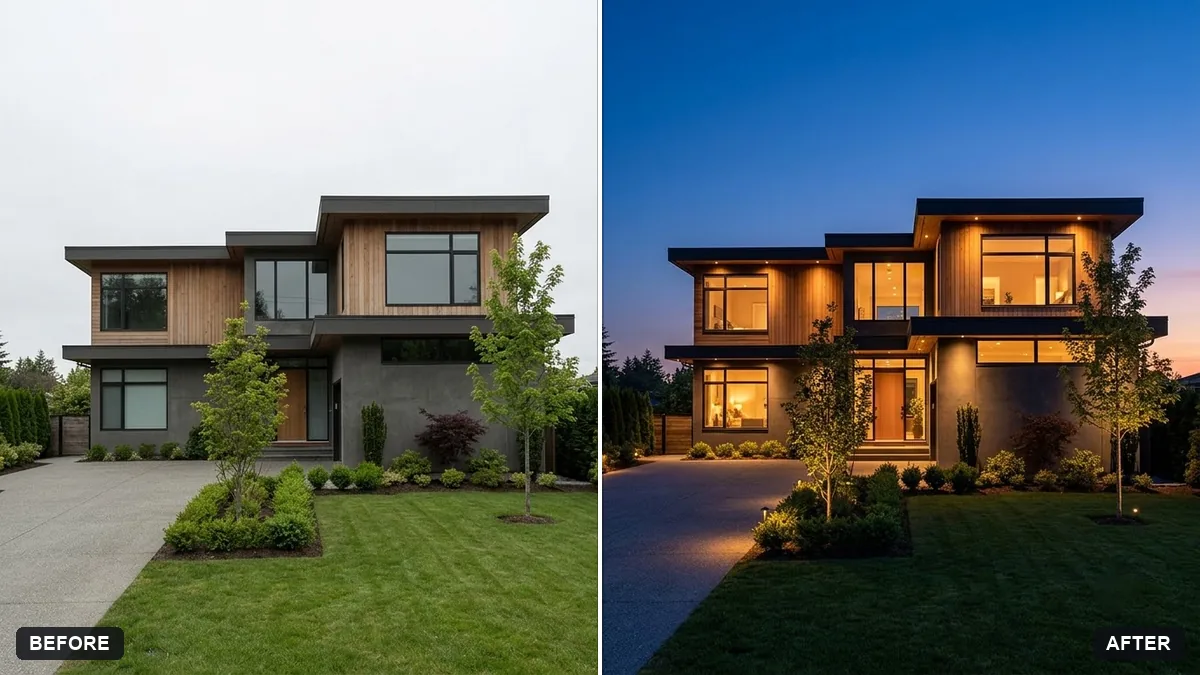
Property exterior at twilight
This prompt turns a daytime exterior photo into a twilight one, keeping the building and landscaping unchanged. Disclose edited photos in listings.
Turn this daytime photo of a [PROPERTY TYPE, e.g. house] exterior into a twilight photo. Keep the building, landscaping and all details exactly the same.

Deep blue sky with a warm glow at the horizon, warm lights on in the windows, lit garden lamps and pathway, soft reflections, inviting mood, professional real-estate quality. Do not add or remove any features.
Clearly label edited photos as digitally enhanced on listings.
Your photo goes to the AI app you choose, never to PromptUp.
Get a better result
Your daytime property photo turned into a twilight shot, with a deep blue sky, a warm glow on the horizon, lights on in the windows and lit garden lamps, structure unchanged.
Twilight photos make homes look inviting with warm windows against a blue sky. The prompt keeps the building and landscaping exactly the same and bans adding or removing features. Labelling it as enhanced, as the tip says, keeps listings honest.
The AI adds features that the property does not have.
Fix: Repeat “do not add or remove anything”, and compare the edges, roof and windows to the original before posting.
- The sky is too dark and the house looks dull. Ask for “early twilight, sky still deep blue, house evenly lit, windows warm”.
- The listing is misleading. Label the picture as a digitally enhanced image and include the original daytime photo as well.
Show the original daylight photo and the twilight version side by side in the listing, with a caption saying which one is edited.
Keep the building. Add a soft reflection on the driveway and brighten the porch light only.
Guides that use this prompt
More photo editing prompts
See all 334 →

More like this
- Architectural exterior renderMidjourney · Gemini · ChatGPT
- Property listing flyerIdeogram · ChatGPT · Gemini
- Modern villa with a pool at duskMidjourney · Gemini · ChatGPT
- Hotel room photo for a listingGemini · ChatGPT
- Warm up a living room for a rental listingGemini · ChatGPT