- Updated
Repaint your house exterior preview
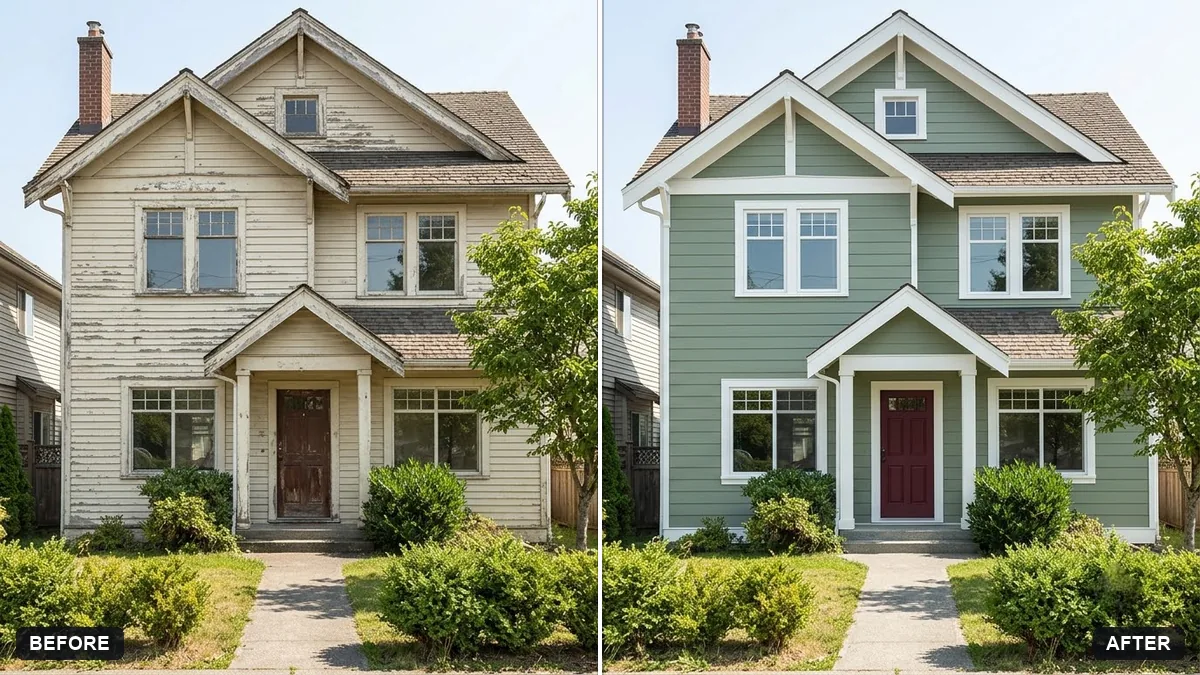
This prompt repaints the walls of the house in your photo in a colour you choose, with trim and door colours, so you can compare options before buying paint.
Repaint the exterior walls of this house in [COLOUR] with [TRIM COLOUR] trim and a [DOOR COLOUR] front door. Keep the building shape, roof, windows and garden exactly the same.

Match the lighting and shadows realistically, keep textures and shadows on the walls, and show the paint colour accurately.
Test the real paint sample on the wall in daylight before buying.
Your photo goes to the AI app you choose, never to PromptUp.
Get a better result
Your house photo with the exterior walls, trim and front door repainted in the colours you chose, with the building shape, roof, windows and garden unchanged and the shadows kept.
Paint spills onto the roof, windows or plants.
Fix: List what stays, such as “roof tiles, window glass, gutters and garden stay unchanged”, and check the edges at full size.
- The wall texture has disappeared. Ask to “keep the render or brick texture and the shadows across the walls”. A photo in even daylight gives better results.
- The colour seems different in the photo to the real paint. Use the preview to compare ideas only. Paint a sample on the wall and look at it morning and evening before buying.
Ask for a wider photo of the street with only your house repainted. You can judge whether the colour sits well beside the houses on both sides.
Keep the roof, windows and garden exactly the same. Make the wall colour lighter and warmer, and try the door in a deep green.
Guides that use this prompt
More photo editing prompts
See all 334 →
More like this
- Architectural exterior renderMidjourney · Gemini · ChatGPT
- Preview solar panels on a roofGemini · ChatGPT
- Preview new bathroom tilesGemini · ChatGPT
- Preview outdoor evening lightingGemini · ChatGPT
- Preview new curtainsGemini · ChatGPT