- Updated
Plant shop lifestyle photo
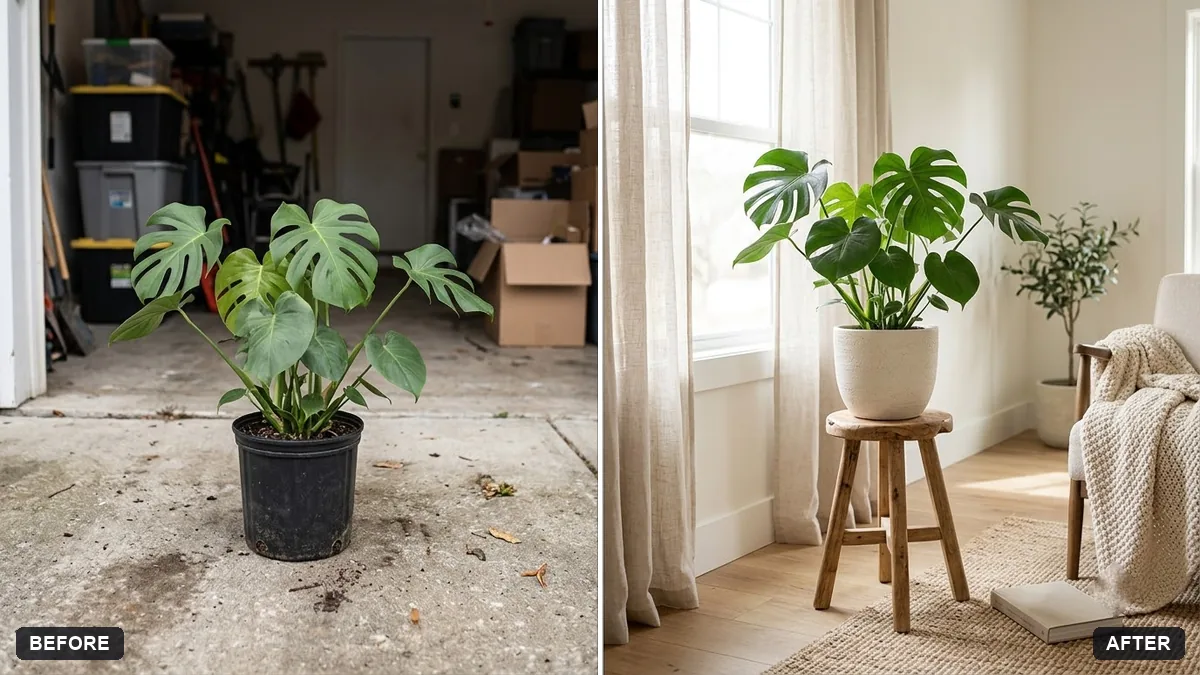
This prompt places your plant in a bright Scandinavian living room on a wooden stool near a window, for a plant shop listing.
Place the [PLANT] from this photo in a bright Scandinavian living room on a wooden stool near a window. Keep the plant, its leaves and pot exactly the same.

Soft daylight, warm minimal decor, a knitted blanket and a book nearby, shallow depth of field, calm and airy, room for text.
Show scale by adding an everyday object next to the plant.
Your photo goes to the AI app you choose, never to PromptUp.
Get a better result
Your plant in its own pot on a wooden stool by a window in a bright Scandinavian living room, with a knitted blanket and a book nearby, soft daylight and space left for text.
Plant buyers want to see how a plant will look at home, so the prompt places yours in a bright living room on a stool by a window. The plant, leaves and pot stay exactly the same so the listing is honest. A blanket and book add a lived-in feel, and the tip about an everyday object shows its size.
The leaves change shape or number.
Fix: Use a clear photo on a plain background and say “keep every leaf and the pot exactly the same”.
- The plant looks the wrong size. Add an everyday object next to it, as the tip says, like a mug, so buyers can judge the size.
- The light suits a plant that needs shade. Match the room to the plant’s care, such as bright indirect light, so the scene does not mislead buyers.
Ask for a bright bathroom with white tiles and steam on the mirror for plants that like humidity.
Keep the plant and pot. Use the exact same room, stool and window light I can reuse for every plant in my shop.
More photo editing prompts
See all 334 →
More like this
- Backpack lifestyle photoGemini · ChatGPT · Midjourney
- Cosy candle lifestyle photoMidjourney · Gemini · ChatGPT
- Yoga mat lifestyle shotGemini · ChatGPT · Midjourney
- Lifestyle product ad for InstagramMidjourney · Gemini · ChatGPT
- Baby product soft lifestyleGemini · ChatGPT · Midjourney