- Updated
Preview a new bedroom wall colour
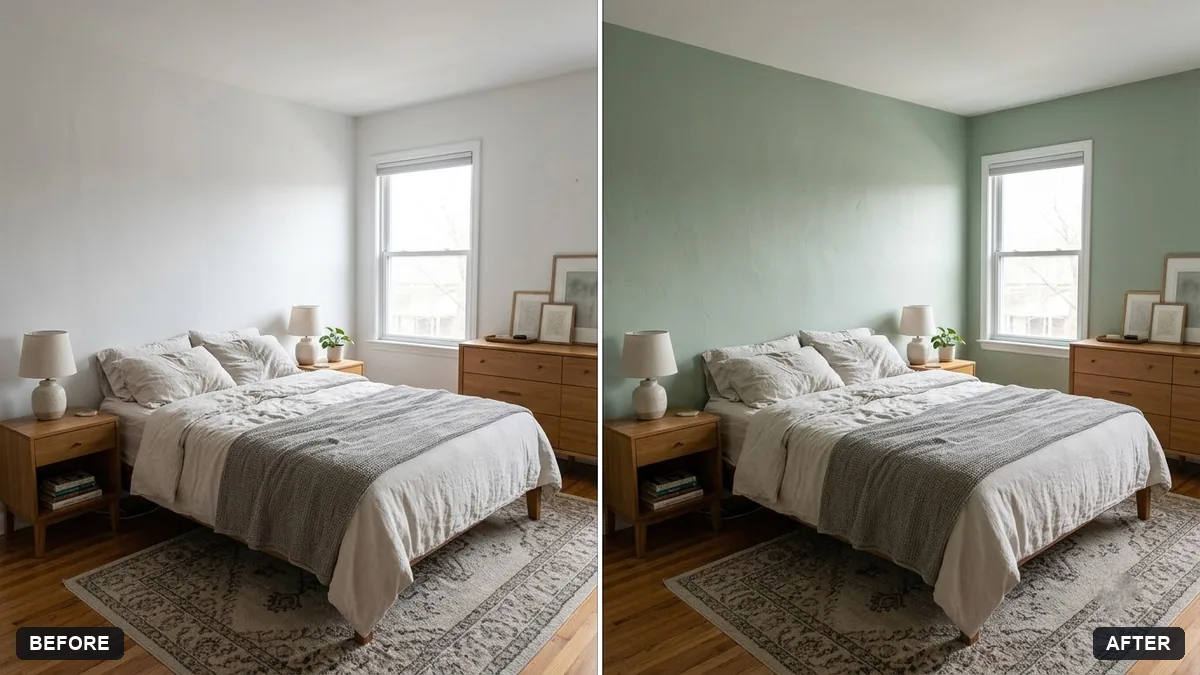
This prompt repaints the walls in your bedroom photo in a colour you choose, keeping shadows, texture, furniture, windows and lighting so the paint looks real.
Repaint the walls in this bedroom photo in [COLOUR]. Keep the shadows, texture, furniture, windows and lighting exactly as they are so the new paint looks realistic.

Do not change anything else.
Try three or four colours in separate prompts to compare.
Your photo goes to the AI app you choose, never to PromptUp.
Get a better result
Your bedroom photo with the walls repainted in your colour, with the shadows, wall texture, furniture, windows and lighting kept so the new paint looks real.
A paint preview only helps if light and shadow stay real, so the prompt keeps shadows, texture, furniture and windows exactly as they are. Only the wall colour changes. Trying several colours in separate prompts, as the tip says, makes comparing easy.
The paint also covers the curtains, headboard or frames.
Fix: Say “change the wall paint only, and leave curtains, headboard, frames and floor in their original colours”.
- The colour looks different from the name on the paint tin. Describe the shade in plain words, like “soft sage green, a little grey”, and check a small test patch on your own wall in daylight and lamp light.
- The wall looks flat and has lost its shadows. Add “keep the existing shading and light falloff across the wall”. A photo with daylight on the wall helps.
As the tip says, try several colours, then ask for “only the wall behind the bed in the darker shade, the other walls in the lighter one”. This shows if a bold wall suits the room.
Keep everything the same except the wall colour. Make it slightly warmer and lighter, and keep the shadow from the window.
Guides that use this prompt
More photo editing prompts
See all 334 →

More like this
- Preview artwork on your wallGemini · ChatGPT
- Repaint your house exterior previewGemini · ChatGPT
- Japandi bedroomMidjourney · Gemini · ChatGPT
- Preview a rug in your roomGemini · ChatGPT
- Preview new bathroom tilesGemini · ChatGPT