- Updated
Preview a new car colour
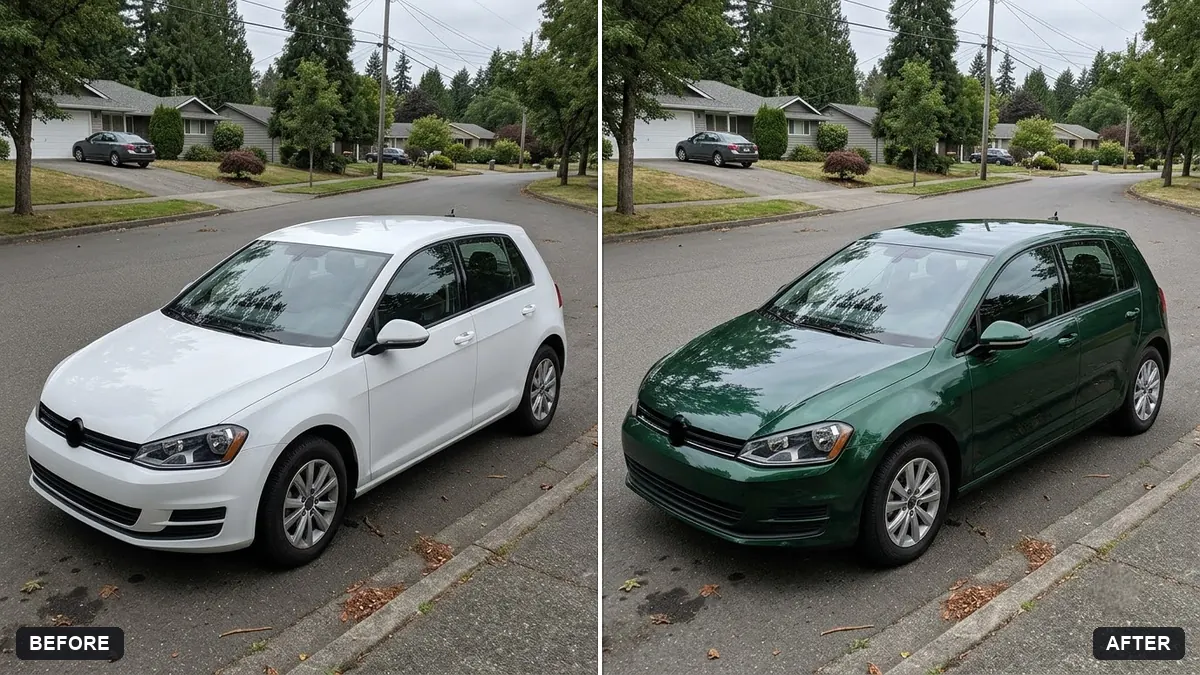
This prompt changes the car to a colour and finish you choose while keeping reflections, shadows, chrome, windows, badges and wheels as they are, with no paint spilling onto other objects.
Change the colour of the car in this photo to [COLOUR] in a [GLOSS / MATTE / METALLIC] finish. Keep the reflections, shadows, chrome, windows, badges and wheels exactly as they are.

Realistic paint result, no overspill onto other objects.
Try matte and gloss versions to compare finishes before choosing a wrap.
Your photo goes to the AI app you choose, never to PromptUp.
Get a better result
Your car photo in the new colour and finish you named, with the original reflections, shadows, chrome, windows, badges and wheels kept, and no colour spilling onto the road or other objects.
The windows or chrome trim pick up the new colour.
Fix: List them, such as “black windows, chrome door handles and grille stay unchanged”.
- A matte finish still looks glossy. Describe the surface, “soft diffused reflections, no sharp highlights, like satin paint”. Check reflections on the bonnet.
- The shade is different from the real wrap or paint. Treat the picture as a rough preview. Ask your installer for a physical sample and view it outside, because screen colours vary.
Ask for “the same car in gloss, matte and metallic, side by side in one image”. It is quicker than three separate runs, and the tip’s comparison is easier to judge.
Keep every reflection, shadow and wheel the same. Make the colour a shade darker and show it as satin, not gloss.
Guides that use this prompt
More photo editing prompts
See all 334 →
More like this
- Preview a beard or moustache styleGemini · ChatGPT
- Try a new hairstyle before you cutGemini · ChatGPT
- Virtually try on an outfitGemini · ChatGPT
- Smooth flyaway hairGemini · ChatGPT
- Car on a showroom floorGemini · ChatGPT