- Updated
Preview a new hair colour
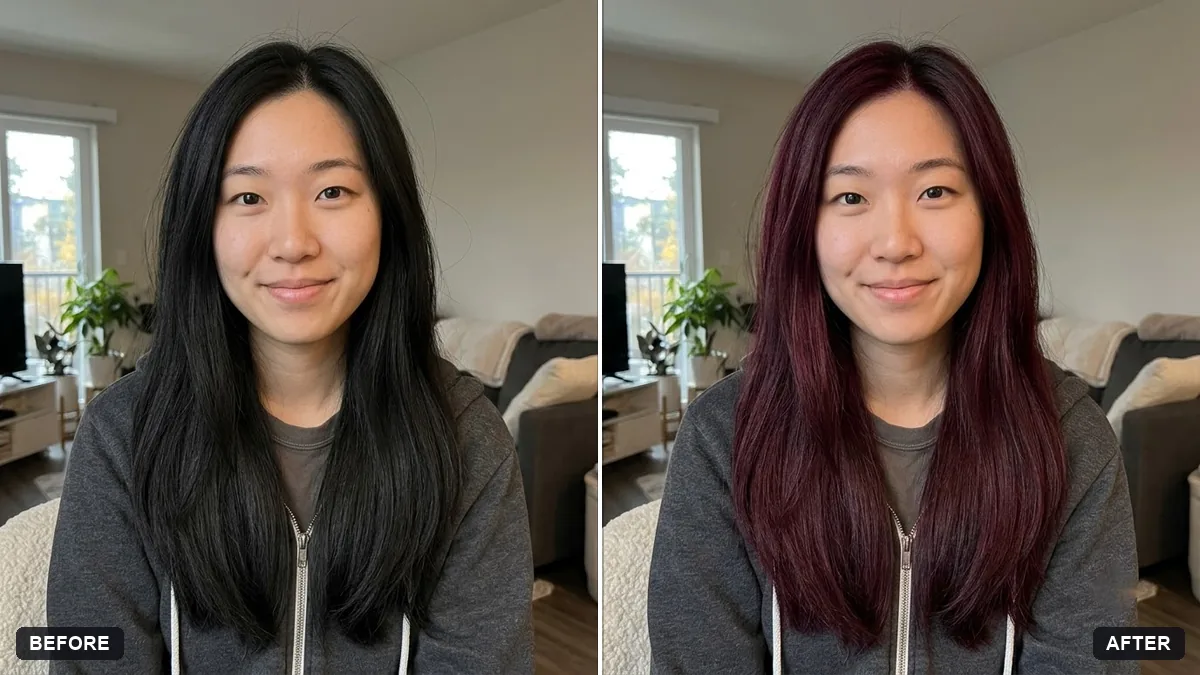
This prompt changes your hair to a shade you choose, with natural or soft highlights and proper roots, and keeps your hairstyle and face the same. Try two or three shades before the salon.
Change my hair colour to [SHADE, e.g. warm chestnut brown] with [NATURAL / SOFT HIGHLIGHTS]. Keep my hairstyle, length, texture and strands exactly as they are.

Do not change my face, skin or anything else. Natural, realistic result with proper roots.
Try two or three shades before you go to the salon and show them the results.
Your photo goes to the AI app you choose, never to PromptUp.
Get a better result
Your photo with the hair colour you named, with natural or soft highlights and proper roots, while hairstyle, length, texture, face and skin stay exactly as they are.
Hair colour edits look fake when the style changes too, so the prompt locks the hairstyle, length, texture and strands and changes only the shade. Naming the shade precisely, such as warm chestnut brown, and asking for natural roots keeps it realistic. Seeing two or three shades before a salon visit, as the tip suggests, is a cheap way to avoid a colour you would regret.
The hair looks flat and painted, losing individual strands.
Fix: Repeat “keep every strand, curl and shine as in the photo, change only the colour”.
- Skin tone or eyebrows seem to shift with the new colour. Say “do not change eyebrows, eyelashes or skin tone”. A new shade next to the face changes how it looks, so judge it carefully.
- The shade is not the one you pictured. Name a precise shade with a comparison, such as “warm chestnut brown, a little lighter than black coffee”, and try two or three, as the tip says.
To preview going grey, use “soft silver grey with a few darker strands near the roots, natural and even”. Show the result to your stylist so you both talk about the same shade.
Keep my exact face from the original photo: same eyes, nose, smile, skin tone and age. Change only the style.
Guides on this topic
More photo editing prompts
See all 334 →
More like this
- Preview a tattoo placementGemini · ChatGPT
- Smooth flyaway hairGemini · ChatGPT
- Natural teeth brighteningGemini · ChatGPT
- Try a new hairstyle before you cutGemini · ChatGPT
- Virtually try on an outfitGemini · ChatGPT